

Introduction
We have all been there. You open up an AI chat window, spend ten minutes carefully crafting the exact right wording, and finally get an absolute masterpiece of an output. You close the tab, move on with your day, and the next time you need that exact same result, it is gone forever—lost somewhere in a bottomless pit of past chat histories.
If you are tired of reinventing the wheel every time you open an AI tool, you are not alone. That exact frustration is why Promptosia exists. It is a sleek, modern platform built to help everyone from solo creators to bustling teams take total control of their AI interactions. Instead of letting your best ideas slip through the cracks, Promptosia lets you save, polish, test, and reuse your instructions like the valuable digital assets they actually are.
Whether you are writing blog posts, debugging code, or managing business workflows, this platform handles the entire lifecycle of your instructions so you can focus on getting things done.
What Is an AI Prompt Management Tool?
Let's break it down simply. An AI prompt is just the command or question you type into an artificial intelligence tool. If you ask an AI to summarize a messy spreadsheet or draft a polite email refusal, your input is the prompt.
The more you use AI, the more these instructions pile up. Before you know it, you have dozens of variations scattered across notes apps, sticky notes, and browser tabs.
An AI prompt management tool is your digital filing cabinet for all these instructions. It brings order to the chaos, giving you a clean, searchable workspace where your best ideas live safely until you need them again.
Why Building an AI Prompt Library Is Important
Imagine a master chef throwing away their best recipes at the end of every shift and trying to remember the ingredients from scratch the next morning. That is essentially what happens when you don't save your AI instructions.
Building an AI prompt library changes the game entirely. Storing your winning instructions in one central spot gives you instant advantages:
- Zero Waste: Never lose a brilliant idea or a perfectly tuned instruction again.
- Instant Recall: Find and copy your favorite workflows in seconds flat.
- Rock-Solid Consistency: Get the exact same high-quality output every time because you are using proven wording instead of guessing.
How Promptosia Works as a Prompt Engineering Platform
Prompt engineering sounds like something that requires a computer science degree, but it really just means learning how to talk to AI so it gives you what you actually want.
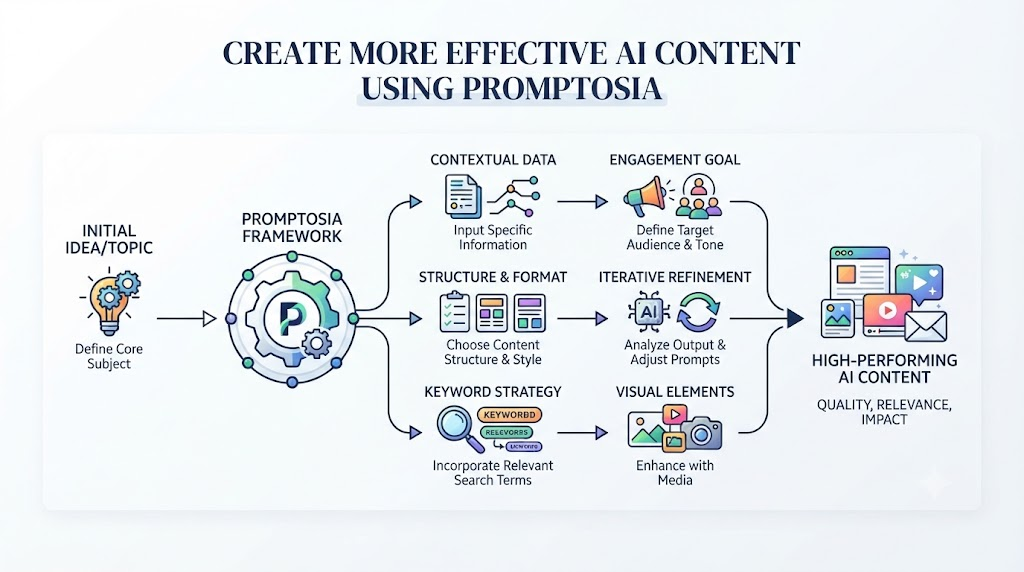
Promptosia serves as an all-in-one prompt engineering platform designed to guide you from a rough idea to a polished masterpiece. It takes the guesswork out of the equation by supporting you through:
- Drafting initial instructions quickly.
- Polishing and enhancing your wording.
- Testing how minor tweaks change your final results.
- Tracking changes as you update your instructions over time.
- Sharing your best work with teammates or peers.
Organizing Prompts With AI Prompt Organizer
When your collection of instructions starts numbering in the hundreds, finding the right one can feel impossible. That is where a smart AI prompt organizer steps in to save your sanity.
A good organizer lets you sort your instructions into clear folders and categories—like marketing, coding, or personal journaling. You can also slap custom tags and variable placeholders like Client Name or Topic onto your templates. This means you can keep your workspace tidy and customize your favorite workflows on the fly.
Improving Instructions With AI Prompt Optimizer
We have all typed a basic instruction into an AI, received a mediocre answer, and thought, "Well, that could have been better."
An AI prompt optimizer fixes that exact problem. It takes your rough thoughts and transforms them into crisp, clear instructions that AI models can understand instantly. By stripping away confusing language and injecting the right context, an optimizer ensures your AI gives you deeply insightful answers right out of the gate.
Understanding Prompts With AI Prompt Analyzer
Ever wonder why an AI gave you a completely useless answer? Usually, it is because the instruction itself was a bit muddy.
An AI prompt analyzer acts like a friendly editor for your instructions. It reviews your text to see if your goals are clear, your formatting requests make sense, and your variables are set up correctly. It spots weak points before you even hit send, saving you from frustrating rounds of trial and error.
Checking Prompt Quality Before Use
Before you drop an instruction into a team-wide workflow or rely on it for a major project, you want to know it actually works.
A dedicated prompt quality checker evaluates your instructions for clarity, structure, safety, and overall usability. It flags text that is too vague or overly complex, ensuring your instructions are robust enough to deliver stellar results every single time.
Managing Prompt Improvements With Version Control
Great instructions evolve. As you test different phrases, you will naturally want to tweak and update your workflows.
A prompt version control tool keeps a neat history of all your edits. If you tweak an instruction and realize the old version worked better, you can roll back with a single click. It gives you the freedom to experiment aggressively without the fear of breaking something that already works.
Testing Different Prompt Results
How do you know if changing a single adjective in your instruction will make the AI's response sharper? You have to test it.
An AI prompt testing tool lets you run different variations of an instruction side by side. You can compare the outputs directly to see which wording yields the most creative, accurate, and helpful answers for your specific task.
Reusing Successful Prompts With Templates
Once you find an instruction that works like magic, you never want to type it out manually again.
Using reusable AI prompt templates turns your best work into plug-and-play shortcuts. Just open your saved template, plug in your specific details for the day, and let the AI do the heavy lifting. It is the ultimate productivity hack for repetitive tasks.
Promptosia Features Comparison Table
| Feature | What It Does | Benefit |
|---|---|---|
| AI Prompt Library | Stores useful prompts in one place | Easy access and reuse |
| Prompt Organizer | Categorizes prompts with tags and folders | Better organization |
| Prompt Optimizer | Improves prompt quality | Better AI responses |
| Prompt Analyzer | Reviews prompt structure | Finds improvement areas |
| Quality Checker | Evaluate prompt effectiveness | Creates stronger prompts |
| Version Control | Saves prompt history | Maintains successful versions |
| Prompt Testing | Compares prompt outputs | Helps choose better results |
| Templates | Saves reusable prompts | Faster workflows |
Who Can Use Promptosia?
Content Creators
Writers and creators juggle outlines, hooks, scripts, and drafts constantly. Promptosia lets them lock down their favorite voice guidelines and writing frameworks in one accessible place.
Developers
Coders use AI for everything from debugging to system architecture. Keeping technical instructions organized means they can pull up specialized prompts instantly without breaking their coding focus.
Marketers
Marketers live on campaign ideas and copy variations. Promptosia helps marketing teams build shared, repeatable workflows so everyone uses the exact same high-converting brand messaging.
Businesses and Teams
Consistency is everything for a growing company. Teams can share proven AI processes across departments, ensuring high standards across sales, support, and product development.
Students and Researchers
Juggling heavy research papers and study notes? Organizing smart AI queries helps students manage heavy workloads and extract key information efficiently.
Benefits of Using Promptosia
- Saves massive amounts of time by cutting out repetitive typing.
- Keeps all your valuable AI interactions neat and searchable.
- Boosts AI output quality with built-in optimization and analysis tools.
- Powers up teamwork with effortless instruction sharing.
- Turns your winning prompts into reusable digital templates.
- Eliminates frustrating trial-and-error workflows.
- Streamlines daily productivity for individuals and teams alike.
Common Problems Without Prompt Management
- Losing brilliant prompts: Forgetting where you typed a killer instruction and having to recreate it from scratch.
- Repeating yourself: Typing the same long explanations over and over across different chat windows.
- Losing track of changes: Tweaking an instruction and forgetting which version actually produced the best results.
- Inconsistent AI answers: Changing your wording slightly every time, leading to wild swings in output quality.
- Siloed knowledge: Struggling to share successful workflows with teammates because everything is stuck in personal chat histories.
Organized prompt management wipes out these headaches entirely by centralizing your assets and standardizing your success.
Frequently Asked Questions (FAQs)
What is an AI prompt management tool?
It is a software platform designed to help you save, organize, update, and retrieve your AI instructions in one central hub instead of losing them in chat histories.
Why do users need an AI prompt library?
An AI library gives you a safe home for your best instructions so you can access them instantly, maintain consistent output quality, and save time.
How does Promptosia help organize prompts?
It provides custom folders, tags, and variable placeholders so you can sort your instructions logically and find what you need in seconds.
What is a prompt engineering platform?
A comprehensive toolkit that supports you through the entire lifecycle of working with AI, from initial drafting to optimization, testing, and sharing.
How does an AI prompt optimizer improve prompts?
An optimizer refines rough thoughts into clear, structured instructions that help AI models understand your exact context and formatting needs.
What does an AI prompt analyzer check?
It reviews your instruction's structure and clarity to spot weak areas and offer constructive tips for better results.
Why is prompt version control important?
It tracks your edit history so you can compare variations and easily roll back to previous successful versions whenever you need to.
How do reusable AI prompt templates save time?
Templates turn your best instructions into plug-and-play frameworks, allowing you to fill in details and run tasks instantly without starting from scratch.
Final Thoughts: Building Better AI Workflows With Organized Prompts
Artificial intelligence is here to stay, but the secret to getting great results isn't just the AI model you use—it's how you talk to it. Random, messy instructions yield random answers, while well-managed prompts unlock true creativity and speed.
By treating your instructions as valuable digital assets, tools like Promptosia help you cut out the friction, save precious time, and build smarter workflows that elevate both individual productivity and team collaboration.






Top comments (0)