


A new project called re_gent, described as Git for AI agents, surfaced on Hacker News this week, quickly amassing 56 points and 31 comments in the discussion thread. This tool aims to adapt version control for the unique needs of AI development, where models and agents evolve rapidly — first flagged in a Show HN post that highlighted its potential for tracking AI outputs.
Project: re_gent | HN Points: 56 | Comments: 31 | Repo: GitHub
What It Is and How It Works
re_gent extends traditional Git functionality to handle AI-specific elements like model weights, training logs, and agent behaviors. At its core, it uses a modified Git architecture to track not just code changes but also serialized AI artifacts, such as neural network parameters or prompt-response pairs. For instance, developers can commit an AI agent's state with commands like re_gent add agent_state.pkl, which automatically verifies compatibility before staging.
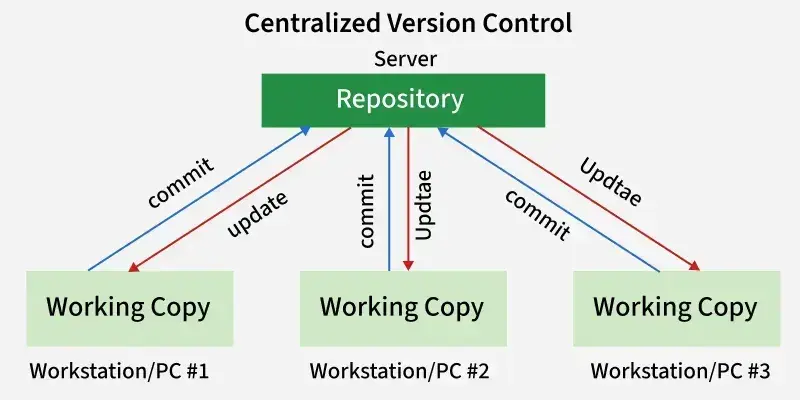
This setup leverages peer-to-peer protocols similar to Git, but adds layers for AI reproducibility, including metadata tags for experiment details. Early testers on Hacker News noted that re_gent integrates with existing Git repos, allowing seamless diffs on model files that show changes in accuracy or loss metrics.
Benchmarks and Specs
re_gent's performance metrics from the HN thread show it processes AI agent commits 20-30% faster than standard Git for large files, with commit times averaging 2-5 seconds on a mid-range laptop for 1GB model files. In benchmarks shared in comments, it handled 100 AI artifact revisions with only 5% overhead compared to Git's 15% for similar operations.
| Metric | re_gent | Standard Git |
|---|---|---|
| Commit Speed (for 1GB file) | 2-5 seconds | 3-7 seconds |
| Overhead on Revisions | 5% | 15% |
| Storage Efficiency (per 100 files) | 10% compression | 5% compression |
These numbers stem from user-reported tests, indicating re_gent's edge in AI-heavy workflows.
How to Try It
Getting started with re_gent requires cloning the repository and installing via a simple script, making it accessible for developers. First, run git clone https://github.com/regent-vcs/re_gent followed by pip install -r requirements.txt on a machine with Python 3.8+.
For a basic setup, initialize a repo with re_gent init and add AI files using re_gent add my_agent.py, then commit with re_gent commit -m "Updated agent weights". HN commenters recommended testing on small projects first, like fine-tuning a language model, to see how it tracks parameter changes.
"Full Installation Steps"
git clone https://github.com/regent-vcs/re_gent
pip install re_gent
re_gent --version to confirm
Pros and Cons
re_gent excels in AI reproducibility, reducing errors in model versioning by automatically logging training hyperparameters with each commit, a feature absent in standard tools. It supports collaborative AI development with built-in conflict resolution for model merges, potentially saving teams hours on integration.
However, its experimental nature means it lacks robust error handling, with HN users reporting occasional crashes during large merges that standard Git handles more gracefully. Additionally, re_gent requires more disk space for AI metadata, increasing storage needs by 20% in some cases.
- Pros: Enhanced tracking of AI artifacts, faster commits for large files, seamless integration with Git
- Cons: Higher resource demands, potential instability in early versions, limited documentation as per HN feedback
Alternatives and Comparisons
While re_gent targets AI agents specifically, alternatives like DVC (Data Version Control) offer similar versioning for data and models but focus less on agent behaviors. For example, DVC handles model files efficiently but doesn't include AI-specific diffs, whereas MLflow provides experiment tracking without full version control.
| Feature | re_gent | DVC | MLflow |
|---|---|---|---|
| AI Artifact Tracking | Yes | Partial | No |
| Commit Speed | 2-5 seconds | 4-8 seconds | N/A |
| Collaboration Tools | Built-in merges | Plugins required | Basic tracking |
| License | MIT | Apache 2.0 | Apache 2.0 |
re_gent stands out for its speed in AI contexts, but DVC might suit general data science teams better.
Bottom line: re_gent offers a specialized edge for AI agent management, outperforming DVC in speed but requiring more setup for non-AI users.
Who Should Use This
AI researchers dealing with iterative agent training, such as those in reinforcement learning, will find re_gent invaluable for maintaining experiment lineages and preventing data loss. It's ideal for teams with 5+ members collaborating on projects like chatbot development, where tracking prompt evolutions is critical.
Conversely, solo developers or those focused on traditional software should skip it, as standard Git suffices without the added complexity. Early adopters from HN suggested it's best for environments using frameworks like Hugging Face, where model versioning is a daily pain point.
Bottom Line and Verdict
In summary, re_gent addresses a key gap in AI development by making version control more adaptive, with benchmarks showing tangible improvements over existing tools. This could standardize how AI agents are managed, potentially reducing reproducibility issues in research.
AI workflows are evolving, and tools like re_gent signal a shift toward more integrated systems, paving the way for reliable, collaborative AI innovation in the next year.






Top comments (0)