
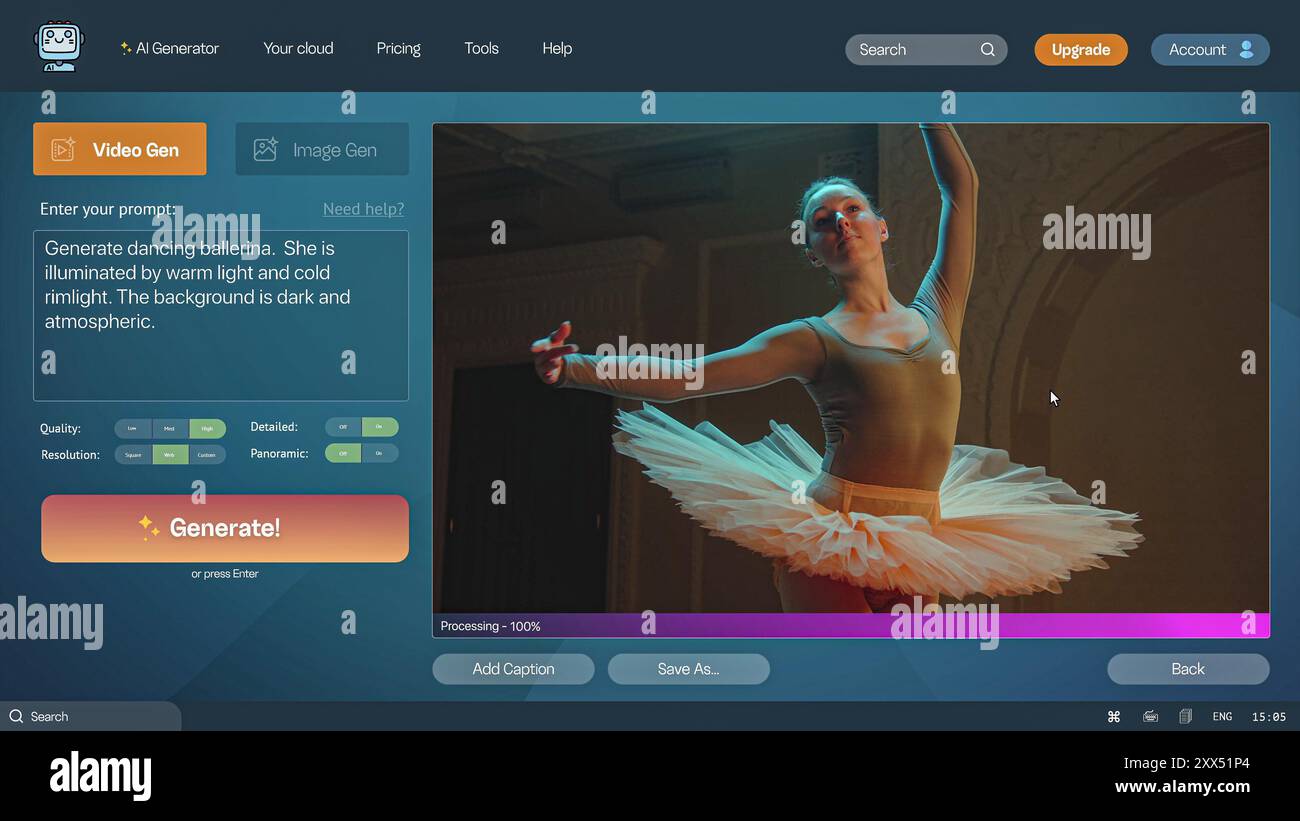

StableVideo.com was Stability AI's hosted video application, documented as a reference implementation of its SVD 1.1 API. The domain now redirects to Stability's Stable Video information page, and the hosted API was retired on July 24, 2025. To keep using SVD, follow Stability's documented self-hosting route for the downloadable checkpoints. Release notes, StableVideo.com, access guide
What are the key facts about StableVideo.com?
| Field | Verified detail |
|---|---|
| Developer | Stability AI. Release notes |
| Released | The March 21, 2024 release notes document StableVideo.com; an exact initial public-opening date is not established by that entry. Release notes |
| Type | Hosted web application using the SVD 1.1 image-to-video API. Release notes |
| Size or parameters | Not applicable to the website; the underlying checkpoint has a separate model card. Release notes, SVD 1.1 card |
| License and access | Hosted service historically; downloadable SVD weights have their own license and access requirements. Access guide, model card |
| Where it runs | The web service ran on hosted infrastructure; the supported continuation is SVD in your own environment. Release notes, access guide |
What did StableVideo.com let you create?
StableVideo.com's role was to put an image-to-video model behind a browser workflow. Stability specifically presented the app as a reference for developers exploring what they could build with its API. Release notes
For planning a similar tool, treat that as an architectural example: an input image, a generation request, a waiting state, and an output that the user can review.
SVD 1.1 takes a still image and produces a short sequence. Its model card specifies 25 frames at 1024 by 576 pixels and describes fixed fine-tuning conditions intended to improve consistency. Model card
The Stable Video Diffusion companion covers the underlying model. This page concentrates on the access transition and the practical responsibilities of running it yourself.
Is StableVideo.com still available, and what are SVD's limits?
Stability's official announcement retires the Stable Video API on July 24, 2025. A saved request for that endpoint is therefore unsuitable as a current quick-start recipe. Deprecation notice
StableVideo.com currently redirects to Stability's Stable Video information page. It describes the model and licensing options without establishing a current free browser-generation allowance. StableVideo.com, Stable Video page
The SVD 1.1 card lists short outputs, possible static scenes, imperfect faces, and illegible text among its limitations. It also says the model cannot be controlled through text. Model card
Build the input image to contain the composition you need. If your intended output depends on a precise written slogan, reserve a separate editing pass for that element rather than relying on the generated frames.
Self-hosting adds installation and maintenance work. The official reference repository documents specific dependencies and environment setup; budget time to get that baseline working before adding an interface. Repository
Define success for the first run as a saved, reviewable clip. Leave production throughput estimates until you have measured the particular machine, checkpoint, and inference configuration you intend to operate.
How can you run SVD after the hosted API retirement?
Follow the supported access route
Open Stability's SVD access guide and review the linked licensing requirements. It directs users to select model weights from the official Hugging Face repositories and obtain the reference implementation. Access guide
Record which variant you selected. A workflow for the original SVD-XT and one for SVD 1.1 should identify their checkpoints explicitly so their settings cannot be mixed accidentally.
Choose an implementation before installing dependencies. Stability's reference repository and Hugging Face Diffusers provide separate documented setup paths. Repository, Diffusers guide
The example below uses Diffusers with the original SVD-XT checkpoint. Follow the Diffusers setup for this example; it does not require installing Stability's reference repository. For the reference-code route, Stability's access guide identifies scripts/sampling/simple_video_sample.py. Diffusers guide, access guide
import torch
from diffusers import StableVideoDiffusionPipeline
from diffusers.utils import load_image, export_to_video

pipe = StableVideoDiffusionPipeline.from_pretrained(
    "stabilityai/stable-video-diffusion-img2vid-xt",
    torch_dtype=torch.float16,
    variant="fp16",
)
pipe.enable_model_cpu_offload()
image = load_image("input.png").resize((1024, 576))
frames = pipe(image, decode_chunk_size=8).frames[0]
export_to_video(frames, "svd-example.mp4", fps=7)
Install CUDA-compatible PyTorch, Diffusers, Transformers, Accelerate, and the video-export dependencies required by your chosen library version. Obtain any required repository access before requesting the weights. Diffusers guide
Prepare input.png with the intended framing in advance. The resize in the example is a size conversion; inspect the source aspect ratio yourself so a stretched input does not become your baseline.
Make the output reviewable
Save the input image beside the video and settings. Review the clip at its exported speed, then examine representative frames for changes to the subject's outline, expression, and small details.
If the clip is unsuitable, write a short reason before rerunning. Separate a content failure, such as a changing face, from an operational failure, such as a missing file or an interrupted process.
For a product prototype, make the generation status visible. Show that the request is still running until the output file exists and can be opened, and retain enough diagnostic information to investigate failed jobs.
Consult the ComfyUI pillar when organizing a broader visual pipeline, while keeping the SVD-specific installation grounded in its own documentation.
Plan the operating cost
Write down the machine configuration and the measured time for your test set. Include rejected generations and idle server time when estimating the operating cost of an application you host.
Use the cloud GPU pricing guide for infrastructure comparisons. Keep the workload assumptions consistent; a headline server price does not describe how many acceptable clips your project will produce.
How do the hosted and self-hosted video options compare?
| Option | Access and responsibility |
|---|---|
| StableVideo.com | Historical hosted interface documented around the SVD 1.1 API. Release notes |
| Self-hosted SVD | Download the licensed model and operate the inference environment yourself. Access guide |
| Runway image-to-video | A separate hosted video-generation route with its own developer API and task lifecycle. Runway guide |
Choose the option whose operating responsibilities fit the project. Evaluate a sample clip through each candidate workflow before comparing the cost of delivering the same creative result.
What else should you know about StableVideo.com and SVD?
Is StableVideo.com a model I can download?
StableVideo.com identifies the hosted web application. SVD is the underlying model family, with weights and reference code available through Stability's documented self-hosting route. Access guide
Does Stability still offer the Stable Video API?
Stability states that its hosted SVD API endpoints were deprecated on July 24, 2025. Its support documentation directs users to self-host the model. Access guide
Can SVD 1.1 generate motion directly from a written prompt?
SVD 1.1 takes an input image; its model card says text control is unsupported. Prepare the visual scene first, then use it as the conditioning image. Model card
Is downloading the model the only setup step?
Running SVD also requires a compatible runtime and compliance with the selected checkpoint's access terms. Stability's guide separates license review, checkpoint download, repository setup, and local sampling. Access guide
Sources
- Stability API release notes
- How to access Stable Video Diffusion
- Stable Video API retirement announcement
- StableVideo.com redirect destination
- Stable Video product page
- SVD 1.1 model card
- Stability reference implementation
- Diffusers SVD guide
- Runway API getting-started guide





Top comments (0)