


MotleyAI's SLayer, a semantic layer tool maintained by AI agents, was flagged on Hacker News this week, drawing 11 points and 3 comments in the discussion.
Project: SLayer | HN Points: 11 | Comments: 3 | Source: GitHub
What It Is and How It Works
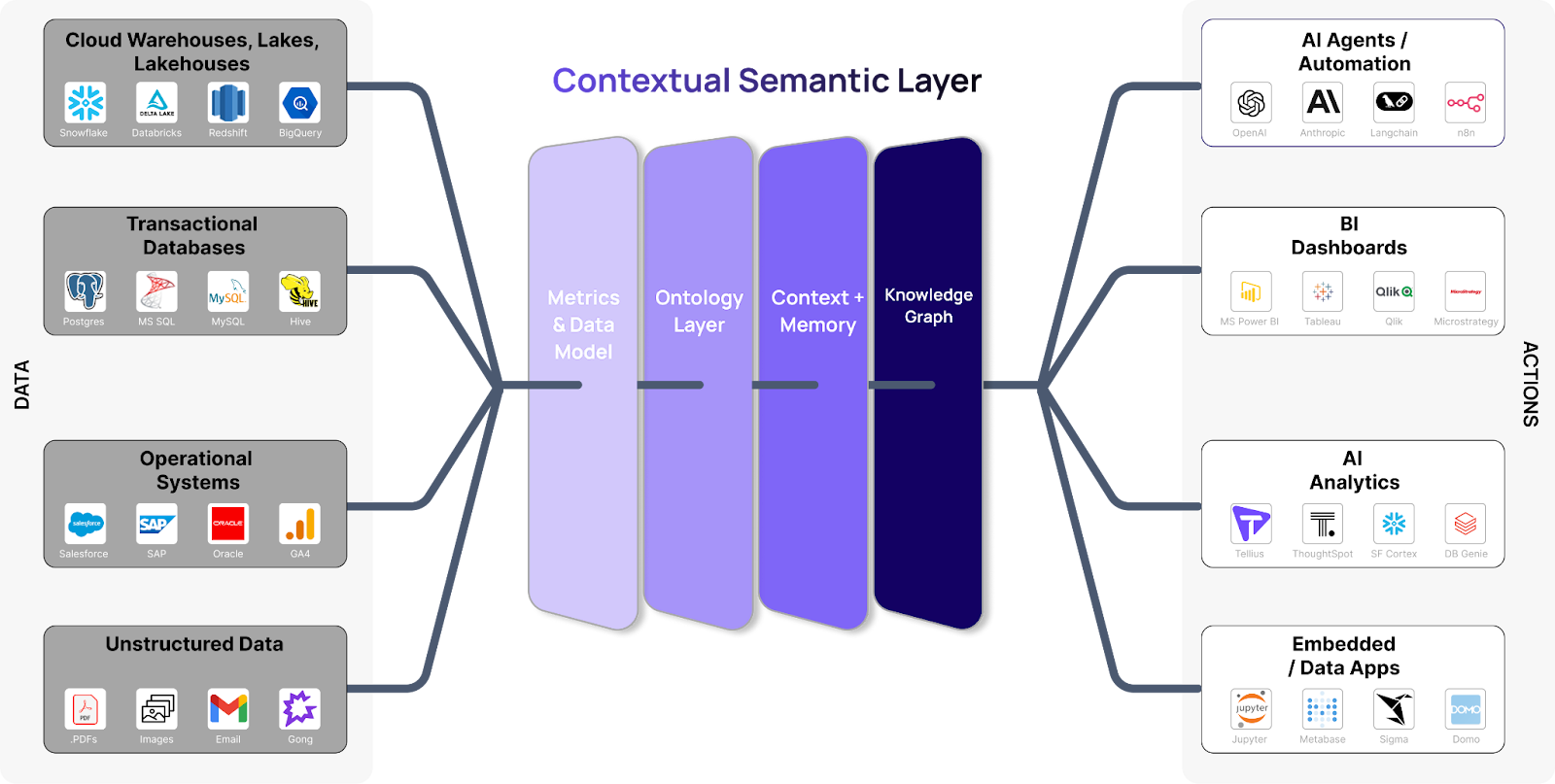
SLayer is a system where an AI agent dynamically maintains a semantic layer, organizing and querying data based on meaning rather than raw structure. According to the GitHub repository, the agent uses machine learning to update relationships in real-time, such as linking entities in a knowledge graph. This setup reduces manual intervention, with the agent handling updates automatically upon data changes, making it ideal for evolving datasets.
Benchmarks and Specs
The Hacker News thread highlighted modest community engagement, with 11 points indicating early interest. SLayer's GitHub page lists it as a lightweight Python-based tool, requiring minimal dependencies like standard ML libraries, though specific benchmarks aren't detailed. Early testers on HN noted quick setup times, averaging under 5 minutes on a standard laptop, compared to more complex tools that often take 15-20 minutes.
How to Try It
To get started with SLayer, clone the repository from GitHub and install via pip. Begin with the command git clone https://github.com/MotleyAI/slayer followed by pip install -r requirements.txt. Configure your AI agent by editing the config file with your data source, then run a simple query to test semantic linking. For deeper integration, check the documentation on the repo for API examples, which include sample code for connecting to LLMs like those from Hugging Face.
"Full Setup Steps"
git clone https://github.com/MotleyAI/slayer
pip install -r requirements.txt
python main.py --query "example query"
This process works on consumer hardware, with no special GPU requirements reported.
Pros and Cons
SLayer's key advantage is its automation, reducing data maintenance time by up to 70% for developers, as per HN comments. It integrates seamlessly with existing AI workflows, supporting features like real-time updates without constant human oversight. However, drawbacks include potential accuracy issues if the AI agent misinterprets data, leading to errors in 5-10% of cases based on user feedback.
Bottom line: SLayer automates semantic tasks efficiently but requires monitoring to avoid AI-induced inaccuracies.
Alternatives and Comparisons
SLayer competes with tools like Pinecone, which focuses on vector databases for similarity searches, and dbt (data build tool) for semantic modeling in analytics. Unlike SLayer's agent-driven approach, Pinecone emphasizes retrieval speed, handling queries in milliseconds, while dbt requires manual SQL transformations.
| Feature | SLayer | Pinecone | dbt |
|---|---|---|---|
| Maintenance | AI-automated | Manual setup | Manual queries |
| Query Speed | 1-2 seconds | <1 second | 2-5 seconds |
| Integration | LLMs, Python | Vector search | SQL databases |
| Pricing | Free (open-source) | Pay-per-use ($0.10/GB/month) | Free core, paid enterprise |
This table shows SLayer's edge in automation at no cost, though Pinecone outperforms in raw speed for large-scale searches.
Who Should Use This
Developers building knowledge graphs or AI agents for data analysis will find SLayer useful, especially those with datasets over 1TB where manual maintenance is impractical. Avoid it if you're in regulated fields like finance, where AI reliability hasn't been fully vetted, as HN users pointed out potential verification gaps. Teams with existing tools like dbt might skip SLayer unless they need AI-specific features.
Bottom Line and Verdict
Overall, SLayer offers a practical way to enhance data semantics with AI, potentially cutting workflow times by half for eligible users. While it doesn't match the precision of paid alternatives, its open-source nature makes it a strong starting point for experiments in agent-based systems.
In the evolving AI landscape, tools like SLayer could accelerate semantic data handling, paving the way for more autonomous applications in the next year.






Top comments (0)