

The necklace was ready for its launch. The product photos were done, the packaging was finished, but choosing the first shot was taking longer than expected.
Should the video begin with the jewelry box opening? Start with a close-up of the pendant? Or show the entire display first?
Each option looks different, but the real question is simpler: what should customers notice first?
For a small shop preparing a product launch, I'd rather answer that question before making a complete advertisement. That's where Seedance 2.5 Flash AI Video Generator can help. It lets creators explore short video ideas using text prompts and visual references before settling on a direction.
Three Openings, Three Different Purposes
Let's use the same gold necklace for all three ideas. The product stays the same. Only the way it's introduced changes.
1. Open the Box First
Imagine a dark green velvet jewelry box slowly opening to reveal the necklace.
This creates anticipation and works well when the packaging is part of the buying experience, especially for gifts or seasonal launches.
Best for: Gift products and special packaging.
2. Show the Pendant Immediately
Start with a close-up of the pendant. Let the camera move slightly closer to reveal its shape and details.
This is a better choice when the jewelry design is the main selling point. Customers see the product without waiting for a reveal.
Best for: Distinctive designs, gemstones, and decorative details.
3. Show the Full Display
Start with the necklace on a display stand, then gradually move the camera closer.
This gives viewers more context and works well when introducing a collection or showing a boutique's visual style.
Best for: Product collections and brand introductions.
Before choosing, ask one question:
What is the main reason someone should notice this product?
If it's the packaging, open the box. If it's the design, show the pendant. If it's the collection, start with the wider display.
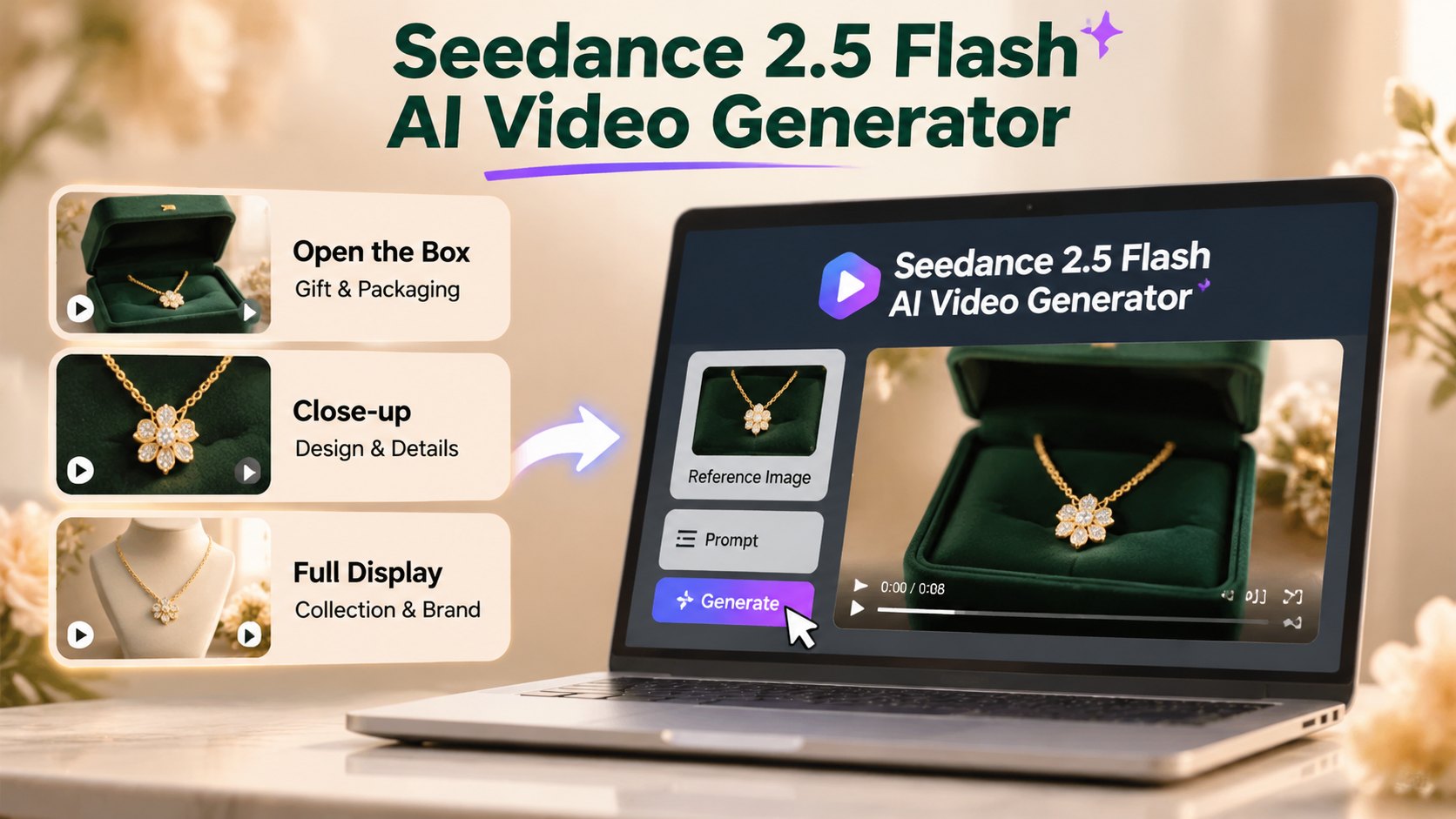
Turn the Ideas Into Short Video Previews
Once the opening direction is clear, prepare a product photograph and use it as a visual reference.
With Seedance 2.5 Flash, you can combine an image reference with text instructions to guide the scene and camera movement. You can also start with text alone if you don't have a suitable reference image.
For the jewelry box concept, a prompt could look like this:
A dark green velvet jewelry box slowly opens on a cream-colored table, revealing the gold necklace from the uploaded reference image. Keep the pendant shape and chain design as consistent with the reference as possible. The camera moves gently closer. End with the entire necklace clearly visible in the center of the frame.
The reference image provides the visual starting point. The prompt explains what should happen.
I'd keep the first version simple. There's little reason to combine several camera movements, changing backgrounds, and multiple actions in one instruction.
The goal is to see whether the opening idea presents the product clearly.
Change One Thing Between Versions
Suppose the first version doesn't look quite right. Maybe the box opens too slowly, the camera moves too close, or the necklace isn't visible long enough.
Instead of rewriting the entire prompt, change one thing at a time:
- Version A: The camera moves closer as the box opens.
- Version B: The camera stays still while the box opens.
- Version C: The camera starts closer to the necklace.
Keep the other instructions consistent. This makes the differences easier to understand.
Seedance 2.5 Flash supports videos from 4 to 30 seconds, with 480p and 720p output options. A short 480p preview may be enough to review the basic composition. When small jewelry details matter, use 720p and inspect the result carefully.
Comparing versions at the same resolution and duration also makes it easier to judge the changes.
Check the Last Frame, Too
It's easy to focus on the opening and forget how the video ends.
Imagine the camera moves toward the necklace, but the pendant is partly outside the frame at the end. The movement might look attractive, but the product is no longer being presented clearly.
Before choosing a version, check three things:
- Is the entire necklace visible at the end?
- Does the camera stop at a useful viewing distance?
- Is there enough space around the product for a price or product name to be added later?
A good opening gets attention. A clear ending gives customers another moment to look at the product.
Don't Let the Camera Become the Main Attraction
Smooth camera movement and attractive lighting are useful, but they shouldn't distract from the product.
For jewelry, pay particular attention to the pendant shape, chain, gemstone placement, and reflections.
AI-generated footage can change small visual details, especially with reflective objects. Even a detailed prompt cannot guarantee that every product feature will remain identical.
Compare the generated video with the original photograph before using it in an advertisement. If exact product details are essential, an actual product photograph or video may still be the better choice.
A visually attractive preview isn't automatically a finished product advertisement.
Decide What Customers Should See First
The jewelry shop doesn't need three completely different advertisements just to make this decision.
It needs to know what deserves attention first.
If the packaging is part of the experience, open the box. If the pendant is the selling point, show the details. If the collection matters, start with the wider display.
Seedance 2.5 Flash gives creators a way to explore these short video concepts before committing to a more complete production.
Start with one product photo and two or three opening ideas. Generate them separately, compare what each communicates, and choose the direction that presents the product most clearly.
Before making the full advertisement, make sure the first shot gives people a reason to look closer.






Top comments (0)