

Introduction
Managing IT systems by hand can take a lot of time. Teams often repeat the same tasks every day. These tasks include checking servers, fixing settings, releasing software, and managing cloud resources.
NoOps offers another way to handle this work. It uses automation and cloud services to reduce the need for manual tasks. This allows teams to spend more time building better systems.
But NoOps is more than using a few tools. It also involves planning, safe processes, and the right technical skills. This guide explores NoOps, its tools, learning paths, job roles, and business uses.
Understanding the NoOps Approach
NoOps is a way of managing technology with less manual effort. It relies on automation, cloud services, and software that can handle routine work.
For example, a company may need to create new servers every time it launches an application. In a traditional setup, an engineer may create each server by hand. With NoOps, a script or tool can complete this task automatically.
The same idea applies to software releases, system checks, updates, and resource management. Teams set rules, and tools carry out the planned work.
NoOps does not remove the need for IT teams. People still plan systems, protect data, review changes, and solve problems that automation cannot handle.
A Simple Example of NoOps
Imagine an online store that receives more visitors during a sale. Its website needs more resources to handle the extra traffic.
An automated cloud system can add resources when demand rises. It can also reduce them when traffic falls. Monitoring tools can check website health and send alerts when something goes wrong.
This helps the business respond without asking an engineer to perform every step manually.
Why Companies Are Moving Toward Automation
Many businesses depend on software for daily work. Slow releases, manual errors, and repeated tasks can affect both teams and customers.
Automation helps companies make their work easier to manage. It also allows technical teams to focus on important problems instead of routine activities.
Better Use of Team Time
Engineers often spend hours on tasks that follow the same steps. Automation can handle much of this work.
Teams can then focus on improving systems, solving difficult issues, and planning new projects.
Faster Software Updates
Automated testing and release tools help developers deliver changes more often. They can check code before it reaches users.
This helps teams find mistakes earlier. It also makes software updates easier to manage.
More Consistent Systems
Manual setup may create differences between servers or environments. Automation follows a set process.
This helps teams create similar systems for development, testing, and production.
Easier Cloud Management
Cloud platforms offer services that can handle many infrastructure tasks. Automation helps teams manage these services through code and rules.
It can also help control resource use. However, teams must still review cloud costs and avoid running unused resources.
How NoOps Automation Is Built
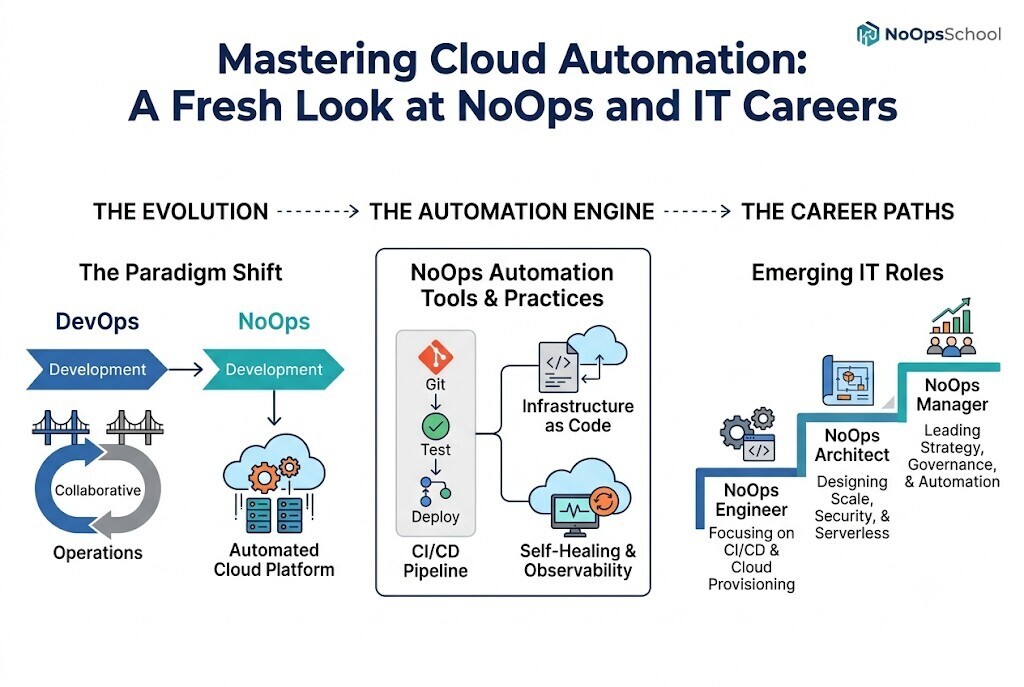
A NoOps setup brings several technologies together. Each part handles a different task. Together, they help teams manage software and infrastructure with less manual work.
Infrastructure Managed Through Code
Infrastructure as Code allows engineers to describe their systems using code files. Tools read these files and create the required resources.
For example, a team can define cloud servers, storage, and network settings. The same setup can be used again when another environment is needed.
This makes changes easier to track. Teams can also store infrastructure files in Git and review updates before using them.
Automated Software Releases
Software does not need to move through every release step by hand. A CI/CD pipeline can run tests, build an application, and prepare a release.
Some pipelines can also deploy approved changes automatically. Teams can add checks to stop a release when a problem is found.
System Checks and Alerts
Automated monitoring checks system health. It can track response times, errors, resource use, and other important details.
When a problem appears, the system may send an alert. It may also run a safe action, such as restarting a service.
Automatic Recovery
Some systems can recover from common failures. They may replace a failed container, restart an application, or add more resources.
These actions work best when teams have tested them. Automation should not make changes without clear rules and safe limits.
NoOps vs DevOps: Understanding the Difference
NoOps and DevOps both support better software delivery. However, they approach daily operations in different ways.
DevOps encourages developers and operations teams to work together. They share responsibility for building, releasing, and maintaining software.
NoOps takes automation further. It tries to reduce the amount of manual work needed to manage systems.
A DevOps team may create a deployment pipeline and still manage some tasks by hand. A NoOps-focused team may automate more of those tasks through cloud services and software tools.
Neither approach suits every company in the same way. Some businesses have older systems that need manual care. Others can automate most of their cloud workloads.
| Approach | Main Goal | Example |
|---|---|---|
| DevOps | Improve teamwork and software delivery | Shared release process |
| NoOps | Reduce manual system management | Automated cloud setup |
| SRE | Keep services reliable | Error and uptime targets |
| AIOps | Use AI to help manage operations | Grouping similar alerts |
| Platform Engineering | Give developers useful tools | Self-service deployment platform |
Companies can use these practices together. Their choice depends on system needs, team skills, risk, and available technology.
Tools That Support NoOps
The tools used in NoOps depend on what a team wants to automate. Some manage infrastructure, while others handle applications, releases, or system health.
Terraform
Terraform helps create cloud infrastructure from code. Teams can use it to manage resources and repeat infrastructure setups.
Docker
Docker packages applications with the parts they need to run. This helps teams move applications between different environments.
Kubernetes
Kubernetes manages container-based applications. It can handle application scaling, restarts, and the placement of containers across systems.
Git and GitOps Tools
Git stores code and tracks changes. GitOps tools use Git files to manage system settings and application deployments.
CI/CD Tools
These tools run software tests and build applications. They can also support automated releases and approval steps.
Monitoring Platforms
Monitoring tools help teams check system health. They collect information and alert teams when important problems appear.
NoOps automation tools should solve clear problems. Using too many tools can make systems harder to manage. Teams should choose tools that work well together and meet their needs.
Building Skills for a NoOps Career
NoOps offers learning opportunities for people working in IT. It can also be a useful path for beginners who want to enter cloud and automation roles.
You do not need to learn every tool at once. Start with basic knowledge and add new skills as you gain experience.
Skills Worth Learning
- Cloud computing and networking
- Linux basics
- Python or Bash scripting
- Infrastructure as Code
- Docker and Kubernetes
- Git and code management
- CI/CD pipelines
- Cloud security
- System monitoring
- Problem-solving
Hands-on practice is important. Reading about a tool is helpful, but using it in a project builds deeper knowledge.
A Practical Learning Plan
| Stage | What to Learn | Practice Idea |
|---|---|---|
| Beginner | Cloud and Linux basics | Set up a small server |
| Next | Scripting and Git | Write a simple automation script |
| Intermediate | Terraform and Docker | Create cloud resources and run an app |
| Advanced | Kubernetes and CI/CD | Build an automated deployment process |
| Further Learning | Monitoring and security | Add alerts and safety checks |
A NoOps training course may provide a clear path through these topics. It can help learners follow a plan instead of trying random tools.
NoOps Certification and Professional Learning
Training and certifications can help professionals study important skills in an organized way. They may also help show what a learner has studied.
A NoOps certification may cover automation, cloud systems, and modern IT practices. The exact topics depend on the learning program.
Different roles may need different learning paths.
- NoOps engineer certification: Focus on cloud resources, scripts, deployment, and monitoring.
- NoOps architect training: Learn system design, cloud choices, security, and automation planning.
- NoOps manager certification: Study team planning, risks, service management, and automation goals.
Before choosing a certification, check the course topics and practical work. Look for clear learning goals and useful exercises.
NoOpsSchool offers learning and certification-focused resources related to NoOps and IT automation. Learners can explore these options to find subjects that match their goals.
Career Roles in NoOps
NoOps knowledge can support different technical jobs. Some roles focus on building systems. Others focus on planning, managing, or improving automation.
NoOps Engineer
This role works on automation scripts, cloud resources, deployment processes, and system checks. The goal is to reduce repeated manual work.
NoOps Architect
An architect plans how different systems connect. They decide how automation, cloud services, security, and application needs fit together.
NoOps Manager
A manager guides the team's work. They plan projects, set goals, review risks, and help teams adopt better automation practices.
Cloud Automation Engineer
This professional builds tools and scripts for cloud systems. They may automate resource setup, changes, and regular maintenance.
Platform Engineer
Platform engineers build shared tools that help developers work more easily. These tools may support testing, deployment, and self-service services.
Learning NoOps can help IT professionals prepare for these roles. However, career progress depends on experience, skill level, projects, and job needs.
Common Problems When Adopting NoOps
Automation can make work easier, but it also needs care. A company should understand its systems before making major changes.
Older Systems May Need Extra Work
Some applications depend on older software or special settings. These systems may not support full automation.
Teams can begin with simpler tasks. They can then improve automation step by step.
Security Must Remain a Priority
Automation tools may have access to cloud resources and important data. Weak access rules can create serious risks.
Use limited permissions, code reviews, testing, and clear approval rules. Teams should also keep records of automated changes.
Automation Can Fail
A wrong script can affect many systems at once. A faulty update may also cause service problems.
Teams should test changes before using them in live systems. They should keep recovery plans ready.
People Still Need to Understand the Systems
Automation does not solve every problem. Teams must know what their tools do and how to respond when something unusual happens.
Good documentation and training help people manage automated systems safely.
NoOps Consulting and Freelance Support
Some businesses want to automate their IT work but do not have the right skills in their teams. They may need help planning projects or setting up new tools.
NoOps consulting services may help businesses with tasks such as:
- Reviewing current IT processes
- Planning cloud automation
- Setting up infrastructure code
- Building CI/CD pipelines
- Improving system monitoring
- Adding security checks
- Moving applications to cloud services
- Planning Kubernetes or GitOps projects
Consultants can help teams understand where automation makes sense. They can also explain the risks and help create a clear project plan.
When Should a Business Hire NoOps Freelancers?
Businesses may hire NoOps freelancers when they need help with a specific project. For example, they may need someone to build a deployment pipeline or automate cloud resource setup.
Before hiring, check their technical experience and past work. Make sure they understand the project requirements and can explain their approach.
Agree on the work, deadlines, testing, and documentation. A clear plan helps both sides understand what needs to be completed.
NoOpsSchool focuses on NoOps learning, professional training, and technical guidance. Businesses and professionals can explore relevant options based on their learning or project needs.
Frequently Asked Questions
What does NoOps mean in IT?
NoOps means using automation to reduce manual work in IT operations. It helps teams manage applications and infrastructure with less daily effort.
How does NoOps help software teams?
It reduces repeated tasks such as testing, deployment, and system setup. Teams can spend more time improving software and solving problems.
What is the difference between NoOps and DevOps?
DevOps focuses on teamwork between development and operations. NoOps focuses on using automation to reduce manual operations work.
Which tools are useful for NoOps?
Terraform, Docker, Kubernetes, Git, CI/CD tools, and monitoring platforms can support NoOps. The best choice depends on the work a team needs to automate.
Is a NoOps training course suitable for beginners?
Yes, beginners can study NoOps after learning basic computer, cloud, and networking concepts. Starting with small projects can make learning easier.
What is a NoOps engineer certification?
It is a learning or assessment program related to NoOps engineering skills. Learners should review its content and practical value before choosing one.
What does NoOps architect training cover?
It may focus on cloud design, infrastructure automation, security, and system planning. The exact topics depend on the training program.
Can NoOps improve cloud management?
Yes, automation can help create resources, manage settings, and scale systems. Teams still need to review security, costs, and system health.
Why do businesses need NoOps consulting services?
Consultants can help businesses plan automation, choose tools, and improve technical processes. They may also help teams manage complex cloud projects.
How can a business hire NoOps freelancers?
Businesses should review technical skills, past projects, communication, and work plans. Clear goals and agreed deliverables help manage freelance projects.
Conclusion
NoOps gives IT teams a way to manage systems with less manual work. Automation can support cloud management, software releases, monitoring, and routine tasks.
Professionals interested in NoOps should learn cloud basics, scripting, containers, Infrastructure as Code, and CI/CD. Small projects can help turn these skills into real experience.
Companies should adopt automation carefully. They need proper security, testing, monitoring, and human oversight.
NoOpsSchool can help learners explore NoOps-related training, certifications, and technical learning resources. Building practical skills is a useful starting point for anyone interested in modern IT automation.





Top comments (0)