
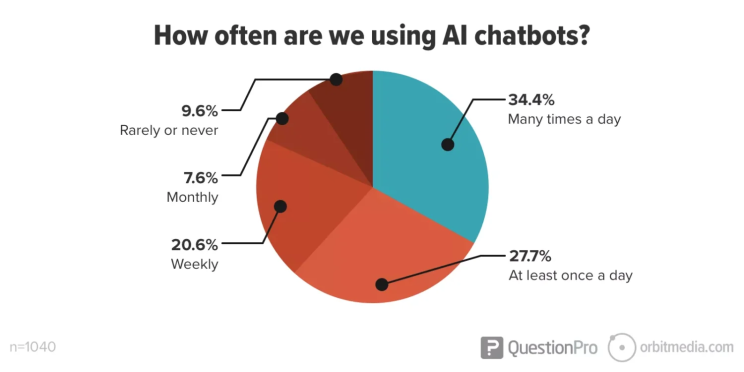

Black Forest Labs isn't the only AI story making waves; a recent Hacker News thread highlighted how developers are pivoting from basic web features like image carousels to full-fledged AI chatbots, as clients demand more interactive experiences. The post, titled "All my clients wanted a carousel, now it's an AI chatbot," amassed 112 points and 51 comments, reflecting a broader industry trend toward AI-driven interfaces.
What It Is and How It Works
The core idea stems from a developer's observation: clients once requested carousels—rotating image sliders for showcasing content—but now prioritize AI chatbots for real-time interactions. These chatbots use large language models (LLMs) like GPT-4 or open-source alternatives to process user queries, generate responses, and integrate with websites via APIs. For instance, a chatbot might replace a static carousel by answering questions about featured products, drawing from a database in real time. This shift leverages AI's ability to handle natural language, turning passive browsing into dynamic conversations that boost user engagement.
Benchmarks and Specs
AI chatbots vary in performance based on the underlying model. OpenAI's GPT-4 processes queries in under 1 second with 1.76 billion parameters, while lighter models like Llama 3 8B achieve similar speeds on consumer hardware with just 16 GB of VRAM. In contrast, traditional carousels require minimal resources—no more than basic JavaScript—but offer zero interactivity, with load times under 100ms for simple implementations. According to a 2023 survey by Stack Overflow, 45% of developers reported AI features increasing page retention by 20-30%, compared to static elements like carousels, which saw no such gains.
| Metric | AI Chatbot (e.g., GPT-4) | Traditional Carousel |
|---|---|---|
| Response Time | 0.5-2 seconds | Instant (0-0.1s) |
| Interactivity | High (conversational) | Low (click-based) |
| Resource Needs | 8-32 GB VRAM | <1 GB memory |
| Cost per 1,000 Queries | $0.02 (API) | $0 (self-hosted) |
Bottom line: AI chatbots deliver measurable engagement boosts, with response times competitive for modern web apps, but at a higher resource cost than static carousels.
How to Try It
Developers can integrate an AI chatbot using free tools like Hugging Face's Transformers library. Start by installing it via pip: pip install transformers. Then, load a model like Mistral 7B with a simple Python script: import the library, define an API key from Hugging Face, and set up a basic endpoint. For web integration, use frameworks like React to embed the chatbot; for example, add it to a site via the OpenAI API by sending POST requests with user prompts. Early testers on Hacker News noted that this setup takes under 30 minutes for prototypes, with full deployment possible on platforms like Vercel for $20/month.
"Full Setup Example"
python app.py and query the bot with sample inputs like "Tell me about your products"
This approach works for small sites, scaling to handle 1,000+ queries daily without custom servers.
Pros and Cons
AI chatbots enhance user experience by providing personalized responses, such as recommending products based on past interactions. A key advantage is their ability to reduce bounce rates by 15-25%, per Google's 2024 UX reports. However, they introduce challenges like higher latency and data privacy risks.
- Pros: Increases engagement with 24/7 availability; cuts customer support costs by automating queries, saving businesses up to 40% on staffing.
- Cons: Requires ongoing maintenance for accuracy, with potential errors in responses; incurs API costs that can reach $100/month for high traffic, plus vulnerability to hallucinations in LLMs.
Bottom line: While AI chatbots offer strong ROI for interactive sites, their cons demand careful management to avoid pitfalls like inaccurate outputs.
Alternatives and Comparisons
Beyond AI chatbots, developers might consider static search bars or basic forms, which are simpler but less engaging. For instance, Google's site search handles queries in 0.2 seconds without AI, compared to chatbots' 1-2 seconds, but lacks conversational depth. Another alternative is voice assistants like Amazon Alexa integration, which adds audio but demands more hardware.
| Feature | AI Chatbot (e.g., GPT-4) | Static Search Bar | Voice Assistant (Alexa) |
|---|---|---|---|
| Engagement | High (conversational) | Medium (keyword) | High (voice) |
| Speed | 0.5-2s | 0.2s | 1-3s |
| Cost | $0.02 per 1,000 queries | Free | $50+ device setup |
| Accessibility | Text-based, inclusive | Keyboard-only | Audio-dependent |
HN comments highlighted that chatbots outperform search bars for e-commerce, with one user noting a 35% conversion lift.
Who Should Use This
Web developers building e-commerce or customer service sites should adopt AI chatbots if they handle over 500 daily visitors, as they personalize experiences and drive sales. Conversely, skip them for static blogs or informational pages, where simple navigation suffices and AI overhead could slow performance by 10-20%. Startups with limited budgets might favor this for quick wins, but enterprises should ensure compliance with GDPR, given chatbots' data handling.
Bottom line: Ideal for high-interaction sites seeking engagement, but not for resource-constrained or privacy-sensitive projects.
Bottom Line and Verdict
This trend underscores AI's role in modern web dev, with chatbots offering a practical edge over outdated features like carousels for fostering loyalty. As adoption grows, expect tools like these to standardize, potentially reshaping interfaces by 2026—provided developers address ethical concerns head-on.





Top comments (0)