
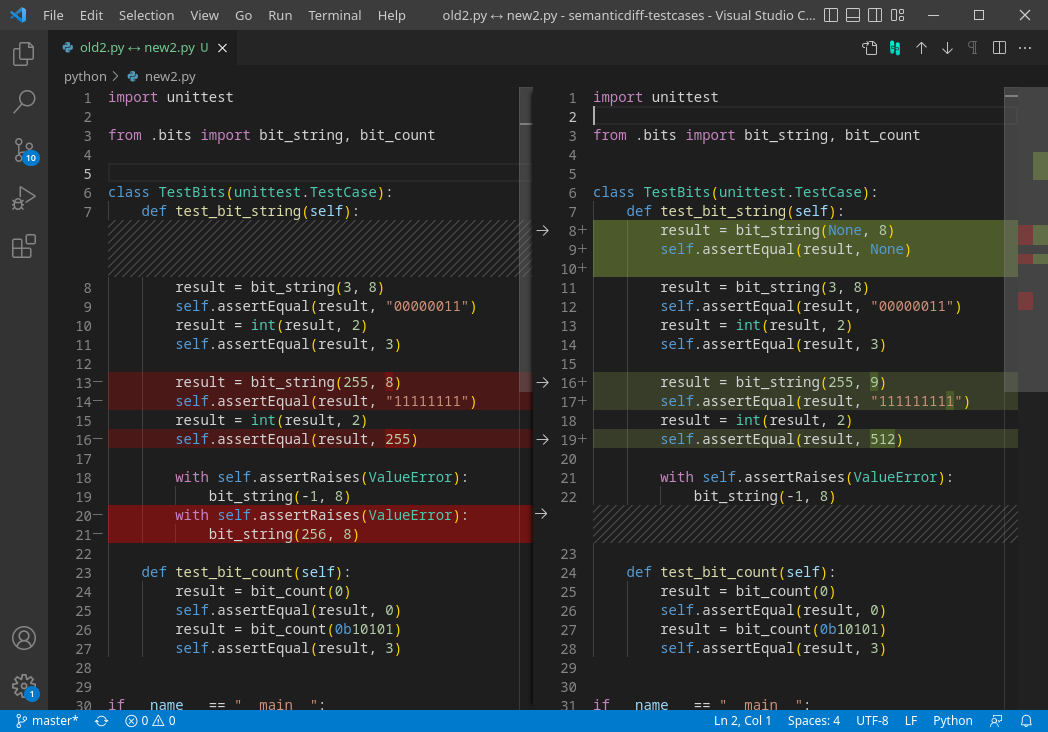

Claude Code for Visual Studio surfaced on Hacker News with 16 points and 5 comments. The extension adds Claude-generated code changes as native VS Code diffs complete with one-click accept or reject controls.
Extension: Claude Code VS | Platform: Visual Studio Code | Key feature: Native diff with accept/reject | Source: GitHub repo firish/claude_code_vs
What It Is and How It Works
The tool connects Claude directly to the VS Code editor. When Claude suggests code edits, the changes appear as standard diff hunks rather than chat text or separate files. Users review each hunk inside the familiar editor interface and accept or reject individual blocks without leaving the file.
This approach removes the copy-paste step common in other Claude workflows. The extension uses VS Code's built-in diff renderer, so syntax highlighting, line numbers, and gutter indicators remain unchanged.

How to Try It
Install the extension from the GitHub repository linked above. After cloning or downloading the VSIX file, load it in VS Code through the Extensions view. Configure the Claude API key in the extension settings panel.
Once active, open any file and trigger Claude via the command palette. Suggested edits render immediately as diffs. No additional build steps or external servers are required.
Pros and Cons
- Native diff rendering matches VS Code's existing review tools
- One-click accept/reject reduces context switching
- Works offline once the API key is set
- Limited to Claude models only
- Early release shows 16 HN points and minimal community testing
- No built-in multi-file refactoring support yet
Alternatives and Comparisons
Several VS Code extensions already connect LLMs to code. The table below compares the new extension against two established options.
| Feature | Claude Code VS | Continue.dev | GitHub Copilot |
|---|---|---|---|
| Native diff accept | Yes | Partial | No |
| Model choice | Claude only | Multiple | OpenAI only |
| Offline capable | Yes | Yes | No |
| Multi-file edits | No | Yes | Yes |
| License | Open source | Open source | Proprietary |
Continue.dev offers broader model support but requires extra configuration for clean diff views. Copilot provides inline suggestions without explicit accept/reject steps.
Who Should Use This
Developers already using Claude for code generation who want tighter editor integration will benefit most. Teams that rely on VS Code's built-in source control tools gain immediate value from the native diff format.
Users needing multi-file refactors or non-Claude models should continue with Continue.dev or Copilot instead.
Bottom Line / Verdict
Claude Code for Visual Studio delivers the first straightforward way to review Claude edits inside VS Code diffs. The narrow model focus and early stage limit its reach, yet the core accept/reject flow solves a clear friction point for Claude users.
Early testers on Hacker News noted the clean integration but asked for broader model support in future releases. The extension remains a targeted improvement rather than a general replacement for existing tools.






Top comments (0)