
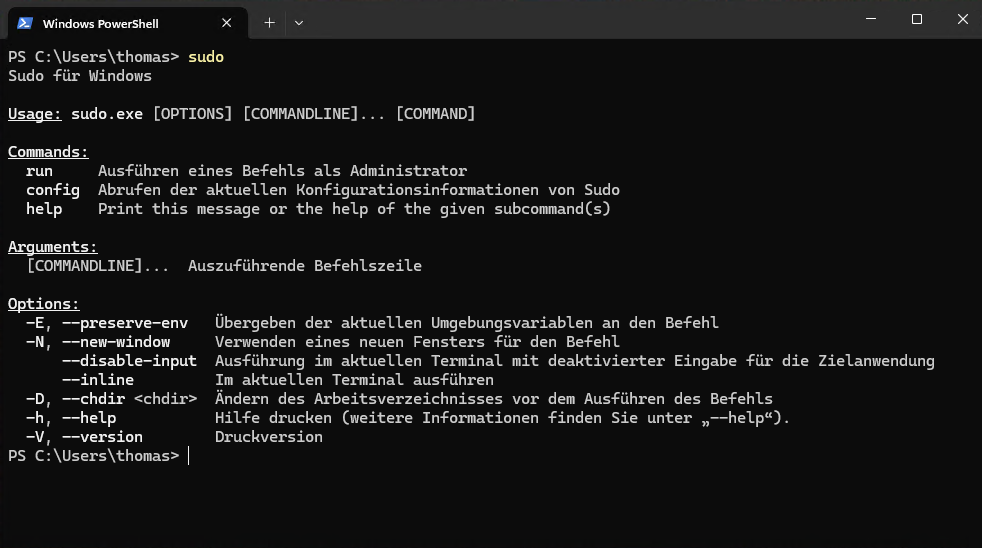

Microsoft has released Sudo for Windows, a new feature that allows users to run commands with elevated privileges directly from the command line, similar to Unix systems. This update addresses a long-standing pain point for developers working across operating systems, potentially streamlining workflows in AI development environments. The tool is now available via GitHub, drawing from Microsoft's open-source efforts.
This article was inspired by "Sudo for Windows" from Hacker News.
Read the original source.Tool: Sudo for Windows | HN Points: 27 | Comments: 9 | Available: GitHub
How Sudo for Windows Works
Sudo for Windows enables running commands as an administrator without opening a separate elevated prompt, reducing context switches during development sessions. For instance, developers can execute a command like "sudo netstat" to view network stats with privileges in one go. This feature integrates into the Windows command prompt and PowerShell, leveraging existing Windows security mechanisms for elevation.
The Hacker News discussion highlights practical use cases, such as faster scripting in build processes. AI practitioners often deal with complex environments where tools like Python or TensorFlow require frequent privilege escalations; this could cut setup time by avoiding repeated admin prompts.
Community Reaction on Hacker News
The post received 27 points and 9 comments, indicating moderate interest from the tech community. Comments noted benefits for cross-platform developers, with one user mentioning it simplifies porting Linux scripts to Windows. Others raised concerns about potential security risks, such as accidental elevation in shared environments.
Bottom line: Early feedback positions Sudo for Windows as a useful bridge for developers, though it sparks security discussions in AI workflows.
Why It Matters for AI Practitioners
Local AI development often involves running resource-intensive processes, like training models on GPUs, which require administrative access. Previous Windows workflows demanded separate elevated sessions, adding 10-20 seconds per operation according to HN anecdotes. Sudo for Windows could reduce this overhead, making it easier to integrate with tools like Anaconda or Docker for AI projects.
Comparisons to existing tools show advantages: unlike third-party apps that add bloat, this is a native Microsoft solution.
| Feature | Sudo for Windows | Third-party Elevators (e.g., RunAs) |
|---|---|---|
| Integration | Native | Add-on |
| Speed Impact | Minimal | 5-15 seconds delay |
| Availability | Free on GitHub | Varies by tool |
| Security | Windows-managed | Dependent on app |
"Technical Context"
Sudo for Windows uses the UAC (User Account Control) system to handle elevations, ensuring compatibility with Windows 10 and 11. Developers can enable it via a simple configuration in the Settings app, requiring no additional downloads beyond the GitHub repo.
This release could accelerate AI tool adoption on Windows, as more developers build cross-platform applications without friction, backed by the growing HN engagement.







Top comments (0)