
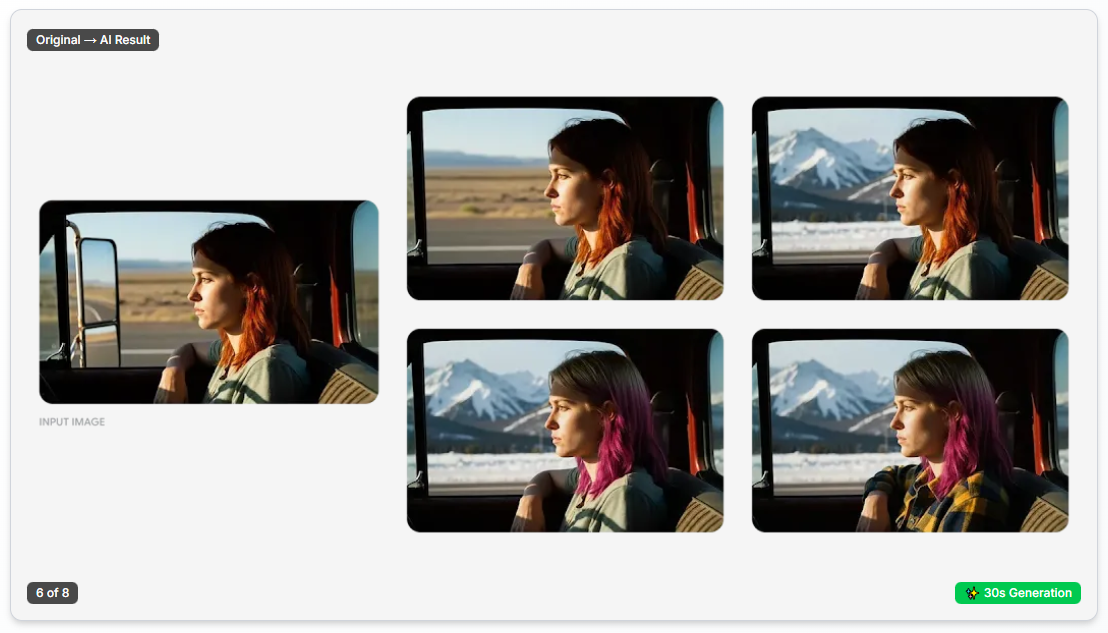
Last week, I watched something fascinating at a design studio in Paris. A junior designer completed a complex background removal in seconds using natural language prompts. Next to her, the senior art director was doing the exact same task in Photoshop with the pen tool and layer masks—it took 15 minutes, but it was pixel-perfect.
"We need both," the studio owner told me. "But figuring out which tool to use for which job is everything."
That moment captures a bigger question facing creators everywhere: Can AI photo editing tools replace professional software like Photoshop? On one side, advocates claim AI is democratizing image editing—no more years of training required, just tell it what you want. On the other side, skeptics argue AI lacks the precision control and creative flexibility needed for professional-grade work.
For freelance designers, this is about which skills to invest in. For brands, it's about which tools give their teams the best ROI. For aspiring creators, it's about what to learn—should you master complex software, or focus on AI prompt engineering?
In this article, we directly compare AI editing tools against traditional software across efficiency, learning curve, cost, and output quality in 2026. No hype, just data-driven analysis of where each approach truly excels.
Evaluation Criteria for Fair Comparison
To fairly compare AI editing tools and Photoshop, we need clear evaluation criteria.
I've tested both approaches across diverse workflows, evaluating them on these dimensions:
Speed and Efficiency: How long does it take to complete common editing tasks? What about repetitive work?
Learning Curve: How long until you're productive? Until you're fully proficient?
Control Precision: How exactly can you control results? Ability to fine-tune?
Cost: Total cost of ownership—not just the tool itself, but training, time, and productivity.
Output Quality: Do results meet professional standards? Consistency?
Flexibility: Can it handle unexpected requests or complex creative visions?
Collaboration and Workflow: How well does it integrate into team environments and professional pipelines?
Neither is universally "better"—it depends on requirements. But these criteria help us understand where each excels and where each struggles.
AI Editing Tools: Strengths and Use Cases
Let's explore where AI editing tools genuinely shine.
Speed and Automated Tasks
AI's most compelling advantage is speed. AI-powered platforms like Nano Banana can process tasks that traditionally required manual work in seconds.
An e-commerce company in Amsterdam needed to remove backgrounds from 200 product images weekly. A skilled designer using Photoshop took 3-5 minutes per image—12-16 hours total per week. After switching to AI tools, the same work dropped to 2 hours, with results acceptable for 95% of cases. The 5% needed manual cleanup, but they still saved 85% of total time.
For repetitive tasks like color correction, noise removal, basic retouching, and resizing, AI's speed advantage is transformative.
Accessibility for Beginners
Photoshop is powerful but notoriously complex. Layers, blend modes, masks, adjustment layers, hundreds of tools—it can take months or years to become proficient.
AI tools offer a dramatically shorter learning curve. Features like natural language editing capabilities in Banana AI let users simply describe what they want. No need to navigate complex interfaces.
A small business owner in Zurich needed to edit product photos for her website. Zero Photoshop experience. Using AI tools, she could produce professional-looking results after 2 hours of onboarding—changing backgrounds, improving lighting, removing small blemishes. Reaching the same level with Photoshop would have required weeks of learning.
For people focused on marketing, e-commerce, or content creation rather than creative technology, AI's accessibility is a game-changer.
Consistent Batch Processing
AI excels at applying consistent edits to hundreds or thousands of images. Define the style once, and it automatically replicates at scale.
A fashion retailer in London needed consistent aesthetics across 3,000 product images. Even using Photoshop actions, each image required slight manual adjustments—time-consuming and prone to small inconsistencies. The AI system applied color grading, exposure adjustments, and subtle sharpening with 98% consistency across all images.
For volume work where consistency matters more than speed, AI is the clear winner.
Intelligent Content-Aware Editing
Modern AI tools understand what's in images—people, objects, sky, buildings. This semantic understanding enables edits that traditional tools can't do as easily.
A travel blogger in Berlin wanted to remove tourists from hundreds of vacation photos. In Photoshop, this required complex cloning and patching work for each photo. The AI tool automatically detected people, removed them, and intelligently filled backgrounds. Not perfect—10-15% needed cleanup—but it reduced work time by 70%.
For tasks requiring intelligent selection like sky replacement, portrait retouching, or object removal, AI's content-awareness capabilities save significant time.
Photoshop and Traditional Tools: Why They're Still Essential
But there's a reason Photoshop and traditional editing software remain industry standards.
Precision Control and Pixel Perfection
Photoshop's biggest advantage is absolute control over everything. Every pixel, every layer, every effect—skilled users can manipulate exactly as desired.
AI tools give you what you ask for, but control over precisely how it achieves that is limited. When you get a result that's almost but not exactly what you wanted, fine-tuning it can be difficult.
A high-end fashion magazine in Milan tried editing a cover photo with AI tools. Results were good but not perfect—skin tone slightly off, catchlights in eyes wrong, clothing texture subtly incorrect. Their senior retoucher spent 3 hours in Photoshop manually refining the image to pixel-level perfection. It wouldn't have been possible without precision control.
For high-stakes editorial work where exact color accuracy, subtle grading, and pixel perfection matter, Photoshop remains unmatched.
Complex Creative Work
Photoshop isn't just a photo editor—it's a complete creative studio. Digital painting, complex compositing, typography, 3D work, advanced effects. Creative possibilities are nearly limitless.
AI tools are good for common editing tasks but struggle with truly original, complex creative visions. Tasks like compositing multiple images, adding custom lighting effects, harmoniously blending diverse elements still require traditional tools.
An advertising agency in Stockholm created a campaign combining 6 different photos into one surreal scene. This involved sophisticated masking, blend modes, light source manipulation, and perspective matching. AI tools couldn't handle this level of creative complexity. It took a skilled Photoshop artist 10 hours, but the result would have been impossible otherwise.
Professional Workflow Integration
Photoshop has been integrated into professional creative workflows for over 30 years. It works seamlessly with other Adobe products, PSD files are industry standard, and nearly every professional printer, agency, and studio supports it.
AI tools often exist independently. Integrating into larger workflows can be awkward. They may lack professional features like CMYK color spaces, 16-bit editing, or ICC profile management.
A print house in Amsterdam had issues with AI-edited images. Files didn't meet print-specific specifications—wrong color space, missing metadata, image compression problems. Everything had to be reprocessed in Photoshop.
For professional environments requiring print production, agency collaboration, or working with client-supplied assets, Photoshop's industry-standard status is a practical advantage.
Non-Destructive Editing and Flexibility
Photoshop's layer system, adjustment layers, and smart objects enable completely non-destructive workflows. You can change, experiment, and revert anything anytime without damaging the original image.
Most AI tools generate a final result. If you change your mind later, you need to start over. This lack of flexibility can be problematic in professional work where clients request multiple revisions.
A brand agency in Zurich shared a case where a client decided they wanted the original color scheme after three rounds of revisions. In Photoshop, it took 5 minutes to adjust layers. With AI tools, they had to repeat the entire process, and results weren't always consistent.
Real-World Comparisons: Same Tasks, Different Approaches
Let's see how theory plays out in practice.
Scenario 1: E-Commerce Product Editing (50 Images)
Tasks: Background removal, white balance correction, minor blemish removal, resizing.
Photoshop Approach:
- Time: 1 hour action setup + 4 minutes per image = 4.3 hours
- Cost: Designer time £340 (£80/hour)
- Quality: Perfect edges, accurate colors, manual QC for each image
- Challenges: Repetitive and tedious; potential for human error
AI Approach:
- Time: 1 hour batch upload and processing + 30 minutes QC = 1.5 hours
- Cost: AI subscription £60 + internal time £120 = £180
- Quality: 98% good; 2% needed manual fixes
- Challenges: Occasional inaccuracy on complex edges (e.g., hair)
Outcome: AI saved 65% time and 47% cost. For e-commerce volume production, AI is the clear winner.
Scenario 2: Magazine Cover Editing
Tasks: High-end skin retouching, subtle color grading, typography integration, exact print specifications.
Photoshop Approach:
- Time: 3 hours by skilled retoucher
- Cost: £300 (£100/hour)
- Quality: Pixel-perfect precision, print-ready, meets brand guidelines
- Final result: Client approved first submission
AI Attempt:
- Time: 2 hours iterating multiple prompts
- Result: Decent retouching but subtle issues—skin tone inconsistencies, catchlights misplaced, no typography integration
- Required additional 3 hours manual work in Photoshop to fix
- Final cost: More expensive in time and frustration
Outcome: For high-end creative work, Photoshop is more efficient and cost-effective.
Scenario 3: Social Media Content (20 Posts Weekly)
Tasks: Apply filters to various images, add text overlays, resize.
Photoshop Approach:
- Time: Template setup + 15 minutes per post = 5.5 hours/week
- Learning curve: Requires intermediate Photoshop skills to use templates efficiently
- Cost: £440 per week
AI + Simple Tools Approach:
- Time: 8 minutes per post = 2.7 hours/week
- Learning curve: Minimal, anyone can do it after a few hours
- Cost: £216 per week
- Quality: Perfectly adequate for social media
Outcome: For fast social content, AI saves 51% time and 51% cost.
The 2026 Verdict: Hybrid Is King
Do AI editing tools beat Photoshop? That's the wrong question. The real question is: When do you use each?
AI Tools Excel When:
- Repetitive batch work (background removal, resizing, basic corrections)
- Quick social media and digital content
- Beginners or non-designers without technical expertise
- Speed takes priority over precision
- Small businesses with limited budgets and time
Photoshop Is Essential For:
- High-end creative work and complex compositing
- Print and professional projects requiring pixel perfection
- Client work with multiple revisions needing non-destructive editing
- Integration with existing professional workflows
- Brand work and precise color control
Smart Workflows: Best of Both Worlds
The most successful creators and studios adopt hybrid approaches:
Implement a Tiered System:
- Volume work: Process 80-90% with AI (background removal, basic corrections)
- Mid-level work: Photoshop with templates and actions
- High-end work: Manual Photoshop work by skilled professionals
Learning Strategy:
- Beginners: Start with AI tools to become immediately productive
- Simultaneously learn basic Photoshop skills (layers, masks, adjustments)
- Serious creators: Master both—AI for efficiency, Photoshop for control
Cost Optimization:
- Use AI for repetitive tasks to free up expert time
- Reserve Photoshop specialists for complex creative work
- AI for initial exploration, Photoshop for final polish
The truth is this isn't a "versus" scenario but an "and" scenario. AI is making image editing more accessible and efficient. Photoshop remains the indispensable tool for precision and complex work. The winners are creators who know when to use which.





Top comments (0)