

Modern organizations generate massive amounts of data every day—from customer records and sales reports to internal documents and operational workflows. The challenge is not just storing this data, but choosing the right platform to manage, access, and scale it effectively.
Within the Microsoft ecosystem, three commonly used data storage solutions often come into discussion: Microsoft Dataverse, SQL Server, and SharePoint. Each serves a unique purpose, and selecting the wrong one can lead to performance bottlenecks, governance challenges, or unnecessary development complexity.
For businesses investing in power platform development services, understanding when to use Dataverse, SQL, or SharePoint is critical. While they may seem interchangeable at first glance, each platform excels in different scenarios—from enterprise-grade relational databases to collaborative document management.
This article explores the strengths, limitations, and ideal use cases of Dataverse vs SQL vs SharePoint, helping organizations determine which solution best fits their needs.
Understanding the Role of Data in the Microsoft Ecosystem
Before diving into comparisons, it’s important to understand how these three technologies fit within Microsoft's broader ecosystem.
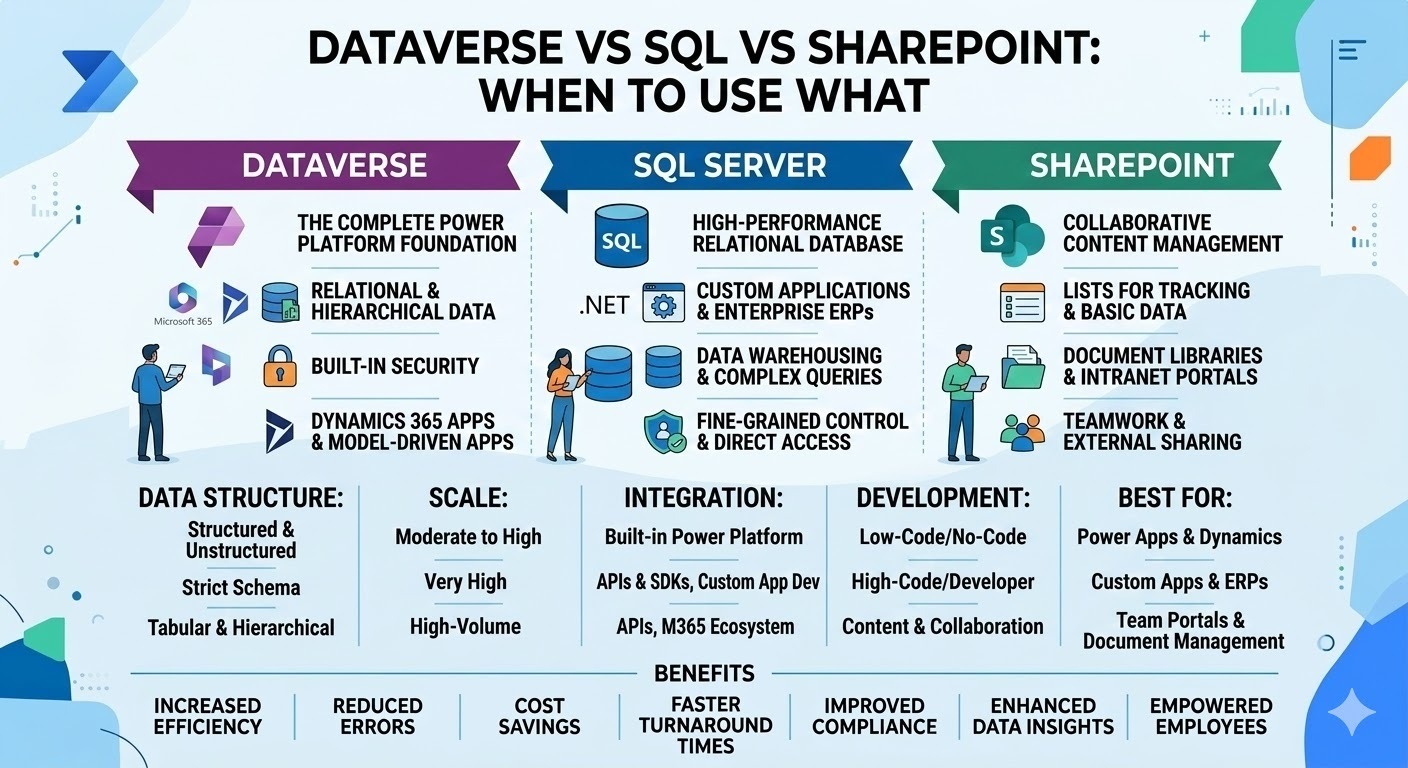
Dataverse is the native data platform for Microsoft Power Platform.
SQL Server / Azure SQL is a traditional relational database system designed for structured, high-volume data.
SharePoint is primarily a collaboration and document management platform with list-based data storage.
Although all three can store data, their design philosophies and ideal use cases differ significantly.
Choosing the correct platform helps organizations:
Improve application performance ⚡
Simplify development processes
Maintain data security and governance
Scale solutions effectively
Reduce long-term maintenance costs
Let’s explore each platform in detail.
What is Microsoft Dataverse?
Microsoft Dataverse is a cloud-based data platform designed specifically for the Microsoft Power Platform, including Power Apps, Power Automate, Power BI, and Copilot Studio.
Dataverse allows developers and citizen developers to securely store and manage business data in a standardized format.
Key Features of Dataverse
Structured relational data storage
Built-in security and role-based access control
Seamless integration with Power Apps and Power Automate
Business rules and logic support
Standard and custom tables
Data validation and relationships
AI and automation integration 🤖
Dataverse acts as the central data layer for Power Platform applications, making it ideal for low-code and enterprise application development.
When to Use Dataverse
Dataverse is the best choice when building business applications using Power Platform tools.
Ideal Scenarios
Power Apps applications
Complex relational data models
Applications requiring business rules
Secure enterprise data management
Workflow automation with Power Automate
Integration with Dynamics 365
For example, if you are building:
A customer service application
Employee onboarding system
Inventory tracking solution
CRM-like internal application
Dataverse provides built-in features that significantly reduce development time.
Organizations using power platform development services often rely on Dataverse as the primary backend because it supports governance, scalability, and security out of the box.
What is SQL Server?
SQL Server (or Azure SQL Database) is Microsoft’s traditional relational database system used for storing and managing structured data at scale.
It is widely used in enterprise environments where performance, scalability, and complex data processing are critical.
Key Features of SQL
High-performance relational database
Advanced querying capabilities
Stored procedures and complex logic
High scalability
Data warehousing capabilities
Integration with enterprise applications
Advanced reporting and analytics 📊
SQL databases are highly flexible and powerful, but they require strong database design and administration skills.
When to Use SQL
SQL is ideal for large-scale enterprise systems and applications requiring high performance.
Ideal Scenarios
Large enterprise applications
Complex transactional systems
Data warehouses
Advanced reporting systems
High-volume data processing
Custom enterprise software
For example, SQL works well for:
ERP systems
Financial systems
Large-scale CRM platforms
E-commerce platforms
Data analytics solutions
SQL is also often used alongside Power Platform when the application must integrate with existing enterprise databases.
What is SharePoint?
SharePoint is primarily a collaboration and document management platform. It allows organizations to store files, manage documents, and create simple data lists.
Although SharePoint lists can store structured data, they are not designed to replace a relational database.
Key Features of SharePoint
Document management
Collaboration tools
SharePoint lists
File version control
Workflow integration
Microsoft 365 integration
Easy access and sharing 📁
SharePoint is widely used for intranets, team collaboration, and document workflows.
When to Use SharePoint
SharePoint works best when the focus is document management and collaboration rather than application data storage.
Ideal Scenarios
Document storage and collaboration
Simple list-based tracking
Internal portals
Project collaboration
Knowledge management systems
Document approval workflows
For example, SharePoint is ideal for:
Document libraries
HR document management
Team project sites
Internal knowledge bases
Company intranet portals
Organizations often work with a SharePoint customization consultant to tailor SharePoint environments, build intranet portals, and integrate workflows.
Dataverse vs SQL vs SharePoint: Key Differences
Understanding the differences between these platforms helps determine the best option for specific scenarios.
- Purpose
Dataverse
Built for Power Platform applications.
SQL
Designed for high-performance enterprise databases.
SharePoint
Designed for document management and collaboration.
- Data Complexity
Dataverse
Supports relational data and business rules.
SQL
Supports complex relational databases and advanced queries.
SharePoint
Best for simple lists and document metadata.
- Integration
Dataverse
Deep integration with Power Platform.
SQL
Integrates with enterprise applications and analytics tools.
SharePoint
Integrates with Microsoft 365 services.
- Security
Dataverse
Role-based security and granular access control.
SQL
Database-level and server-level security.
SharePoint
Permission-based access for files and lists.
- Scalability
Dataverse
Highly scalable for business apps.
SQL
Extremely scalable for enterprise systems.
SharePoint
Limited scalability for structured data.
When to Choose Dataverse Over SQL
Although SQL is powerful, Dataverse offers advantages in Power Platform scenarios.
Choose Dataverse when:
Building Power Apps applications
Creating low-code solutions
Managing relational data with minimal development
Implementing automated workflows
Applying built-in security and governance
Dataverse significantly reduces development complexity because many features—such as relationships, forms, and security—are already built in.
For businesses leveraging power platform development services, Dataverse often becomes the default data platform.
When to Choose SQL Over Dataverse
SQL remains the best option for heavy-duty enterprise data management.
Choose SQL when:
Data volume is extremely large
Complex queries and stored procedures are required
Existing enterprise systems depend on SQL
Custom backend logic is necessary
Advanced reporting and analytics are required
Many organizations run hybrid architectures where SQL handles core enterprise data, while Power Platform applications connect to it.
When to Choose SharePoint Over Dataverse or SQL
SharePoint should be used when the primary focus is content collaboration rather than application data.
Choose SharePoint when:
Managing documents and files
Creating internal collaboration spaces
Tracking simple lists
Building company intranet portals
Implementing document approval workflows
A sharepoint customization consultant can help businesses design intranet solutions, automate document workflows, and integrate SharePoint with Power Automate.
However, SharePoint should not be used as a replacement for a database when applications require complex relationships or large data volumes.
Can These Platforms Work Together?
Yes—and in many organizations, they do.
Microsoft’s ecosystem encourages integration rather than replacement.
A typical enterprise architecture might look like this:
SQL Server stores core enterprise data
Dataverse powers Power Apps applications
SharePoint manages documents and collaboration
For example:
A Power App uses Dataverse for operational data.
Financial records are stored in SQL.
Supporting documents are stored in SharePoint.
Power Automate workflows then connect all three systems, enabling seamless business processes.
This integrated approach allows organizations to leverage the strengths of each platform.
Common Mistakes Organizations Make
Despite the flexibility of these platforms, businesses often make a few common mistakes.
Using SharePoint as a Database
Many teams start storing large amounts of application data in SharePoint lists. Over time, this leads to:
Performance issues
Data limitations
Poor scalability
Overengineering with SQL
Sometimes organizations use SQL for applications that could easily run on Dataverse, increasing development costs unnecessarily.
Ignoring Governance
Without proper governance policies, data can become fragmented across platforms.
Working with experienced power platform development services providers can help organizations avoid these mistakes and design scalable architectures.
Best Practices for Choosing the Right Platform
When deciding between Dataverse, SQL, and SharePoint, consider the following factors:
- Data Complexity
Simple lists → SharePoint
Relational business data → Dataverse
Complex enterprise databases → SQL
- Application Type
Power Platform apps → Dataverse
Enterprise software → SQL
Document collaboration → SharePoint
- Scalability Requirements
Small teams → SharePoint
Business applications → Dataverse
Large enterprise systems → SQL
- Security Needs
Basic permissions → SharePoint
Role-based data security → Dataverse
Advanced database security → SQL
Final Thoughts
Choosing between Dataverse, SQL, and SharePoint is not about determining which platform is “better.” Instead, it’s about selecting the right tool for the right job.
Dataverse excels as the data backbone for Power Platform applications.
SQL remains the gold standard for large-scale enterprise databases.
SharePoint is ideal for document management and team collaboration.
By understanding the strengths of each platform, organizations can design smarter architectures that improve performance, security, and scalability.






Top comments (0)