
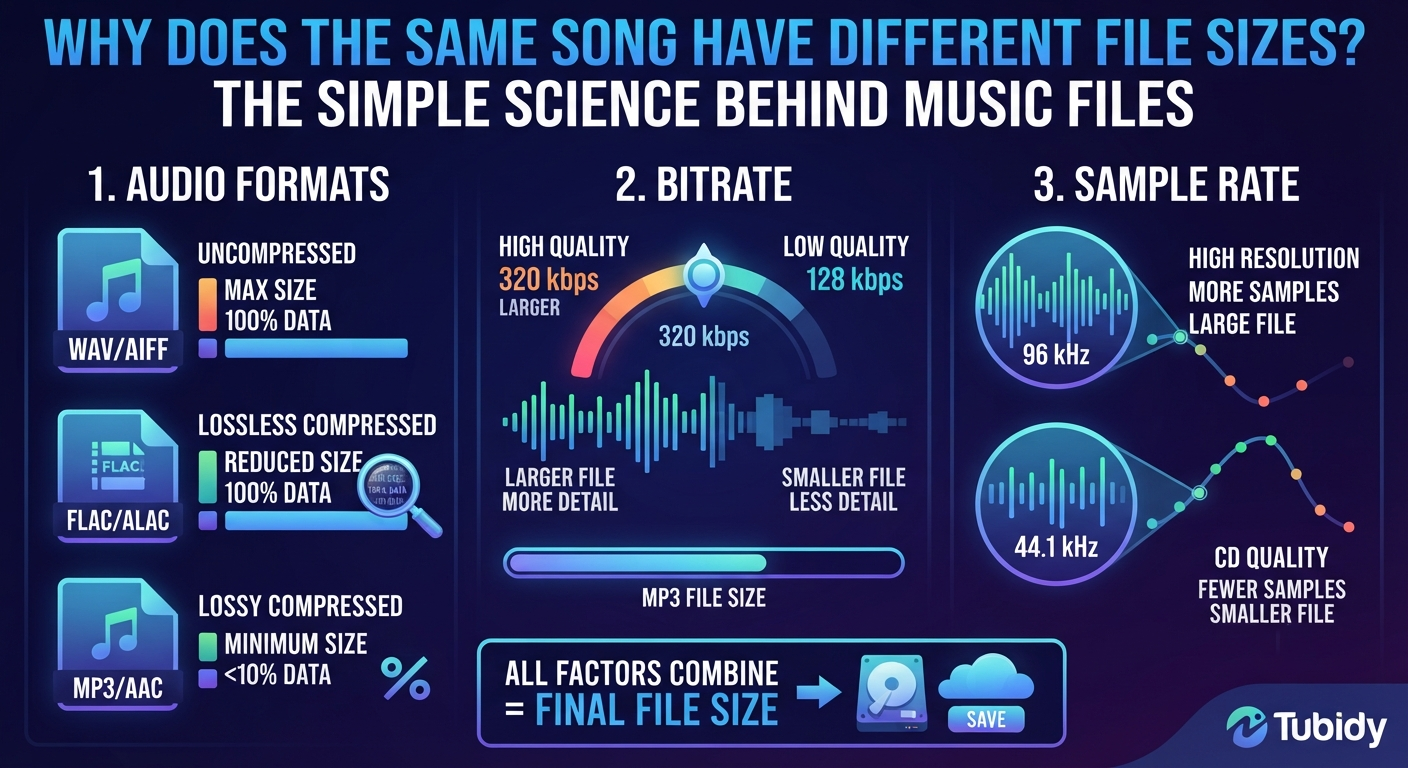

Have you ever downloaded the same song twice and noticed that one file is much larger than the other?
It may seem strange. The song is the same. The artist is the same. The length may even be the same. So why can one audio file take up 3 MB while another takes up 8 MB, 12 MB, or even more?
The answer is hidden in the way digital audio is created, compressed, and stored.
When people use music services or tools such as Tubidy, understanding file size can make it easier to choose audio that fits their device, storage space, and listening habits. Let's break it down in simple terms.
Why Can the Same Song Have Different File Sizes?
The same song can take up different amounts of storage because the audio can be encoded, compressed, and saved using different settings.
Think of it like packing the same clothes into two bags. One bag may use space very efficiently, while the other may leave more room around everything. The contents are still the same, but the amount of space they occupy can be different.
With digital audio, factors such as these can change the final file size:
- Audio format
- Bitrate
- Compression method
- Sample rate
- Number of audio channels
- Length of the song
Quality settings used during encoding
This means two files containing the same song can have noticeably different sizes.
What Is an Audio File?
Before looking at file size, it helps to understand what an audio file actually is.
When music is recorded, the original sound is converted into digital information that computers, phones, tablets, and other devices can understand.
That digital information is then stored in a file.
There are many audio formats, including MP3, AAC, WAV, FLAC, and others. Each format handles audio information differently.
Some formats are designed to reduce file size while keeping the sound reasonably clear. Others preserve much more of the original audio information but require considerably more storage.
This is why file format is one of the first things to consider when comparing two versions of the same song.
Bitrate: One of the Biggest Factors
If you've ever seen options such as 128 kbps, 192 kbps, or 320 kbps, you've seen different bitrate settings.
Bitrate describes how much audio data is processed or stored per second.
In simple terms, a higher bitrate generally means more data is used for the audio.
For example, an MP3 encoded at 320 kbps will normally be larger than the same song encoded at 128 kbps.
Imagine two people describing the same photograph.
One person gives you a quick description using only the main details. Another describes the image with much more information.
The second description takes longer and contains more information. Digital audio works in a somewhat similar way.
Does a Higher Bitrate Always Mean Better Sound?
Not necessarily.
A higher bitrate can preserve more audio information, but the final listening experience also depends on other factors.These can include:
The quality of the original recording
The audio format
How the file was encoded
Your headphones or speakers
Your phone or computer
Your hearing and listening environment
A larger file is therefore not automatically a better file in every situation.
What Is Audio Compression?
Compression is another major reason file sizes can differ.
Uncompressed audio can take up a lot of storage. Compression reduces the amount of data needed to store the audio.
There are two broad types of compression: lossy and lossless.
***Lossy Compression*
Lossy compression removes some audio information to create a smaller file.
MP3 is a well-known example of a lossy audio format.
The goal is to reduce file size while keeping the resulting audio acceptable for everyday listening.
This is one reason MP3 files became so popular for portable music.
Lossless Compression
Lossless compression works differently.
It reduces file size without permanently removing the original audio information.
Formats such as FLAC are commonly associated with lossless audio.
Because more information is retained, lossless files are usually larger than compressed lossy versions of the same recording.
Why Does Song Length Matter?
It sounds obvious, but song length has a direct effect on file size.
A three-minute song contains less audio data than a ten-minute song when the same format and bitrate are used.
For example, if two MP3 files use the same bitrate, the longer track will generally require more storage.
This is why a short song and a long podcast episode can have very different file sizes even when they use the same audio format.
Does the File Format Change the Size?
Yes.
The format used to save an audio file can make a significant difference.
An MP3, WAV, and FLAC version of the same recording can have very different file sizes because they use different methods of storing audio information.
For everyday mobile listening, smaller compressed files can be convenient because they use less storage.
For professional recording and editing, larger or lossless files may be more appropriate because preserving audio information can be important.
The right choice depends on what the listener needs.
Why Sample Rate Also Matters
Another technical factor is sample rate.
Sample rate describes how many times per second an analog sound is measured when it is converted into digital audio.
You'll commonly see values such as 44.1 kHz and 48 kHz.
Higher sample rates can create more data, although sample rate alone does not determine whether one file will sound better than another.
Bit depth, bitrate, compression, format, and the source recording all play different roles.
For normal listeners, there is usually no need to become an audio engineer. But understanding these basic terms makes it easier to understand why files are not all the same size.
Why Does This Matter on a Phone?
File size becomes particularly noticeable on mobile devices.
A phone may contain photos, videos, apps, documents, messages, and music. Storage can disappear quickly.
Suppose you save hundreds of songs. Choosing smaller audio files can leave more space for other content.
This is one reason mobile users often pay attention to:File size
Audio format
Bitrate
Device storage
Offline listening
Compatibility
Mobile-friendly music tools, including Tubidy Mobi, are part of a wider shift toward accessing digital media through smartphones.
What Does a Tubidy MP3 Download Have to Do With File Size?
When someone looks for a Tubidy MP3 download, file size can be an important practical consideration.
An MP3 is designed to store audio in a relatively compact digital format. Depending on the encoding settings, two versions of the same track can still have different sizes.
For example, a shorter MP3 encoded at a lower bitrate may use only a few megabytes, while a longer track or higher-bitrate version can require considerably more space.
Understanding this helps users make more informed choices instead of assuming that every MP3 file will have the same size.
Why Smaller Files Can Be Useful
Smaller audio files have several practical advantages.
They Use Less Storage
If your phone has limited storage, smaller files allow you to keep more songs without filling the device as quickly.
They Can Be Easier to Manage
A collection of smaller files may be easier to organize and move between compatible devices.
They Can Matter When Data Is Limited
When downloading or transferring files, file size can affect how much mobile data is used.
They Are Convenient for Mobile Listening
People who primarily listen through smartphones may prefer a balance between reasonable audio quality and manageable file size.
However, reducing file size too aggressively can also reduce audio quality. Finding the right balance is usually more useful than simply choosing the smallest possible file.
Why Bigger Files Can Also Be Useful
Larger files are not automatically unnecessary.
There are situations where retaining more audio information is important.
Musicians, producers, editors, and other audio professionals may work with larger or lossless files because they need more detailed audio information during production.
For everyday listening, however, many people prefer a practical balance between quality and storage.
It comes down to the purpose of the file.
A Simple Example
Imagine you have a four-minute song.
You create three versions:Version A: 128 kbps MP3
Version B: 192 kbps MP3
Version C: 320 kbps MP3
All three versions contain the same song, but their file sizes will generally be different.
The 128 kbps version will normally be the smallest.
The 192 kbps version will usually sit between the two.
The 320 kbps version will generally be the largest.
The important point is that the song did not become longer. The amount of data used to represent the audio changed.
That is the basic reason the same song can exist in different file sizes.
The Bigger Picture: Convenience vs. Quality
Digital music is often about finding a balance.
A very large file may offer advantages in certain situations, but it also takes more storage. A very small file saves space, but aggressive compression can affect sound quality.
For many everyday listeners, the goal is somewhere in the middle: good enough sound, reasonable file size, and easy playback.
This balance is especially relevant when listening on smartphones, where storage, data use, and device compatibility all matter.
Tools and platforms such as Tubidy sit within this broader digital music environment, where people want convenient ways to access and manage audio across their everyday devices.
Final Thoughts
The next time you see two files containing the same song but notice that their sizes are different, there is no mystery behind it.
The difference usually comes down to factors such as bitrate, compression, audio format, sample rate, song length, and encoding settings.
A small MP3 file is not simply a “shorter” version of a song. It is a different way of representing the same audio using less or more digital information.
Understanding these basics can make digital music much easier to navigate. Whether you're managing storage on your phone, comparing audio files, or exploring options such as a Tubidy MP3 download, knowing what affects file size helps you make more practical choices.
The goal is not always to find the biggest file or the smallest file. It is to find the format and quality that make sense for how you actually listen to music.
Frequently Asked Questions
Why are two MP3 files of the same song different sizes?
They may use different bitrates, encoding settings, compression methods, or source files. Song length can also affect the final size.
Does a higher bitrate make an MP3 file larger?
Generally, yes. A higher bitrate uses more data per second, so the resulting file will usually be larger.
Is a smaller MP3 always lower quality?
Not necessarily. File size depends on several factors, including format, bitrate, duration, and encoding. However, stronger lossy compression can reduce audio quality.
What is Tubidy Mobi?
Tubidy Mobi refers to the mobile-oriented side of the Tubidy experience, fitting into the broader way people access digital media through smartphones.
What should I consider before choosing an audio file?
Consider the audio format, bitrate, file size, device compatibility, available storage, and how important audio quality is for your particular listening needs.





Top comments (0)