

AI dance generation stopped being a novelty when creators started asking a sharper question: can this character perform that exact short-form move without manual rigging? This guide shows a practical way to transfer dance motion from a reference clip to an original or licensed character image while protecting timing, identity, and rights. As of June 1, 2026, Kling AI describes Motion Control as a workflow built around a static character image plus a reference video, and Kuaishou's February 5, 2026 Kling 3.0 launch emphasized stronger consistency and up to 15-second video generation.
The useful version is not "make my character dance" as a vague prompt. It is "make my character follow this motion."
Why AI dance generation is taking off now
Short-form dance content has always rewarded speed. A trend starts moving on TikTok, Reels, or Shorts, and the useful window can be measured in days, not months.
Traditional animation is too slow for that tempo. Motion capture can be accurate, but it still asks for cameras, cleanup, retargeting, and a character rig. Prompt-only AI video is fast, but the dance is usually approximate. The body may move, yet the beat, footwork, arm timing, and camera framing drift away from the reference.
Motion-control AI changes the production question. Instead of asking the model to invent choreography from text, the creator gives it a concrete motion example.
That shift is visible in creator communities. A recent r/KlingAI_Videos post described cloning a viral TikTok-style short onto a different AI character in under 5 minutes, with attention on pose transfer, background consistency, and character identity. Another r/klingO1 post framed the "Vibe Dance" trend as a simple workflow: start with a clear photo, apply motion control, and turn it into a short dance-style clip for TikTok, Reels, or similar platforms.
The reactions also reveal the quality bar. In an earlier r/klingO1 dance thread, commenters were not only asking whether the clip looked cool. They were asking how the creator made the character follow a specific choreography and sync with the song. That is the real demand.
The new workflow: reference motion beats prompt guessing
For AI dance generation, text prompts are useful for style, mood, clothing, lighting, and camera intent. They are weak at preserving precise body timing.
If the goal is a recognizable dance move, the reference video should carry the motion. The prompt should support it.
| Workflow | What you provide | Best for | Common failure |
|---|---|---|---|
| Prompt-only video | Text prompt | Loose dance ideas, mood boards, quick concepts | The model invents the wrong choreography |
| Image-to-video | Character image plus prompt | Subtle character movement | Body motion may be generic |
| Reference motion video | Character image plus dance clip | Viral moves, gestures, beat-driven action | Needs a clean source clip and stable subject image |
| Manual animation | Rigged character, keyframes, editing | Production-grade control | Slower and more expensive |
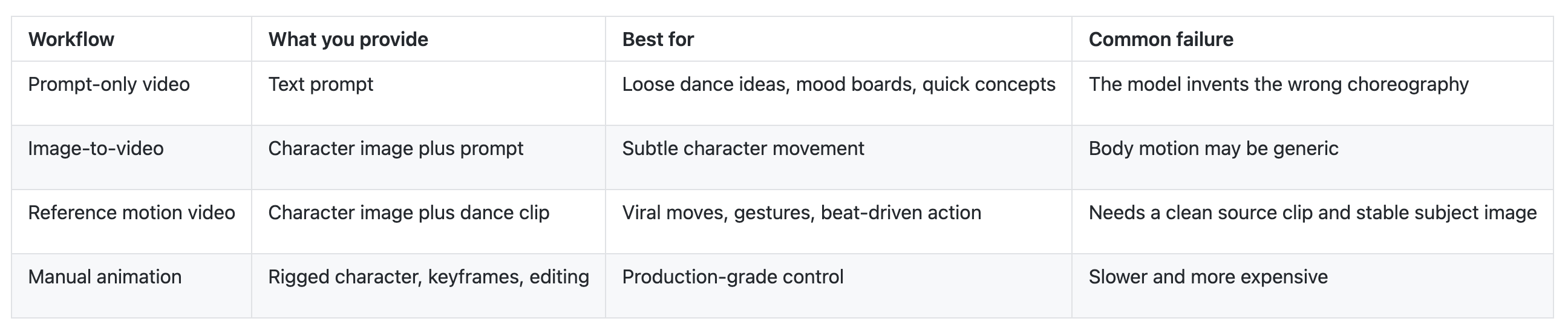
Kling's official Motion Control page explains the core pattern clearly: upload a character image and a motion reference video, then generate a video that follows the reference movement. Kuaishou's Kling 3.0 announcement also points to a broader industry move toward reference-based control, including multiple image references, reference-to-video, in-video editing, and stronger visual coherence across frames.
For creators, that means the job is no longer only prompt writing. The job is choosing clean inputs.
What makes a dance reference work
The best reference clip is not always the most viral clip. It is the clip with the cleanest motion signal.
Use this checklist before you upload:
- Length: 3-10 seconds is enough for most social dance tests. Longer clips increase the chance of drift.
- Visibility: The full body should be visible if the dance depends on footwork, knees, or hip movement.
- Camera: A steady or simple camera move is easier to transfer than fast zooms, cuts, or shaky handheld footage.
- Occlusion: Avoid clips where arms pass behind objects, other people cross the frame, or the body is hidden.
- Lighting: Strong contrast helps the model understand limb position.
- Rights: Use your own recording, licensed footage, or a reference you have permission to use.
That last point matters. "Transfer a viral TikTok move" should not mean copying another creator's exact video or making a real person appear to perform an action they did not consent to. A safer workflow is to record your own version of a trend, use a licensed dance reference, or create a simple motion reference with a collaborator.
This is where the example starts to look usable.
How to transfer a viral TikTok move to a character
The workflow below is designed for a creator, social team, virtual influencer operator, or indie brand that needs one short vertical clip quickly.
1. Pick a character you are allowed to use
Start with an original character, a brand mascot, a licensed 3D avatar, a synthetic influencer, or character art you own. Avoid celebrities, private people, copyrighted entertainment characters, and recognizable fan art unless you have permission.
For the image, use:
- One clear full-body or three-quarter-body view
- Visible face and outfit details
- No extra people in the frame
- A simple background
- A pose that roughly matches the dance starting pose
If the reference starts with arms crossed and your character image has arms hidden behind the body, expect artifacts.
2. Create or source a clean dance reference
Record a 5-8 second clip of the move. If you are reacting to a TikTok trend, make your own reference performance instead of ripping another creator's upload.
Keep the dancer centered. Use a plain background. Film vertical if the final clip is vertical. If the move includes a sharp arm swing, foot tap, or shoulder hit, make sure those body parts stay visible.
3. Upload the character and reference motion
Open Motion Control AI, upload the character image, then add the reference motion video. If you are still testing the concept, start with a short clip before spending time on a polished edit.
Keep the prompt short and specific:
Use the uploaded character as the main subject. Follow the dance motion from the reference video. Preserve the character's face, outfit, body proportions, colors, and silhouette. Keep the background stable. Generate a short vertical social video.
For a stylized character, add only the essential style guardrail:
Keep the character in the same 3D mascot style. Do not redesign the face, clothing, or color palette. Follow the reference dance timing closely.
4. Generate one test before polishing
Do not judge the workflow from a heavily edited final cut. Run one first pass and score it honestly.
Check these 5 points:
- Does the character follow the main beats of the dance?
- Do the arms, legs, hands, and torso remain believable?
- Does the face stay recognizable through turns and motion blur?
- Does the outfit keep its shape, colors, and important details?
- Does the background stay stable enough for a social post?
If the first pass fails, fix the input before adding more prompt text. A cleaner reference video usually helps more than a longer prompt.
5. Edit for the feed
Once the motion is usable, trim the video to the strongest 3-7 seconds. Add captions, beat cuts, a clean loop point, and safe-zone spacing for platform UI.
For TikTok/Reels-style clips, the first half-second matters. Start on a visible pose change, not a slow setup. If the generated clip has a tiny glitch near the end, cut before it rather than trying to explain it away.
Quality scorecard for AI dance videos
Use a small scorecard before publishing. It prevents the common trap of posting a clip because the character looks good in the first frame.
| Criterion | Good result | Warning sign |
|---|---|---|
| Motion adherence | The biggest dance beats match the reference | The character performs a generic dance |
| Body stability | Arms, legs, shoulders, and hips stay readable | Extra joints, melted hands, foot sliding |
| Identity consistency | Face and outfit remain recognizable | The face changes during turns |
| Timing | Movement feels close to the beat | Motion lags or accelerates randomly |
| Camera and background | Scene stays stable enough for a feed clip | Background rewrites itself frame to frame |
| Editability | A 3-7 second section is clean | Every section needs repair |
A clip does not need to be perfect to work on social. It needs one clean loop, a clear character, and a motion viewers understand immediately.
Common mistakes that make AI dance clips look fake
Using a reference with hidden feet. If the trend depends on footwork, the model needs to see the feet. Crop too tight and the output will guess.
Starting from a weak character image. Blurry faces, complex backgrounds, cropped limbs, and side views make identity preservation harder.
Overloading the prompt. "Cyberpunk cinematic ultra-realistic viral dance music video with dynamic camera and dramatic lighting" gives the model too many ways to rewrite the shot. Keep the motion task first.
Expecting one model pass to solve rhythm. If the dance must hit exact audio beats, plan a light editing pass. Generate the motion first, then trim and align the best section to the sound.
Ignoring rights. The safest viral workflow is trend-inspired, not person-copying. Use original characters and references you can legally reuse.
Where MotionControlAI fits
MotionControlAI is built around the exact workflow AI dance creators are moving toward: upload a character image, provide a reference motion video, and generate a controlled character video.
Use Motion Control AI when the movement matters more than a prompt. Use Reference to Video when preserving the subject is the priority. Use the AI Video Generator when you are still exploring the concept before choosing a motion reference.
For dance clips, the practical advantage is simple: the reference video carries the choreography. That makes it easier to test a brand mascot, virtual influencer, anime-style character, product character, or creator avatar against the same movement without rebuilding the animation from scratch.
If your goal is one short social clip this week, start with a single original character image and a 5-second reference dance. Generate one version, score it with the checklist above, then improve the weakest input.
Rights-safe examples to try
Here are three clean ways to test AI dance generation without leaning on risky source material:
| Use case | Character input | Reference motion | Output idea |
|---|---|---|---|
| Brand mascot | Original mascot render | Team member performs a simple 5-second move | Mascot joins a launch-day dance trend |
| Virtual influencer | Licensed synthetic avatar image | Creator records a short arm-and-shoulder routine | Avatar posts a quick Reels loop |
| Game or comic character | Owned character art | Original dance reference filmed in studio | Character teaser for a community update |
The important pattern is ownership. You can be fast and still keep your source materials clean.
FAQ
What is AI dance generation?
AI dance generation is the process of creating a video where a person, avatar, mascot, or character performs dance-like motion. In a motion-control workflow, the creator supplies both a character image and a reference dance video.
Can I transfer a TikTok dance to any character?
Technically, motion-control tools can transfer dance motion to many character types, including human, anime, mascot, and 3D-style subjects. Practically, use characters and reference clips you own or have permission to use.
Is a prompt enough to make a character follow a specific dance?
Usually no. A prompt can describe the vibe, but a reference motion video is much better for specific choreography, timing, body direction, and gesture transfer.
How long should the dance reference be?
For a first test, use 3-10 seconds. Short clips are easier to control, review, trim, and loop for social platforms.
Why does my AI dance video flicker or change the face?
The most common causes are a weak character image, fast body turns, hidden limbs, noisy backgrounds, or a reference clip that asks the model to infer too much motion. Use a clearer character image and a cleaner reference before changing the prompt.
Make the first version small
The fastest path is not a full music video. It is one character, one clean motion reference, one 5-second clip, and one honest scorecard.
Open Motion Control AI, upload a character image, add a short reference dance, and generate a first pass you can actually judge. If the character stays recognizable and the movement reads in the first second, you have the foundation for a repeatable AI dance workflow.




Top comments (0)