


YouTube thumbnails are often the first thing viewers notice before clicking a video. A well-designed thumbnail can communicate a video's topic, attract attention, and improve click-through rates.
For designers, content creators, educators, marketers, and researchers, downloading thumbnails is useful for inspiration, presentations, competitor analysis, or studying visual trends.
If you've searched for a 4k thumbnail downloader, you're probably looking for the highest-quality version of a YouTube thumbnail without losing sharpness.
This guide explains how YouTube thumbnails work, the available resolutions, how to download them safely, and what to keep in mind before reusing them.
What is a 4K thumbnail downloader?

A 4K thumbnail downloader is a tool or method that retrieves the highest-resolution thumbnail associated with a YouTube video.
It's important to understand that the downloader does not create a 4K image. Instead, it accesses the maximum-resolution thumbnail uploaded by the video's creator.
If the creator uploaded a high-resolution thumbnail, you'll receive that version. If not, the highest available image may be Full HD or another lower resolution.
In simple terms, a thumbnail downloader gives you access to the best version that YouTube stores for that particular video.
Why download YouTube thumbnails?
People download YouTube thumbnails for many legitimate reasons.
- Study successful thumbnail design
- Analyze competitor branding
- Create educational presentations
- Build case studies
- Save design inspiration
- Compare visual trends across niches
- Review color combinations and typography
- Archive reference material
Many designers maintain collections of effective thumbnails to better understand what attracts viewers in different content categories.
How YouTube thumbnail resolution works

Every YouTube video can have multiple thumbnail sizes. Depending on the uploaded image and YouTube processing, different versions may be available.
| Thumbnail Type | Typical Resolution | Best Use |
|---|---|---|
| Default | 120 × 90 | Preview |
| Medium | 320 × 180 | Embedded content |
| High Quality | 480 × 360 | Standard viewing |
| Standard Definition | 640 × 480 | Older uploads |
| Maximum Resolution | Up to 1280 × 720 or higher when available | Design reference and analysis |
Although people often refer to these as 4K thumbnails, YouTube's maximum thumbnail is usually 1280 × 720 pixels.
Some creators upload extremely detailed source artwork, which leads people to describe them as "4K quality," even though the displayed thumbnail dimensions are different.
Benefits of downloading the highest-quality thumbnail

Using the maximum available resolution provides several advantages.
Better visual analysis
Small images hide important design details. A high-resolution thumbnail lets you inspect:
- Font choices
- Text placement
- Background separation
- Facial expressions
- Color grading
- Lighting
- Composition
Easier presentations
If you're teaching YouTube marketing or digital design, higher-resolution images remain sharp when displayed on large screens.
Better inspiration
Graphic designers often zoom into thumbnails to study design techniques. A higher-resolution image preserves those small details.
How to manually download a YouTube thumbnail
You don't always need special software.
A simple process works for many public videos.
Step 1
Copy the YouTube video's URL.
Step 2
Extract the video ID.
For example:
https://www.youtube.com/watch?v=ABCDEFGHIJK
The video ID is:
ABCDEFGHIJK
Step 3
Use the thumbnail URL format:
https://img.youtube.com/vi/VIDEO_ID/maxresdefault.jpg
Replace VIDEO_ID with the actual ID.
Example:
https://img.youtube.com/vi/ABCDEFGHIJK/maxresdefault.jpg
If the maximum-resolution image exists, it will load automatically.
If it doesn't, YouTube may return a lower-resolution version or no image.
Using online thumbnail downloaders
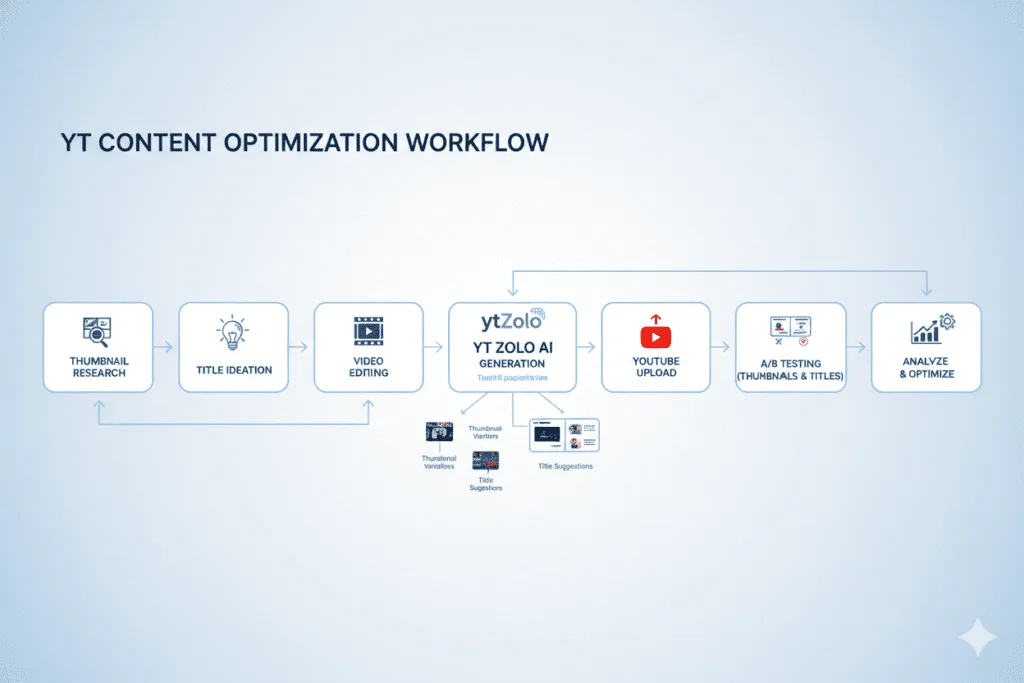
Many creators prefer online tools because they eliminate manual URL editing.
These tools typically require only:
- Video URL
- One click
- Resolution selection
- Download
If you're looking for a detailed explanation of how these tools work, this guide on 4K Thumbnail Downloader from ytzolo provides additional technical insights into thumbnail retrieval methods and supported image resolution.
Manual method vs online downloader

| Feature | Manual Method | Online Tool |
|---|---|---|
| Easy for beginners | No | Yes |
| Requires URL editing | Yes | No |
| Downloads highest available image | Yes | Yes |
| Works on mobile | Limited | Usually |
| Time required | Moderate | Fast |
Both methods ultimately retrieve the thumbnail stored by YouTube.
Common mistakes people make
Assuming every thumbnail is 4K
Not every video includes a maximum-resolution thumbnail. Older uploads may only provide lower-resolution images.
Believing downloaders improve image quality
A downloader cannot increase image resolution.
It simply retrieves the highest version already available.
Ignoring copyright
Downloading an image does not automatically grant permission to reuse it commercially.
Always understand ownership before republishing someone else's work.
Using compressed screenshots
Taking a screenshot of YouTube usually results in lower quality than downloading the original thumbnail.

Can you reuse downloaded thumbnails?
This depends on how you plan to use them.
Generally acceptable uses include:
- Education
- Commentary
- Research
- Personal inspiration
- Design analysis
Commercial reuse is a different matter.
Using someone else's thumbnail in advertising, merchandise, or commercial products may require permission from the original creator.
Always review copyright rules in your country before republishing images.
Tips for studying successful thumbnails

Instead of copying popular thumbnails, analyze the design decisions behind them.
Pay attention to:
- Subject positioning
- Background simplicity
- Color contrast
- Emotional expressions
- Minimal text
- Readability on mobile
- Brand consistency
- Use of negative space
Over time, you'll begin to recognize recurring patterns used by high-performing creators.
Frequently Asked Questions
What is a 4K thumbnail downloader?
It is a tool or method that downloads the highest-resolution thumbnail available for a YouTube video.
Are all YouTube thumbnails available in 4K?
No. The available resolution depends on what the creator uploaded and what YouTube stores.
Can I download thumbnails without installing software?
Yes. You can use YouTube's image URL structure or an online thumbnail downloader.
Does downloading a thumbnail reduce its quality?
No. The downloaded image retains the quality stored on YouTube.
Can I use downloaded thumbnails in my own videos?
You should obtain permission before reusing someone else's thumbnail for commercial purposes. Downloading an image does not transfer copyright ownership.
Final thoughts
A 4k thumbnail downloader is useful for creators, educators, researchers, and designers who want to study YouTube visuals in the highest available quality. Whether you choose the manual URL method or an online downloader, understanding how YouTube stores thumbnails helps you access the best possible image without unnecessary complexity.
Remember that downloading a thumbnail is only one part of the process. Responsible use, respect for copyright, and learning from successful design patterns are what truly make these images valuable. By focusing on analysis rather than imitation, you can develop stronger visual skills and create thumbnails that are both original and effective.






Top comments (0)