
The AI content creation industry continues to evolve beyond text and images. Audio has become one of the fastest-growing areas, powering YouTube videos, podcasts, audiobooks, online courses, games, advertisements, and multilingual content.
To address this growing demand, ytZolo has introduced AI Audio Studio, a new collection of AI-powered audio creation tools designed to simplify voice generation, music creation, dubbing, speech enhancement, and transcript synchronization.
Instead of relying on multiple software platforms, creators can now access several professional audio workflows from a single dashboard.
Let's explore everything included in the new release.
What is AI Audio Studio?
AI Audio Studio is a collection of intelligent audio generation and editing tools built to automate many tasks that previously required expensive software or professional audio engineers.
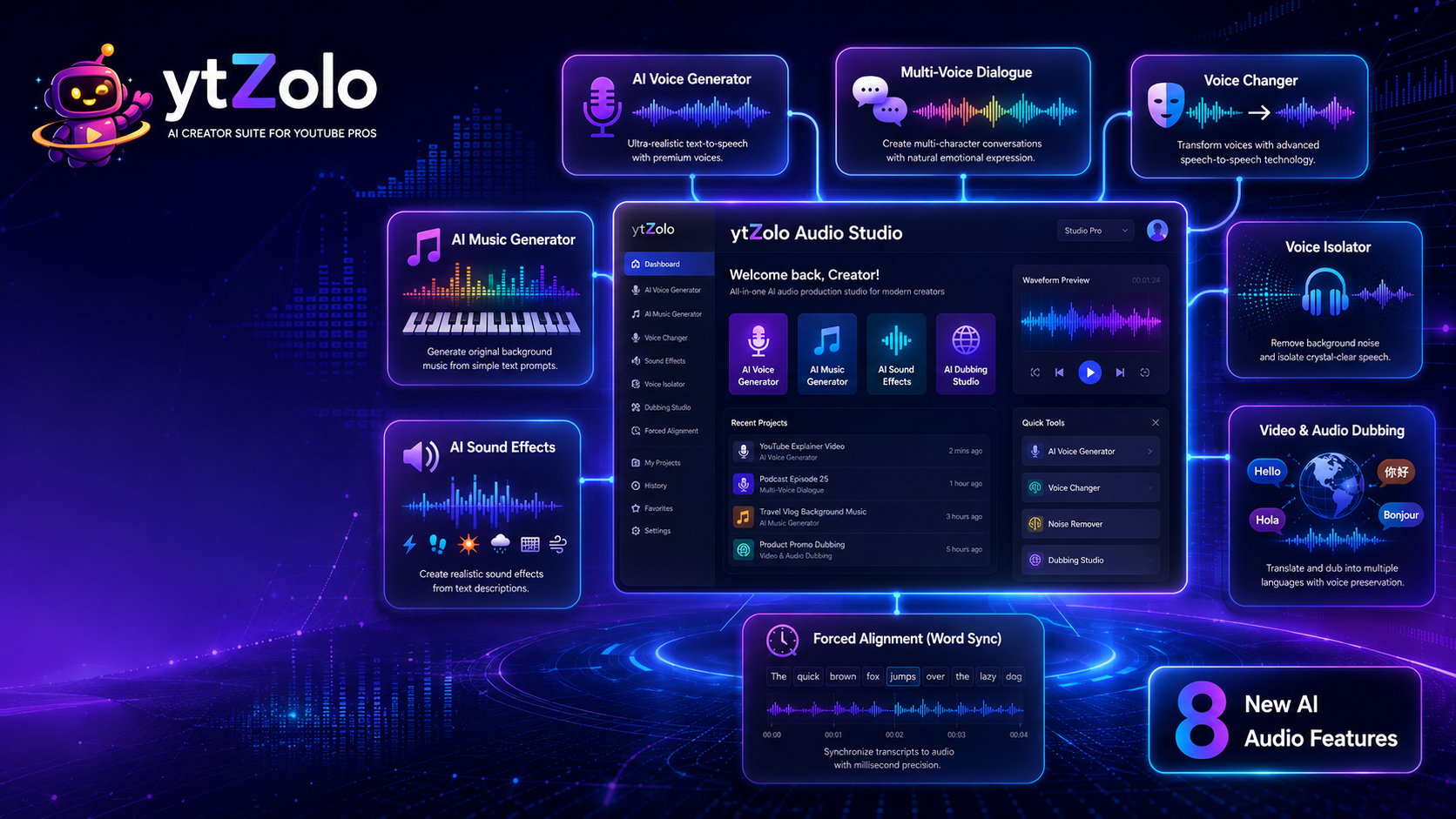
The newly released studios include:
- Voice Generator
- Multi-Voice Dialogue
- Voice Changer
- AI Music Generator
- AI Sound Effects
- Voice Isolator
- Video & Audio Dubbing
- Forced Alignment These tools are suitable for YouTube creators, educators, marketers, developers, podcast producers, filmmakers, agencies, and businesses producing multilingual content.
1. Voice Generator
One of the biggest additions is the new AI Voice Generator.
This tool converts plain text into natural-sounding speech using premium AI voices designed to sound realistic instead of robotic.
Key capabilities
- Ultra-realistic Text-to-Speech
- Premium voice library
- Natural pronunciation
- Human-like pacing
- Professional narration quality
- Multiple speaking styles
Creators can use it for:
- YouTube narration
- Audiobooks
- Explainer videos
- E-learning
- Podcasts
- Product demonstrations
- Corporate training
Rather than recording every script manually, users can instantly transform written content into polished voiceovers.
2. Multi-Voice Dialogue
Creating conversations between multiple speakers normally requires several voice actors.
The new Multi-Voice Dialogue Studio automates this process.
Users simply upload a script, assign speakers, and the AI generates realistic conversations with emotional expression.
Features
- Multiple speakers
- Emotional voice tags
- Natural conversation flow
- Character switching
- Realistic pacing
- Dynamic dialogue generation
This is especially useful for:
- Storytelling
- Audio dramas
- Animated videos
- Educational scenarios
- Role-play simulations
- Marketing videos
Instead of editing dozens of audio tracks manually, creators can generate complete conversations in minutes.
3. Voice Changer
The new Voice Changer Studio performs speech-to-speech transformation.
Rather than generating a completely synthetic voice, it transforms existing recordings into a different voice profile while preserving clarity and expression.
Possible applications include:
- Character voices
- Content localization
- Brand voice consistency
- Entertainment
- Creative projects
- Voice styling
The result is cleaner and more natural than traditional pitch-shifting software.
4. AI Music Generator
Background music often requires licensing, subscriptions, or music production experience.
The AI Music Generator removes these barriers by creating original music directly from text prompts.
Users simply describe the desired mood or style.
Examples include:
- Cinematic
- Upbeat
- Corporate
- Relaxing
- Emotional
- Electronic
- Gaming
- Ambient
The AI then generates matching background tracks suitable for videos, podcasts, advertisements, presentations, and social media content.
This significantly speeds up production while reducing dependency on stock music libraries.
5. AI Sound Effects
The new AI Sound Effects Generator creates realistic audio effects using natural language prompts.
Instead of searching through thousands of sound files, users describe the sound they need.
Examples include:
- Rain
- Thunder
- Keyboard typing
- Crowd applause
- Footsteps
- Animal sounds
- Explosions
- Wind
- Ocean waves
- Mechanical noises
The AI generates custom sound effects that can be used in:
- Games
- Videos
- Podcasts
- Short films
- Animations
- Commercials
This dramatically reduces time spent browsing stock audio libraries.
6. Voice Isolator
Poor recording quality remains one of the biggest challenges for creators.
The new Voice Isolator focuses on extracting clean speech while removing unwanted background noise.
It can help eliminate:
- Background conversations
- Traffic
- Wind noise
- Echo
- Room reverb
- Fan noise
- Environmental distractions
The output is cleaner, more professional speech that requires less manual editing.
This tool is valuable for podcasters, YouTubers, interview recordings, online courses, and remote meetings.
7. Video & Audio Dubbing
Localization has become increasingly important as creators reach international audiences.
The new Video & Audio Dubbing Studio helps translate content into multiple languages while preserving the characteristics of the original speaker.
Core capabilities include:
- Multilingual translation
- Voice preservation
- Natural speech synthesis
- Cross-language dubbing
- Video localization
- Audio localization
This enables creators to expand their reach without recording every language manually.
Businesses, educators, and global content creators can significantly reduce localization costs while maintaining a consistent viewing experience.
8. Forced Alignment (Word Sync)
Accurate transcript synchronization is essential for subtitles, captions, accessibility, and post-production editing.
The new Forced Alignment Studio performs millisecond-level synchronization between audio and text.
Features include:
- Word-level timing
- Transcript alignment
- Subtitle synchronization
- Caption generation
- Speech timing
- Audio-text matching
Applications include:
- Video subtitles
- Podcast transcripts
- Speech analytics
- Accessibility
- Language learning
- Audio editing
Precise synchronization makes post-production significantly more efficient.
Why This Release Matters
Many creators currently rely on separate platforms for:
- Text-to-Speech
- AI Music
- Sound Effects
- Noise Removal
- Dubbing
- Voice Conversion
- Transcript Alignment
Managing multiple subscriptions increases costs and complicates production workflows.
By bringing these capabilities together inside a single Audio Studio, creators can move from script to finished audio more efficiently.
Who Can Benefit?
The new Audio Studio is useful for:
- YouTube creators
- Podcast producers
- Marketing agencies
- Content creators
- Educators
- Game developers
- Course creators
- SaaS companies
- Video editors
- Businesses creating multilingual content
Final Thoughts
With the launch of AI Audio Studio, ytZolo expands beyond traditional creator productivity into AI-powered audio production.
The release introduces eight dedicated studios covering speech generation, dialogue creation, voice transformation, music composition, sound effect generation, speech cleanup, multilingual dubbing, and transcript synchronization.
As AI continues to reshape content creation, integrated audio workflows like these can help reduce production time while making professional-quality audio more accessible to creators of all sizes.
FAQ
What is AI Audio Studio?
AI Audio Studio is a collection of AI-powered tools for voice generation, music creation, dubbing, speech enhancement, sound effects, and transcript synchronization.
Can AI generate realistic voices?
Yes. Modern AI voice generators can produce natural-sounding speech with human-like pacing, pronunciation, and emotional expression.
What is AI dubbing?
AI dubbing translates spoken content into multiple languages while preserving the speaker's original vocal characteristics.
What is Forced Alignment?
Forced Alignment synchronizes transcripts with recorded speech, assigning precise timestamps to individual words for captions and subtitles.
Which industries can use AI Audio Studio?
It can be used by YouTube creators, podcasters, educators, businesses, developers, marketers, filmmakers, and localization teams.




Top comments (0)