

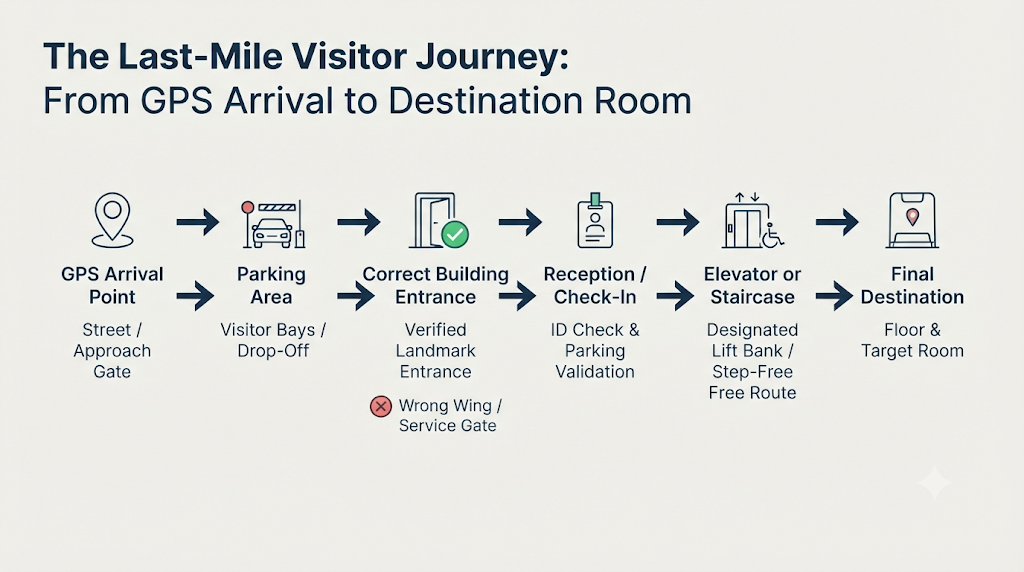
Standard navigation apps reliably bring visitors to your street address, yet that final stretch between the main road and your reception desk often causes unnecessary friction. In business parks, multi-wing hospitals, hotels, and large event venues, last mile navigation for businesses is a persistent operational challenge. Visitors frequently turn into the wrong driveway, circle full staff lots, enter through an unstaffed side door, or take an elevator bank that does not serve your floor.
While enterprise campuses sometimes deploy dedicated visitor wayfinding software, most offices and venues simply need concise, step-by-step guidance that guests can read quickly on a mobile screen. Drafting clear digital visitor arrival instructions from scratch—and tailoring them for drivers, pedestrians, delivery couriers, or wheelchair users—can be time-consuming. By feeding verified location facts into a structured AI prompt, operations teams and venue managers can turn rough notes into accurate, easy-to-follow arrival guides in minutes.
The Reusable AI Prompt
Copy the complete template below, fill in the bracketed placeholders with your verified site details, and paste it into your preferred AI assistant.
Act as an operations specialist and technical writer. Convert the verified location information below into clear, scannable visitor arrival instructions.

### Verified Location Inputs
- **Business / Venue Name:** [Insert official business or venue name]
- **Complete Address & Exact Entrance Coordinates:** [Insert street address and latitude/longitude pin for the visitor entrance]
- **Visitor Type & Purpose of Visit:** [e.g., First-time client, conference attendee, job applicant, courier]
- **Arrival Method:** [Driving, walking, public transport, or taxi/rideshare]
- **Parking Location, Access Gate & Parking Rules:** [Insert lot name, gate number, entry procedure, and validation rules]
- **Building Entrance & Visible Landmarks:** [Insert entrance name, canopy/door color, nearby street corner, or landmark]
- **Reception & Security Check-In Process:** [Insert desk location, ID requirements, and badge issuance]
- **Elevator, Floor & Room Information:** [Insert elevator bank name, floor number, corridor turns, and room/hall name]
- **Accessibility & Step-Free Access:** [Insert accessible parking bays, ramp locations, and step-free lift routes]
- **Delivery-Specific Instructions (if applicable):** [Insert loading bay gate or courier drop-off rules, or write "Not applicable"]
- **On-Site Contact Information:** [Insert reception or helpdesk phone number]
- **Temporary Closures, Construction or Access Restrictions:** [Insert active gate closures, roadworks, or write "None"]

### Strict Output Rules
1. **Use chronological, numbered steps** following the visitor journey: Arrival & Parking → Building Entrance → Reception / Check-In → Final Destination.
2. **Separate directions by arrival method** when both driving and non-driving options apply.
3. **Write short, clear, mobile-friendly sentences.** Keep each step focused on one concrete action.
4. **Highlight important landmarks and entrance names** in **bold** so visitors can confirm they are on the right path.
5. **Present accessibility information separately** in a dedicated callout section when step-free details are supplied.
6. **Never invent or assume details.** Do not fabricate addresses, routes, landmarks, gate numbers, distances, or walking times.
7. **Distinguish confirmed facts from unverified gaps.** At the end, provide a brief "Missing or Conflicting Details to Verify" checklist flagging anything unclear or omitted.
Practical Demonstration
To see how the prompt behaves with realistic inputs, imagine an operations coordinator preparing parking and entrance directions for visitors attending a seminar. (All names, addresses, coordinates, and phone numbers below are completely fictional examples created for demonstration.)
- Business / Venue Name: Northbridge Innovation Hub (Fictional Example)
- Complete Address & Exact Entrance Coordinates: 850 Riverview Avenue, Tower B (Fictional Coordinates: 00.0000° N, 00.0000° E)
- Visitor Type & Purpose of Visit: External seminar attendees
- Arrival Method: Driving and taxi/rideshare
- Parking Location, Access Gate & Parking Rules: Underground Visitor Parking P1 via West Gate on Elm Lane. Collect an entry token at the barrier; validate at the Tower B reception desk.
- Building Entrance & Visible Landmarks: Enter through the Tower B South Glass Lobby directly behind the stone water wall. Do not use the Tower A revolving doors.
- Reception & Security Check-In Process: Check in at the Tower B Ground Floor Security Desk with government photo ID to collect a visitor pass.
- Elevator, Floor & Room Information: Take the Central Express Elevators to Level 4, turn right out of the lift lobby, and enter Seminar Room 402.
- Accessibility & Step-Free Access: Step-free route from Parking P1 via the Central Express Elevators. Designated accessible bays are next to the P1 elevator vestibule.
- Delivery-Specific Instructions (if applicable): Not applicable
- On-Site Contact Information: Reception Helpdesk at [Fictional Phone: 000-000-0000]
- Temporary Closures, Construction or Access Restrictions: Riverview Avenue main driveway is closed for utility work; all vehicles must enter via Elm Lane.
Sample AI-Generated Output
When run with the fictional inputs above, the prompt produces a clean, structured guide:
Arrival Instructions: Northbridge Innovation Hub (Seminar Attendees)
Important Notice: The main Riverview Avenue driveway is closed for utility work. All vehicles must approach via Elm Lane.
By Car (Driving & Parking)
- Enter West Gate on Elm Lane and follow the ramp down to Underground Visitor Parking P1.
- Collect a parking token at the barrier gate and keep it for validation at reception.
By Taxi or Rideshare
- Ask your driver to drop you at the Elm Lane pedestrian drop-off zone near the plaza.
Building Entrance & Check-In
- Walk toward the courtyard plaza and locate the stone water wall.
- Enter through the Tower B South Glass Lobby directly behind the water wall. (Ignore the Tower A revolving doors.)
- Present a valid government photo ID at the Tower B Ground Floor Security Desk to receive your visitor pass and validate your parking token. Reaching Seminar Room 402
- Proceed to the Central Express Elevators and take the lift to Level 4.
- Exit the lift lobby, turn right, and follow the corridor to Seminar Room 402. Accessibility & Step-Free Guidance
- Designated accessible parking bays are located directly beside the Parking P1 elevator vestibule.
- The Central Express Elevators provide step-free access from Parking P1 to the Ground Floor Security Desk and Level 4.
On-Site Assistance: Call the Reception Helpdesk at [Fictional Phone: 000-000-0000].
Missing or Conflicting Details to Verify:
- Confirm whether step-free access is available from the Elm Lane taxi drop-off zone to the Tower B South Glass Lobby.
- Clarify whether visitor parking validation covers the entire seminar duration or has a time cap.
Improving Prompt Accuracy
Because language models cannot see your physical property, output quality depends entirely on input precision:
- Supply entrance photographs: When using a multimodal AI tool, attach clear photos of your parking gate, street signage, and main doorway so the model can reference exact visual cues.
- Provide exact entrance pins: Main street addresses often drop map pins at the center of a large plot. Paste the exact coordinates of the visitor gate or drop-off bay.
- Call out common wrong turns: Explicitly list neighbouring towers, closed gates, or wrong elevator banks so the prompt warns guests before they make a mistake.
- Include floor-level and accessibility notes: Mention turn directions, ramp locations, and lift restrictions explicitly rather than assuming visitors will spot internal signs.
- Generate audience-specific versions: Run separate prompts for visiting clients, delivery couriers, and large conference crowds so each group sees only relevant steps.
- Walk the route yourself: Ask a colleague unfamiliar with the route to follow the finished text on their phone before publishing it.
Practical Business Application
Verified instructions only help when visitors can access them effortlessly. Many organizations publish these guides on a dedicated how to find us page for business websites, embed them in calendar invitations, or print QR code directions for visitors at parking barriers and lobby entrances. For conferences and multi-hall gatherings, an event venue directions QR code on registration confirmations lets attendees pull up exact room directions as soon as they step out of their vehicle.
Platforms such as Proezi offer one practical way to centralize this information, enabling businesses to publish arrival instructions—alongside other operational essentials like a UPI QR code payment page or a page to share business registration details online—through reusable links and QR codes that can be updated anytime without reprinting signage.
Closing Thought
AI excels at organizing messy operational notes into calm, scannable instructions, but accurate source details and real-world verification remain essential. Test this prompt on your own office, clinic, or venue layout, and share any useful prompt refinements or edge-case additions in the PromptZone comments.





Top comments (0)