

When I need to edit audio, I usually do not want a full production tool. I just want to upload a file, trim the part I need, preview it, and download the result without installing software or creating an account.
That is what made Audio Cutter AI interesting to me. It is positioned as a free online audio cutter that lets users trim and edit files like MP3, WAV, and FLAC directly in the browser, with no login required and uploads up to 500MB. The workflow is straightforward: upload, adjust the interval, preview, and download.
From a regular user’s point of view, that focus is its biggest strength. Audio Cutter AI does not try to be an advanced studio editor. It tries to make one common job feel fast and accessible.
What Is Audio Cutter AI?
Audio Cutter AI is a browser-based audio editing tool built for quick trimming and cutting. On its homepage, it highlights support for common audio formats such as MP3, WAV, and FLAC, a maximum upload size of 500MB, and a free online workflow with no sign-up required. It also presents itself as an easy option for fast editing on desktop or mobile.
In simple terms, it is the kind of tool you would open when you need to shorten a recording, cut a clip from a longer file, remove an unwanted section, or prepare audio for sharing.
First Impressions: Clean, Clear, and Easy to Start
My first impression is that Audio Cutter AI is designed for people who want to get started immediately.
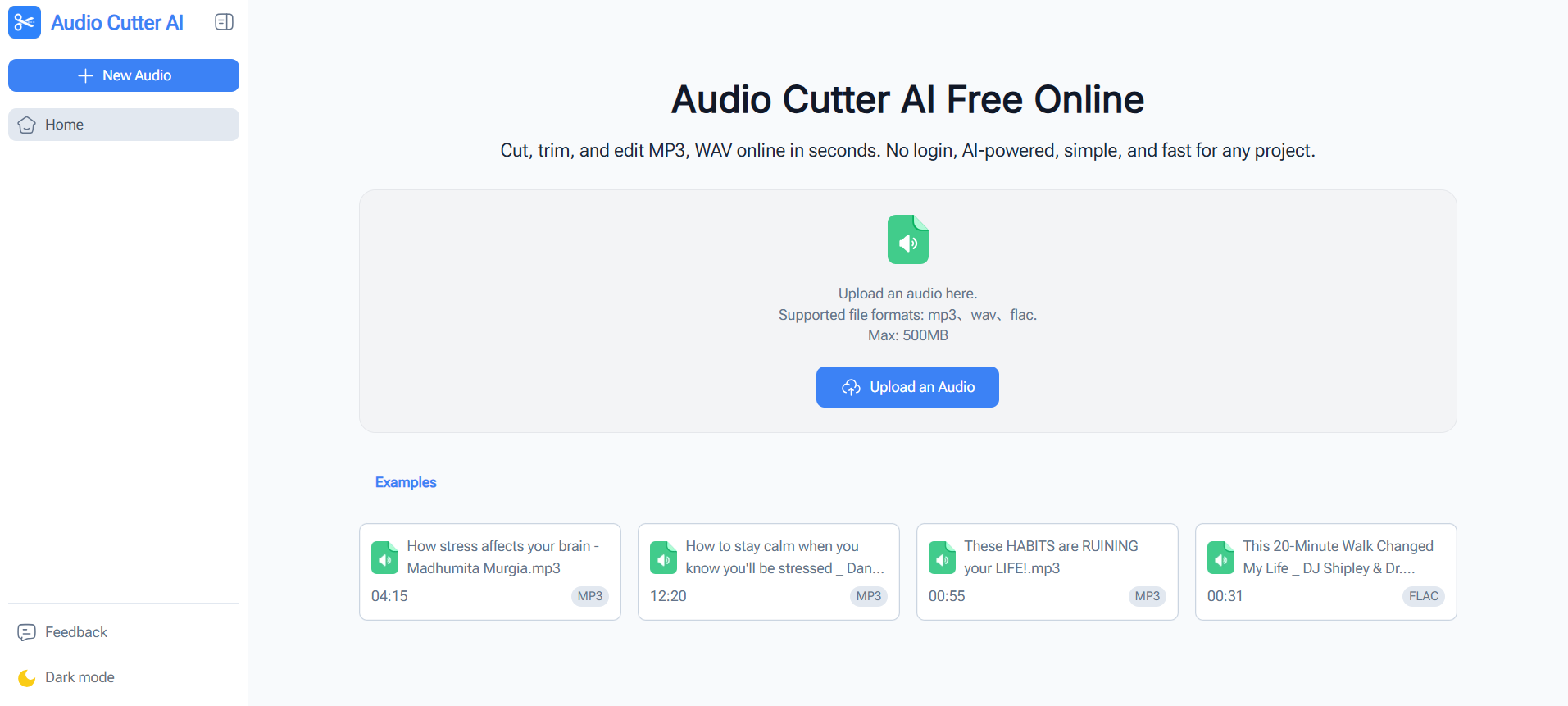
The homepage makes the main action obvious. The upload area is visible right away, supported file formats are listed near the top, and the interface explains the process in a way that feels beginner-friendly. There are also sample files on the page, which is a helpful detail because it gives new users a sense of what the tool is built for before they even upload anything.
That matters more than it sounds. A lot of online audio tools either feel too technical or too cluttered. Audio Cutter AI goes in the opposite direction. The layout is simple, the message is easy to understand, and the product feels approachable within seconds.
From a UI perspective, that is a strong start.
The User Experience: Where Audio Cutter AI Works Well
1. The workflow is easy to understand
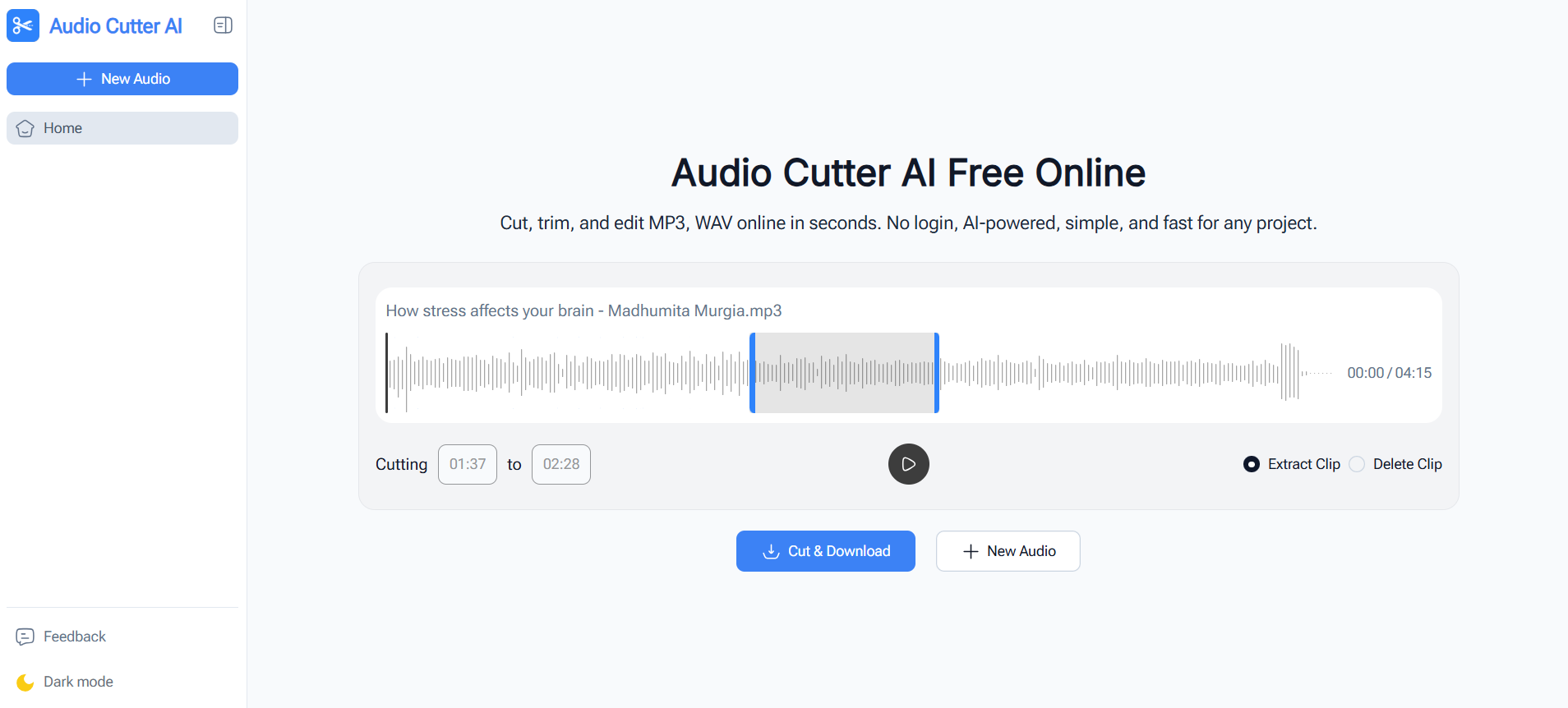
Audio Cutter AI explains its process in three steps: upload your audio file, customize the interval, then preview and download. That kind of structure is especially helpful for casual users who do not edit audio often.
Nothing about the tool’s presentation suggests a steep learning curve. It feels built for quick success.
2. It removes a lot of friction
One of the most practical benefits is that Audio Cutter AI works directly in the browser and does not require downloads or sign-ups. For users who only need occasional trimming, that is a real convenience.
That makes it useful for people who want to edit a file once and move on, rather than commit to installing desktop software.
3. It covers common file needs
The site clearly supports MP3, WAV, and FLAC, which already covers many everyday use cases. The 500MB file limit is also large enough for a lot of voice recordings, lectures, interviews, and spoken audio projects.
For a typical user, that means there is a good chance the file they already have will work without extra conversion.
4. Preview before download is a practical touch
The ability to preview edits before downloading is one of those small features that makes a tool feel much safer to use. Audio Cutter AI explicitly includes previewing as part of its core three-step flow and FAQ.
That matters because even simple trimming can be frustrating if you have to export first just to find out the cut point was slightly off.
Who Audio Cutter AI Feels Best For
Based on how the product is presented, Audio Cutter AI is a good fit for users who need fast, lightweight editing rather than advanced production features. The homepage specifically calls out content creators, marketing teams, students, educators, podcast hosts, social media managers, and journalists.
From a normal user perspective, I would say it feels especially useful for tasks like:
- trimming silence from a voice recording
- cutting short clips from interviews or podcasts
- cleaning up lesson audio
- preparing snippets for social posts
- shortening long recordings without opening complex software That is where the tool’s simplicity becomes a real advantage.
What Stands Out Most
The biggest strength of Audio Cutter AI is not that it tries to do everything. It is that it keeps the experience focused.
A lot of people do not need multitrack editing, effects, or a professional dashboard. They just need a quick, reliable way to cut audio online. Audio Cutter AI seems to understand that use case well. Its product copy, step-by-step structure, and feature set all point toward fast, low-friction editing rather than heavy production work.
That makes the tool easier to recommend to beginners.
What Could Make Audio Cutter AI Even Better
The most useful improvements, in my view, are not about changing the product’s core identity. The current appeal comes from simplicity. What would make it stronger is adding a few lightweight features that expand what users can do without making the interface feel complicated.
1. More precise trimming controls
The current setup looks well suited to fast editing, but more precise controls would make the tool even more practical for users who care about clean timing.
Helpful additions could include manual time entry, finer interval adjustment, zoomed waveform selection, or keyboard-based trimming controls. These kinds of features would be especially valuable when cutting spoken audio, music intros, or short-form content where timing matters.
This would not change the simplicity of the product. It would just give users a bit more control when they need it.
3. Fade in and fade out options
A simple fade in and fade out feature would be one of the best functional upgrades Audio Cutter AI could add.
A lot of clipped audio sounds abrupt at the start or end, especially when it is being used in podcasts, social videos, lessons, or presentations. Even a very basic fade option would make exported files sound more polished and intentional.
It is a small feature, but one that could noticeably improve the final result for many users.
3. Silence detection for spoken audio
Silence detection feels like a very natural next step for a tool like this.
Many users are not editing music. They are editing voice recordings, meetings, lessons, interviews, or podcast drafts. In those cases, one of the most repetitive tasks is manually finding and trimming pauses or dead air.
An automatic silence detection option could save time while still fitting the product’s beginner-friendly identity. It would make the tool feel smarter without making it harder to use.
4. Batch editing for repeat tasks
Right now, Audio Cutter AI feels ideal for one-file-at-a-time work. But batch editing would make it much more useful for people handling multiple clips in a row.
That could help with things like trimming several voice notes, cleaning up a set of lesson recordings, shortening multiple ad clips, or preparing a group of podcast assets in one session.
For creators and teams, that kind of feature would add a lot of practical value.
5. More export flexibility
The homepage emphasizes smooth output and a simple download flow. A few added export options could make the tool more flexible without making it complex.
For example, it would be useful to let users choose output format, adjust quality settings, rename files before download, or export in more than one version when needed.
That would help bridge the gap between casual use and more frequent content workflows.
Features I Would Personally Like to See Next
If Audio Cutter AI continues to grow, I think the best direction is to stay simple while adding time-saving features.
The most useful additions would probably be:
- silence trimming for voice-based content
- fade effects for smoother starts and endings
- more precise trimming tools
- batch processing for multiple files
- smarter clip suggestions
- more flexible export settings Those features would keep the tool approachable while making it more useful for creators, educators, and regular repeat users.
Product Direction: Where It Has the Most Potential
The strongest opportunity for Audio Cutter AI is not becoming a full professional editor. Its best path is becoming a highly reliable browser-based tool for quick audio cleanup and trimming.
That is already the lane it is signaling: fast, free, beginner-friendly, no login, and easy to use across devices. If the product keeps that foundation and gradually adds practical features like silence detection, fades, and better precision, it could become even more appealing without losing what makes it easy today.
In other words, the product does not need to become bigger. It just needs to become a little smarter.
Is Audio Cutter AI Worth Trying?
Yes, especially if you want a simple online audio cutter for quick edits.
Audio Cutter AI already covers the basics that matter to everyday users: it is browser-based, free to use, supports common formats, includes preview before download, and does not require sign-up.
That combination makes it easy to try and easy to understand. For users who need fast trimming without the weight of full editing software, that is a strong value.
Final Verdict
From an ordinary user’s perspective, Audio Cutter AI is a useful, beginner-friendly tool that makes audio trimming feel easy.
Its clean interface, straightforward workflow, and no-login browser-based setup make it especially attractive for quick tasks. It already feels well suited for creators, students, educators, podcasters, and anyone who wants to cut audio online without dealing with unnecessary complexity.
What makes it promising is that the foundation is already solid. And if the team adds a few thoughtful features such as fade controls, silence detection, batch editing, and more precise trimming, Audio Cutter AI could become even more valuable for everyday editing.
For now, I would describe it this way: it is a lightweight online audio cutter that already makes the basics easy, and it has clear room to become even more useful with the right next features.






Top comments (0)