

The Problem
My biggest frustration with AI video generation has never been creating a single impressive clip.
Most models can already produce interesting results.
The real challenge starts when I want to create a complete sequence.
For example:
- a product story
- a short cinematic scene
- a social media campaign video
- a multi-shot narrative
The problems usually appear after the first few seconds:
- characters become inconsistent
- lighting changes between shots
- camera movement feels disconnected
- editing multiple short clips takes too much time
I wanted a workflow that could help me create longer, more connected videos without constantly rebuilding scenes.
That's why I decided to test Seedance 2.5 AI Video Generator.
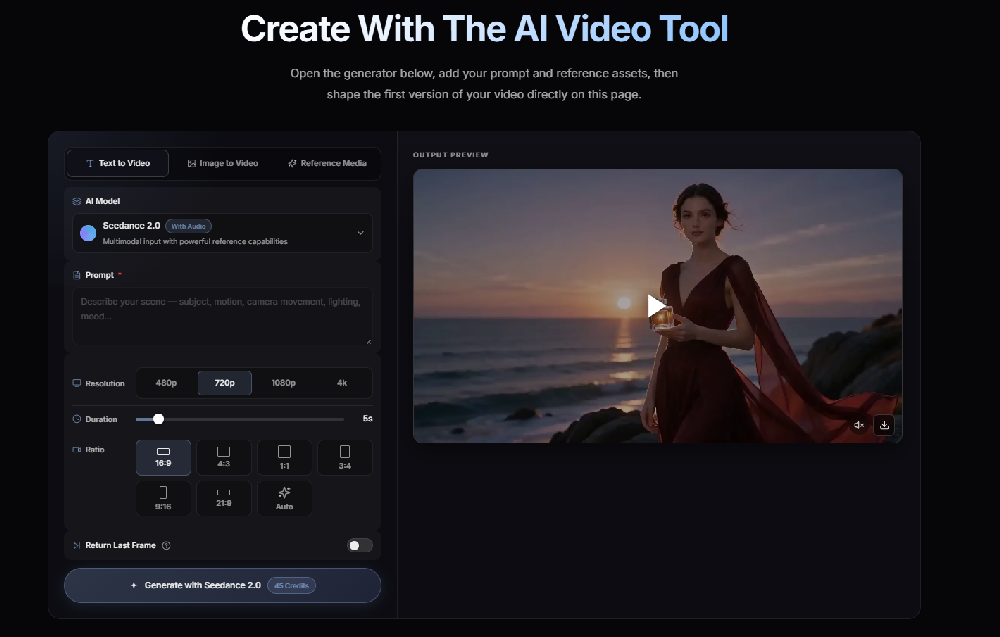
What Makes Seedance 2.5 AI Video Generator Different?
Instead of looking at Seedance 2.5 as just another text-to-video tool, I tested it as part of a complete video creation workflow.
The features I focused on were:
- Longer single-shot video generation
- Multi-reference input
- Better scene consistency
- More controllable editing workflow
- Higher-resolution output
According to the official information, Seedance 2.5 introduces longer native video generation, richer reference understanding, and improved control for creating more complete scenes.
For me, the biggest question was not:
"Can it create a beautiful frame?"
It was:
"Can it help me finish a complete video faster?"
How I Created My First Seedance 2.5 Video
Step 1 — Start With a Clear Story Idea
Instead of writing a complicated prompt immediately, I started with a simple concept.
Example:
A designer introduces a new product inside a modern studio.
The goal was to create a short commercial-style sequence.
Step 2 — Prepare Reference Materials
Before generating the video, I prepared:
- product images
- environment references
- color style references
- character references
This helped define the visual direction.
For AI video creation, I found that references often work better than adding more descriptive words because they provide a clearer visual target.
Step 3 — Build the Prompt Around Motion
My prompt structure became:
Subject + Action + Camera + Lighting + Mood
Example:
Premium smartwatch on a modern desk, designer picking up the product, slow cinematic camera movement, soft studio lighting, premium commercial atmosphere.
Instead of adding dozens of keywords, I focused on:
- what happens
- how the camera moves
- what feeling the scene should create
Step 4 — Refine Specific Parts
One thing I wanted to test was whether longer AI video workflows could reduce unnecessary regeneration.
Instead of recreating the entire scene, I focused on improving individual elements:
- camera movement
- product position
- lighting style
- background details
This is closer to how traditional video editing works.
My First Impressions
After testing the workflow, the biggest improvement I noticed was not simply image quality.
It was creative control.
Compared with creating many disconnected short clips, a longer generation approach made it easier to think about:
- storytelling
- pacing
- scene transitions
- overall visual consistency
The process felt less like collecting AI clips and more like directing a short sequence.
Who Is Seedance 2.5 AI Video Generator Useful For?
Based on my workflow, I think it is especially interesting for:
Content Creators
Creating YouTube videos, Shorts, and social content.
Marketing Teams
Building product videos and campaign concepts.
Designers
Turning static concepts into motion.
AI Filmmakers
Testing scenes before production.
Small Businesses
Creating promotional videos without a large production team.
What I Would Recommend Testing First
If you're trying Seedance 2.5 for the first time, I wouldn't start with random prompts.
I would suggest:
- Choose one small project.
- Prepare reference images.
- Create a 20–30 second scene.
- Compare the workflow with your current method.
The biggest value may not come from generating one impressive clip.
It comes from seeing whether the entire creation process becomes faster.
Final Thoughts
After using Seedance 2.5, my biggest takeaway is that AI video generation is moving beyond simple clip creation.
The next challenge is workflow.
Longer scenes, better references, and more controllable editing can make AI video tools more practical for real projects.
I’m still testing different creative approaches, but Seedance 2.5 AI Video Generator has changed the way I think about planning AI videos.
Instead of asking:
"Can AI create this shot?"
I now ask:
"Can AI help me build the whole story?"





Top comments (0)