

Breaking Open the "Black Box" of Video Content
Have you ever found yourself in this situation: trying to locate a specific key decision within a two-hour meeting recording, only to be forced to fast-forward through it frame by frame? Or perhaps you received a transcript for a foreign language course, only to discover the screen riddled with AI-generated "hallucinations"—words that don't exist—and paragraphs so garbled they were utterly unreadable?
This is not an isolated incident; it represents the collective dilemma facing current video-to-text tools. Video is, in essence, a temporal "black box"—information is locked within the timeline, rendering it unsearchable, unquotable, and impossible to organize in bulk. Traditional transcription tools merely "dump out" the contents of this black box; they never truly help you understand it.
"An exceptional transcription tool should not merely mark the endpoint of speech recognition; it should serve as the starting point for knowledge extraction."
The arrival of Saveto AI redefines the ceiling of this entire field. It is far more than a simple transcriber; it is a productivity hub that seamlessly integrates intelligent summarization, speaker identification, and multi-format export capabilities—making video content truly usable for the very first time.
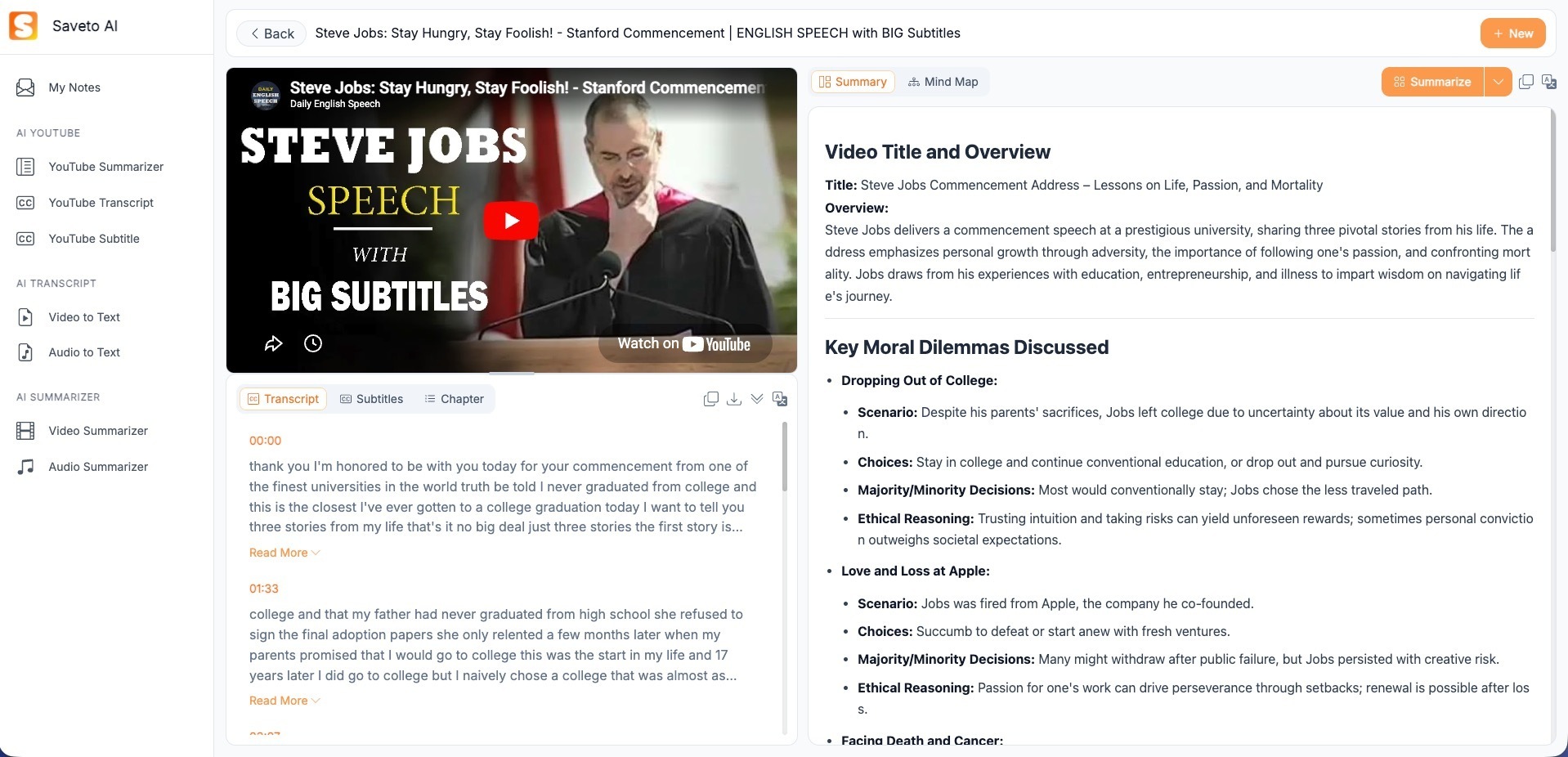
How Saveto AI Empowers Diverse Groups
For Academic and Language Learners
For learners engaging with English-language MOOCs or academic lectures, Saveto AI Video to Text Converter’s bilingual comparison feature serves as a powerful tool. Supporting translation between multiple languages, it allows learners to view foreign-language courses while simultaneously referencing accurate Chinese translations in real time—eliminating the need to expend valuable cognitive resources on overcoming language barriers.
Even more significant is the key excerpt feature: when faced with specialized lectures spanning up to three hours, Saveto can—with a single click—identify and extract core terminology, definitions, and arguments, condensing the originally dense content into concise knowledge cards optimized for review.
For Content Creators and Marketers
For creators who live and breathe content every day, time is everything. Saveto AI Video to Text Converter quickly transforms the core message of a YouTube or TikTok video into a blog draft or social media copy—compressing a secondary creation process that would typically take hours down to mere minutes.
From an SEO perspective, Saveto automatically generates timestamped chapter descriptions for your videos. This not only enables search engines to better understand your video content but also significantly boosts your content's visibility and click-through rates within search results.
For Enterprises and Professionals
In corporate environments, information often begins to dissipate the moment a meeting concludes. Saveto transforms recorded meetings from platforms like Zoom and Teams into a fully searchable knowledge base—precisely capturing every action item and key decision point—ensuring that critical details are never lost to oblivion simply because "no one compiled the meeting minutes."
Why Choose Saveto AI?
In long-form content, the gap in accuracy is amplified geometrically. For a 90-minute meeting, a 5% error rate means you would need to manually correct hundreds of critical pieces of information.
Financial-Grade Transcription Accuracy
The underlying AI models powering Saveto have been fine-tuned using massive datasets of specialized professional audio. Consequently, they outperform general-purpose transcription tools—by a wide margin—when handling background noise, heavy accents (such as Indian English or mixed Cantonese-Mandarin speech), and industry-specific terminology. This gap in accuracy becomes geometrically amplified when processing longer-form content.
Intelligent Formatting & Speaker Differentiation
Traditional tools typically output a dense, monolithic block of text that is difficult to read. Saveto AI, however, automatically identifies and distinguishes between speakers (e.g., Speaker A vs. Speaker B) and intelligently segments the text based on semantic boundaries. This transforms the raw transcription from a mere "pile of words" into a "structured document," representing a quantum leap in readability.
Seamless Integration & Multi-Format Export
One transcription, multiple applications. Saveto supports exporting transcripts in various formats—including SRT subtitle files, PDF, Word, and Markdown—ensuring perfect compatibility with popular note-taking apps such as Notion, Obsidian, and Roam Research. This allows your knowledge to flow freely and truly come to life.
Saveto AI vs. NoteGPT
When compared side-by-side with similar tools, the market is certainly not lacking in browser extensions or low-cost, lightweight utilities—tools that still retain their value in specific scenarios. However, in dimensions such as professional-grade content, long-form video processing, and in-depth creative repurposing, the disparity is immediately apparent.
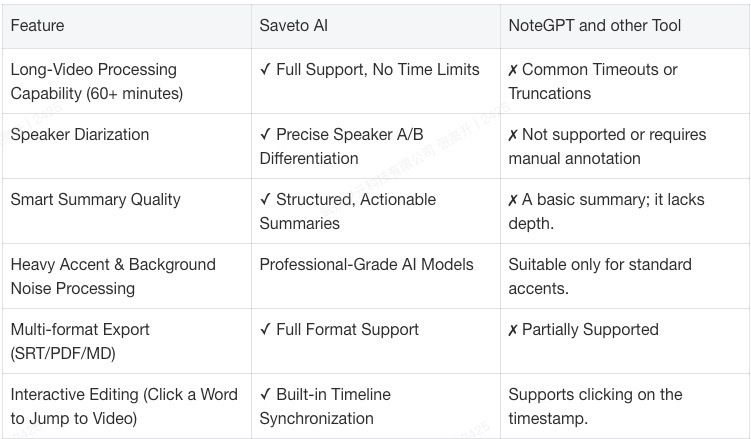
Lightweight plugins are suitable for quickly generating summaries of short-form videos, serving as a "gateway" for content previews. However, when you are dealing with lecture recordings, industry summits, or multilingual content—and require in-depth organization and creative repurposing—Saveto is the professional tool truly capable of handling these tasks.
How to Use the Saveto AI Video-to-Text Converter?
From import to distribution, the entire workflow takes no more than five minutes. Here is exactly how it works:
01 Upload Locally or Paste a URL
Simply drag and drop local video files directly, or paste links from YouTube, Bilibili, or Zoom recordings to begin processing immediately.
02 Intelligent Analysis
Generate Transcripts and Summaries in Seconds
Our AI works in the background to simultaneously perform speech-to-text conversion, speaker identification, and intelligent summarization—delivering results almost instantly.
03 Interactive Editing
Click Text to Jump to the Corresponding Timestamp
Every transcribed sentence is linked directly to the video's timeline. Click on any sentence, and the video will instantly jump to that specific point, making verification and correction highly efficient.
04 One-Click Distribution
Export to Your Collaboration Platforms
Choose from SRT, PDF, Word, or Markdown formats, and export with a single click to Notion, Obsidian, or any other collaboration platform—allowing knowledge to flow seamlessly into your existing system.
Summary
In an era of information overload, true scarcity lies not in content itself, but in the ability to comprehend it. Saveto AI helps you break through the time constraints of video, transforming every piece of content worth watching into a searchable, quotable, and shareable knowledge asset.





Top comments (0)