

Introduction
This common frustration is exactly why modern platforms like Promptosia exist. Promptosia was created to solve a very simple problem: making it easy for individuals, creators, professionals, and teams to organize, improve, manage, and share their valuable AI instructions. Instead of losing useful prompts across scattered notes, users can now save their best instructions in a structured digital library and reuse them whenever needed. Whether you are a writer looking to streamline your content creation, a developer managing coding instructions, or a business professional building daily AI workflows, having a central hub changes how you interact with technology. It helps users treat their best prompts as valuable digital assets rather than temporary, throwaway messages.
What Is an AI Prompt Management Tool?
An AI prompt is simply the instruction, question, or text input you give to an artificial intelligence tool to get a specific output. When you first start using AI, you might only write a few short sentences a day. However, as you rely more on AI for research, creative tasks, and problem-solving, you begin writing dozens or even hundreds of prompts every week.
Managing these instructions quickly becomes a messy chore. This is where an AI prompt management tool becomes essential. It acts as a dedicated workspace designed specifically to help you save, categorize, and refine your instructions. Instead of starting from scratch every single time you open an AI chat window, a dedicated management tool allows you to retrieve proven instructions instantly, tweak them for new tasks, and maintain a consistent standard of quality across all your AI projects.
Why Building an AI Prompt Library Is Important
Most people do not realize how many good prompts they lose every single day. When you chat with an AI, older conversations slide down a sidebar, get buried under new topics, or disappear entirely when you clear your cache.
Building an AI prompt library puts an end to this cycle of loss. When you store your successful prompts in a clean, searchable digital folder system, you never have to worry about recreating a great idea from memory. Easy access to your previous instructions means you can instantly resume productive tasks without wasting time on trial and error. Over time, an organized collection of prompts turns into a personal productivity playbook, helping you accomplish more in less time.
How Promptosia Works as a Prompt Engineering Platform
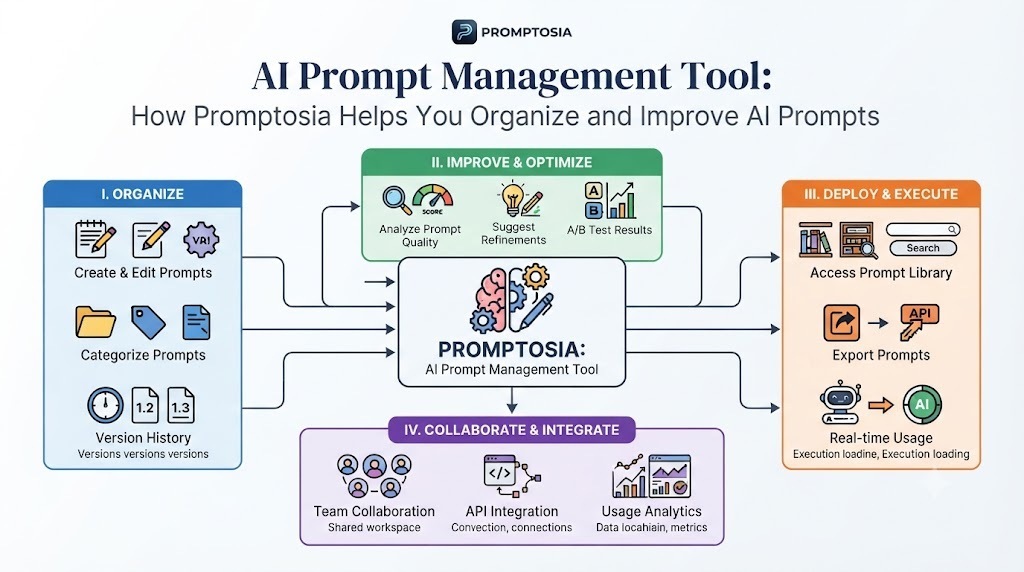
Prompt engineering sounds like a complex technical term reserved for computer scientists, but at its core, it simply means the art and practice of writing better instructions for AI. A robust prompt engineering platform supports you through the complete journey of working with AI instructions.
This journey includes creating fresh ideas, organizing them logically, improving their wording, testing different variations side-by-side, comparing the results, managing different versions over time, and sharing helpful templates with others. Rather than treating prompt writing as a guessing game, a structured platform gives you the right environment to experiment safely, track what works, and build dependable, repeatable AI workflows for your daily tasks.
Organizing Prompts With AI Prompt Organizer
When your prompt collection grows past ten or twenty items, a simple list will no longer cut it. Finding the right instruction in a massive wall of text slows down your workflow.
An AI prompt organizer helps you solve this clutter by letting you create custom categories, add descriptive tags, and insert flexible variables into your instructions. You can easily sort your prompts by project type—such as marketing copy, software debugging, or academic research—and use smart search features to locate the exact template you need in seconds. Good organization turns a chaotic mess of notes into a streamlined, easy-to-navigate digital filing cabinet.
Improving Instructions With AI Prompt Optimizer
Writing a basic prompt is easy, but writing an effective prompt that gives you consistent, high-quality results takes practice. Sometimes your initial instructions are too vague, leading to generic or unhelpful AI responses.
An AI prompt optimizer helps you take a simple, rough draft and turn it into a clear, structured instruction set. It guides you in adding necessary context, clarifying your desired output format, and removing confusing wording. By refining your inputs, you help the AI understand your exact goals on the very first try, saving you from endless rounds of back-and-forth corrections.
Understanding Prompts With AI Prompt Analyzer
Before you put a complex prompt into heavy daily rotation, it helps to understand how it is constructed and where it might fail. Prompt analysis takes a close look at the mechanics behind your instructions.
An AI prompt analyzer reviews your core goals, checks how you have structured your variables, looks closely at the requested tone, and evaluates the final output format. If a prompt is missing crucial context or contains contradictory instructions, the analyzer helps you spot those weak points so you can fix them before running important tasks.
Checking Prompt Quality Before Use
Quality control is just as important for text instructions as it is for software code or written content. If you send a poorly structured prompt to an AI, the resulting output will likely be messy or off-target.
Using a built-in prompt quality checker ensures that your instructions meet a high standard of clarity, structure, safety, and usability before you spend time running them. It acts as a helpful second pair of eyes, pointing out ambiguous phrasing and ensuring your prompt is fully ready to perform reliably in real-world scenarios.
Managing Prompt Improvements With Version Control
Prompts are rarely perfect on the first try. As you test and tweak your instructions over days or weeks, you will naturally make adjustments to improve their performance. Without a tracking system, it is easy to overwrite a good version with a bad experiment and lose your progress.
A prompt version control tool keeps a neat history of your changes. It lets you save previous iterations, compare updates side-by-side, and instantly roll back to an earlier version if your latest experiment does not work out. This safety net allows you to experiment freely without the fear of losing a prompt that was already working well.
Testing Different Prompt Results
How do you know if changing a single word in your prompt will give you a better output? The only way to be sure is through direct comparison.
An AI prompt testing tool lets you test multiple variations of a prompt against the same task to see which one delivers the most accurate and useful results. By comparing outputs side-by-side, you remove the guesswork from prompt writing and build a foundation of data-backed, high-performing AI workflows.
Reusing Successful Prompts With Templates
Nobody wants to type out the same multi-step instructions every single morning. When you find a prompt formula that consistently produces great results, it should be turned into a template.
Using reusable AI prompt templates saves an incredible amount of time by letting you fill in quick placeholder variables instead of rewriting entire paragraphs. This approach eliminates repetitive work, standardizes your processes, and ensures you get consistent quality every time you tackle a familiar task.
Who Can Use Promptosia?
Content Creators
Writers, bloggers, and social media managers often use AI to brainstorm ideas, outline articles, and draft copy. Content creators use Promptosia to save their best writing prompts, tone guides, and formatting templates, ensuring their brand voice stays consistent across every project.
Developers
Software engineers use AI to write code, debug errors, and explain technical concepts. Developers rely on Promptosia to organize complex coding instructions, system prompts, and architecture queries without cluttering their local code editors.
Marketers
Marketing professionals manage campaigns, email copy, and ad variations daily. Marketers use Promptosia to create repeatable workflows, test different ad angles, and share winning campaign prompts across their entire department.
Businesses and Teams
Growing companies need standard operating procedures for everything, including their AI usage. Businesses and teams use Promptosia to share valuable prompt assets across departments, ensuring everyone utilizes the most effective company-approved AI instructions.
Students and Researchers
Students, educators, and researchers process heavy amounts of information. They use Promptosia to organize research queries, study prompts, and summarization guidelines, keeping their academic workflows tidy and efficient.
Benefits of Using Promptosia
- Saves time: Cuts down the hours spent searching for old chat histories or rewriting instructions from memory.
- Keeps prompts organized: Uses clean folders, categories, and tags to keep your workspace clutter-free.
- Improves AI output quality: Refines your instructions so you get accurate, useful answers on the first try.
- Helps teamwork: Makes it easy to share winning prompts and standard workflows with colleagues.
- Makes successful prompts reusable: Turns one-time text inputs into dependable, long-term templates.
- Reduces repeated work: Eliminates the frustration of typing out identical instructions day after day.
- Creates better AI workflows: Establishes a reliable, structured system for all your daily AI interactions.
Common Problems Without Prompt Management
- Losing valuable prompts: Forgetting where you saved a brilliant instruction and having to recreate it from scratch.
- Creating the same instructions repeatedly: Wasting precious minutes every day typing out similar prompts because you lack a central library.
- Not tracking improvements: Making random edits to prompts without knowing which version actually produced the best results.
- Getting inconsistent AI results: Submitting casual, unstructured prompts that lead to unpredictable and frustrating AI outputs.
- Difficulty sharing prompts with teams: Relying on messy copy-pasting through chat apps instead of having a shared, organized repository.
Proper prompt management completely solves these daily hurdles by giving your instructions a secure, structured home.
Frequently Asked Questions (FAQs)
What is an AI prompt management tool?
An AI prompt management tool is a dedicated software platform that helps you save, organize, improve, and retrieve your AI instructions in one central place instead of losing them in chat histories.
Why do users need an AI prompt library?
An AI prompt library acts like a digital filing cabinet for your best instructions, allowing you to access, reuse, and share successful prompts instantly without starting from scratch.
How does Promptosia help organize prompts?
Promptosia provides a clean structure featuring custom categories, searchable tags, and flexible folders so you can keep your prompt collection tidy and easy to navigate.
What is a prompt engineering platform?
It is a comprehensive workspace that guides you through the entire lifecycle of working with AI instructions, from initial creation and optimization to testing and version control.
How does an AI prompt optimizer improve prompts?
An AI prompt optimizer refines your rough drafts by adding missing context, clarifying your goals, and restructuring sentences to ensure the AI gives you a better response.
What does an AI prompt analyzer check?
An AI prompt analyzer reviews the underlying structure of your instructions, evaluating clarity, tone, variable usage, and overall format to spot potential areas for improvement.
Why is prompt version control important?
Prompt version control lets you track your changes over time, compare past iterations side-by-side, and safely roll back to an earlier setup if a new experiment does not work.
How do reusable AI prompt templates save time?
They allow you to insert quick variables into pre-tested instruction sets rather than rewriting complex multi-step prompts every time you perform a routine task.
Final Thoughts: Building Better AI Workflows With Organized Prompts
As artificial intelligence becomes a standard part of our everyday work, the way we communicate with these tools matters more than ever. Good prompts help you unlock the true potential of AI, saving you time and delivering much higher quality results. Managing your instructions properly stops the endless cycle of lost chats and repeated work, turning temporary ideas into powerful long-term assets. Whether you are working alone on creative projects or collaborating with a fast-paced team, organizing your prompts helps you work smarter, stay productive, and get the most out of every AI interaction. Platform solutions like Promptosia make it easier than ever to build these smart habits and take full control of your digital workflow.




Top comments (0)