

For two years I edited every interview recording the same way. Load the file into a waveform editor, drag the playhead, listen, guess, rewind, listen again. Pulling one usable answer out of a 90 minute conversation regularly cost me 20 minutes of hunting, and another 10 to trim it cleanly.
What finally changed that routine was not a faster editor with better shortcuts. It was giving up the timeline and describing the clip I wanted in plain language. That is the idea behind Audio Cutter AI's AI audio editing and cutting tool, and it took me roughly one afternoon to stop reaching for the old workflow.
The Part of Audio Editing I Kept Avoiding
My recordings are long and unstructured. A podcast interview runs 60 to 90 minutes. A lecture recording is closer to 2 hours. A customer call is short but full of overlap, pauses, and people talking over each other.
The cutting work itself is not hard. The hard part is locating things. When someone says "they talked about pricing somewhere in the middle," I have no timestamp to work with. I scrub, I speed up playback to 2x, I skim a transcript if one exists, and I still miss the first pass more often than I care to admit.
Traditional editors assume you already know where the moment is. They give you a precise tool for a problem I do not have yet.
Why Timeline Scrubbing Breaks Down
There are three specific places where the old method falls apart for me.
The first is topic search. If I remember what was said but not when it was said, a waveform is useless. The visual shape of an audio file tells you almost nothing about its content.
The second is precision trimming. Getting a clean start and end point by eye is guesswork. I end up keeping extra silence at the front, then nudging the boundary, then listening again.
The third is repetition. When I need eight clips from one recording, I pay the full locating cost eight times. The tool does not remember that I already found minute 34.
What Editing by Prompt Actually Looks Like
The workflow I use now has three steps.
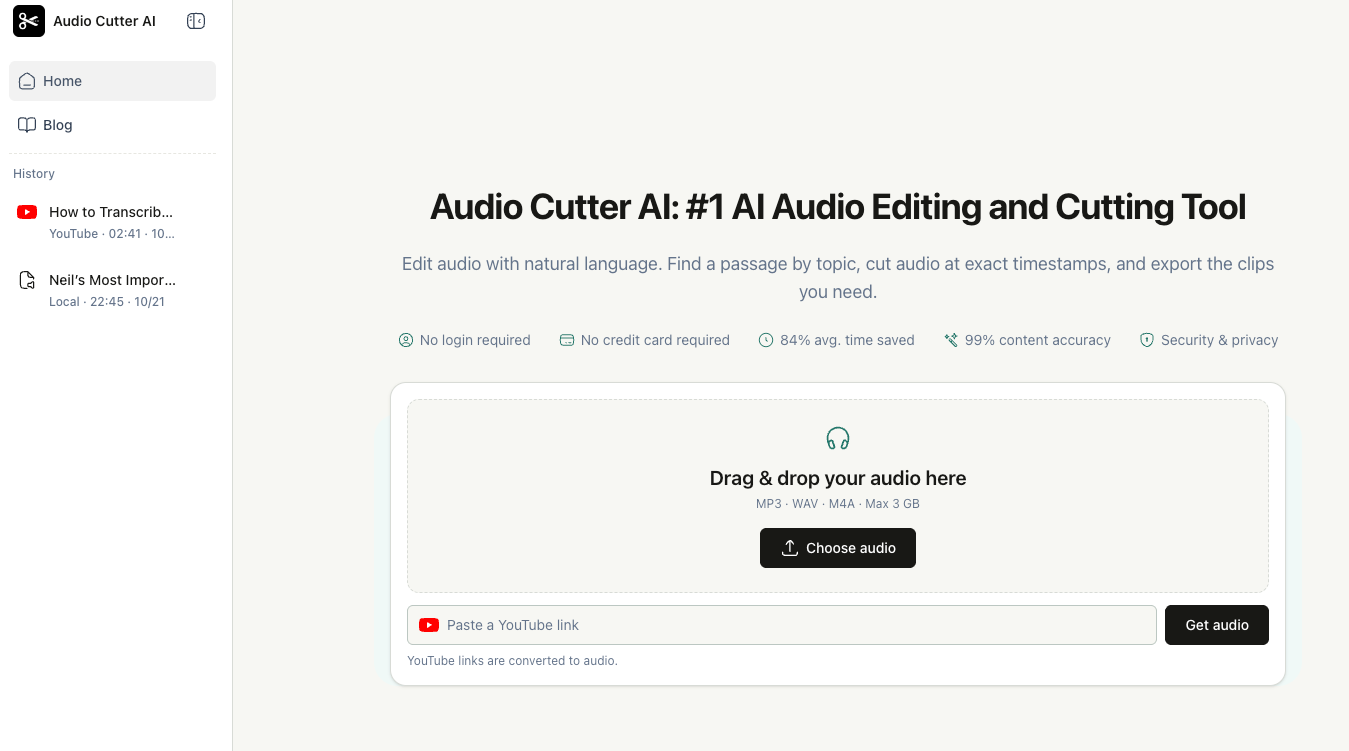
Upload the recording. The upload box takes MP3, WAV, and M4A files up to 3 GB, and it also accepts a YouTube link, which gets converted to audio before editing.
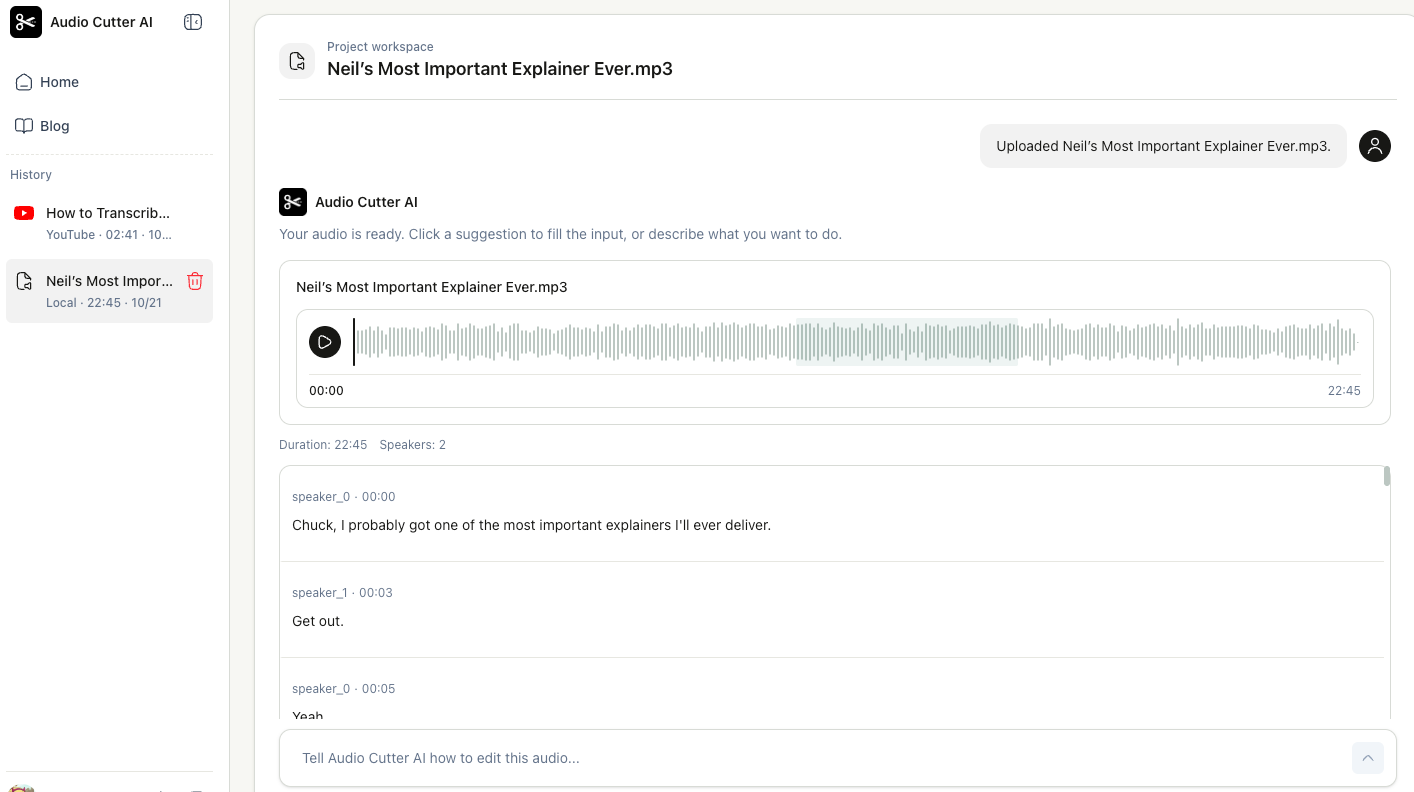
Describe the change in a sentence. This is where the mental model shifts. Instead of navigating to a location, I write what I want: "Find the guest's first pricing decision" or "Keep 1:00 to 1:30." The prompt can be semantic or it can be an exact time range, and both work in the same input.
Preview and export. I listen to the selection before committing to it. If the boundary is off, I refine it in the same conversation rather than starting over. Then I export as MP3 or WAV, either as one combined file or as separate clips.
Finding a Passage When You Do Not Know the Timestamp
This is the feature that won me over. I can describe an idea or an answer I remember and get back a matching passage from the recording, without knowing where in the file it sits.
It is not magic, and it is worth being honest about the limits. Vague prompts return vague results. "Find the interesting part" gives me something plausible but arbitrary, while "Find where they explain the refund policy" lands much closer to what I actually want. The specificity of my prompt is the single biggest factor in whether the first result is usable.
I also always preview before exporting. A passage can match the topic and still start three words too late, and that is much easier to fix in the same conversation than to redo from scratch.
Keeping One Speaker Out of a Messy Meeting Recording
The other prompt I rely on is speaker isolation. On a meeting recording with four people and constant interruption, I can ask to keep only one speaker's remarks and get a clip built from just that person.
This one deserves more caution than the topic search. Where speakers interrupt or overlap each other, the selection can grab a fragment of the wrong voice. I listen to the result against the original before I trust it, especially on the sections where two people were talking at once. It saves me an enormous amount of time, but it is a first draft, not a final cut.
Splitting a Long Recording Into Usable Clips
For lecture recordings I use the split instead. I tell it how long each part should be, five minutes for example, review where the split points landed, and export the pieces as separate files or recombine the ones I want into a single file.
The same input handles the other trims I used to do by hand. I can remove a section from the middle by giving its start and end times, and the remaining audio joins into one shorter clip. I can shorten the current selection to a set duration, say 10 seconds, for a social teaser. And there is a silence removal toggle in the export settings, which matters when the recording came from a call with long pauses.
One thing to watch: if you turn silence removal on, the exported duration depends on how many pauses get removed. The clip you export will be shorter than the range you selected, which is the intended result but worth knowing before you promise a client a 10 minute file.
Who This Fits, and Who It Does Not
This fits people who work with long, spoken, unstructured recordings and who think about content rather than seconds. Podcasters cutting episode clips and teasers. Teachers and course builders turning a lecture into short lessons. Researchers and journalists pulling relevant answers out of long interviews. Anyone who has ever thought "I know they said it, I just cannot find it."
It fits less well if your work is already precise and visual. If you are doing music editing, sound design, multi-track mixing, or anything where the waveform itself is the thing you are shaping, a prompt is a slower way to say something you already know. It is also not a replacement for a full editing suite. It finds and cuts; it does not mix, master, or add music.
For my own work, the split is simple. I still open a real editor when I need to do fine audio craft. I stopped opening one just to find a moment.
If long recordings are eating your week, Audio Cutter AI – an AI audio editing and cutting tool that takes instructions in plain language – is worth an afternoon of your time.



Top comments (0)