
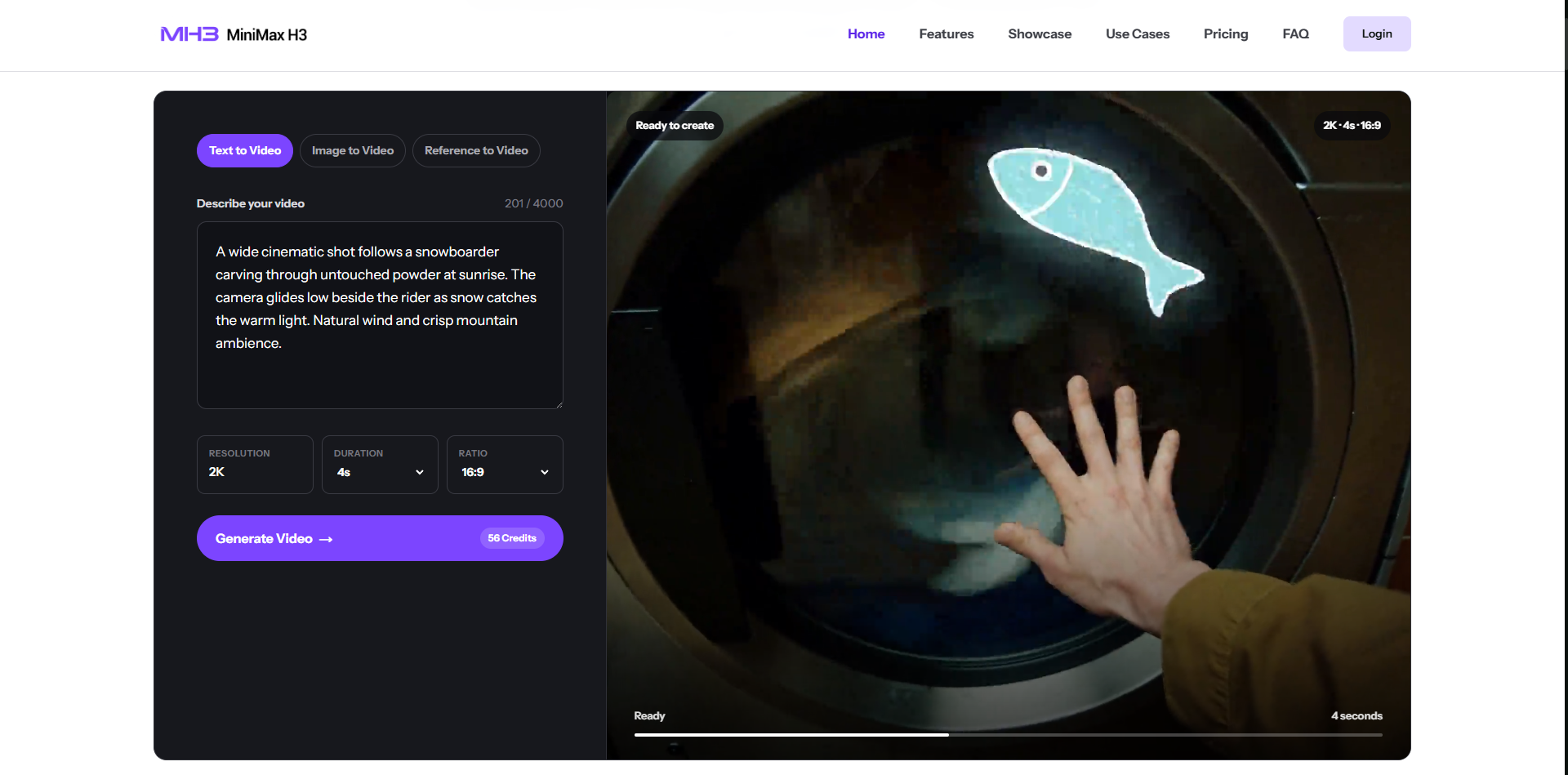

If you’ve spent hours crafting layered prompts for separate text-to-video, image animation, and audio AI tools, you know the biggest workflow pain: constant context loss between platforms. You draft a cinematic prompt in one tool, export frames to an image animator, then import footage into a sound generator—only to lose character consistency, camera timing, and visual tone across every export step. For prompt engineers, content marketers, UI designers and game artists building repeatable video assets, fragmented AI stacks waste hours refining identical prompts across multiple systems. Today, one multimodal model eliminates all these workflow gaps: MiniMax H3.
Most competing video AI tools split visual generation and audio rendering into fully isolated pipelines, forcing prompt writers to duplicate scene descriptions for visuals and sound separately. MiniMax H3 rewrites this rule by unifying text prompts, reference images, guide video clips, and custom audio samples inside a single rendering engine. Every prompt you write controls both moving visuals and synchronized stereo sound in one pass, removing the need to copy-paste prompt text across three or four separate AI platforms. This single unified prompt layer is the core value difference that makes the tool indispensable for anyone building reusable prompt templates on PromptZone.
The Unique Prompt-First Advantages That Beat Other AI Video Generators
As a platform built for prompt engineers, PromptZone readers prioritize control, consistency, and prompt reusability—three areas where this model outperforms mainstream alternatives by a wide margin.
1. Single Prompt Controls Full Visual + Audio Narrative
You can write one master prompt up to 4,000 characters that defines subjects, camera movement, lighting, pacing, dialogue, ambient sound, and on-screen typography all at once. There is no need to split your creative brief into separate visual prompts and audio prompts. For PromptZone users building shareable prompt templates, this means one complete copy-paste prompt generates a finished 2K video from 4 to 15 seconds, across all common aspect ratios including vertical 9:16 social reels, cinematic 21:9 ads, and square brand content. Your prompt library instantly becomes far more versatile without extra editing work.
2. Multi-Reference Prompt Lock Solves Character & Style Drift
A massive frustration for prompt creators is visual drift across generated batches: characters change facial features, brand colors shift, and camera movement loses cohesion between clips. The multi-reference prompt system built into MiniMax H3 lets you embed image, video, and audio reference cues directly into your prompt workflow. Upload reference art to lock character appearance, guide footage to copy custom camera choreography, and audio samples to set music or voice tone—all activated by simple prompt commands. When sharing templates on PromptZone, you can bundle reference asset instructions alongside your text prompt, giving other community members perfectly consistent results every time they test your work. Static image-to-video tools lack this layered reference prompt logic, leading to messy, inconsistent output even with detailed prompt writing.
3. Native Stereo Audio Generated Alongside Visuals
Nearly all text-to-video models force prompt writers to generate silent footage first, then build separate audio prompts for voiceover or background music. This creates permanent timing mismatches between action and sound, requiring extra prompt revisions to align beats and movement. This multimodal engine renders stereo audio frame-by-frame alongside your visuals using the same master prompt. Every lighting shift, character gesture, and camera pan auto-syncs with matching ambient noise, dialogue or scoring defined in your prompt text. Prompt engineers no longer need to draft two separate creative briefs to achieve polished, broadcast-ready short videos.
Real Prompt Engineer Workflows Built for PromptZone Creators
The feature set is tailor-made for anyone creating, testing and sharing prompt templates within the PromptZone community:
E-commerce product prompt templates: Upload product photos as reference anchors in your prompt, write lighting and scene descriptions, and generate consistent product showcase reels without reworking prompts for every new item.
Vertical social ad prompt packs: Craft reusable 9:16 prompt blueprints with built-in text rendering instructions, crisp logo preservation, and synced marketing voice audio for TikTok and Instagram content batches.
UI demo animation prompts: Design prompt templates that render blur-free app interfaces, menu transitions and on-screen text, perfect for designers sharing workflow assets on PromptZone.
Game cutscene motion prompts: Attach reference actor footage to your prompt to transfer natural movement onto digital avatars, cutting down manual prompt adjustments for animated sequences.
Brand identity consistent prompts: Embed brand color and logo reference rules inside your core prompt structure, ensuring every generated clip adheres to brand guidelines automatically.
Why This Unified Model Outshines Fragmented AI Video Stacks
Traditional multi-tool video workflows force prompt engineers to rewrite, tweak and reformat identical creative descriptions for each separate platform. Every file export introduces quality loss, timing errors and visual drift that demand prompt rework. By centralizing all input types and generation logic in one prompt-driven environment, the platform eliminates repetitive prompt duplication and cross-tool alignment fixes. Freelance prompt creators, agency template builders and indie game designers all gain massive efficiency gains, letting them publish more polished, functional prompt templates to PromptZone in less time.
Final Thoughts for PromptZone’s AI Creator Community
For anyone building prompt libraries, testing multimodal AI workflows, or sharing reusable creative templates, the separation of video and audio generation in standard tools creates unnecessary friction. A unified system that lets one single prompt control visuals, motion, and synchronized sound delivers unmatched consistency and speed for all short-form video creation tasks. If you’re tired of splitting your creative brief across disjointed AI platforms and want to build more powerful, one-click prompt templates for the PromptZone community, explore the full prompt-driven multimodal capabilities available via MiniMax H3 to upgrade your entire video generation workflow.




Top comments (0)