

Introduction
Small communication gaps often create the biggest delays in daily business operations. A client arrives ten minutes late because a map app dropped them at the wrong building entrance. An invoice sits unpaid because a customer mistyped a bank account number copied from a messy email thread.
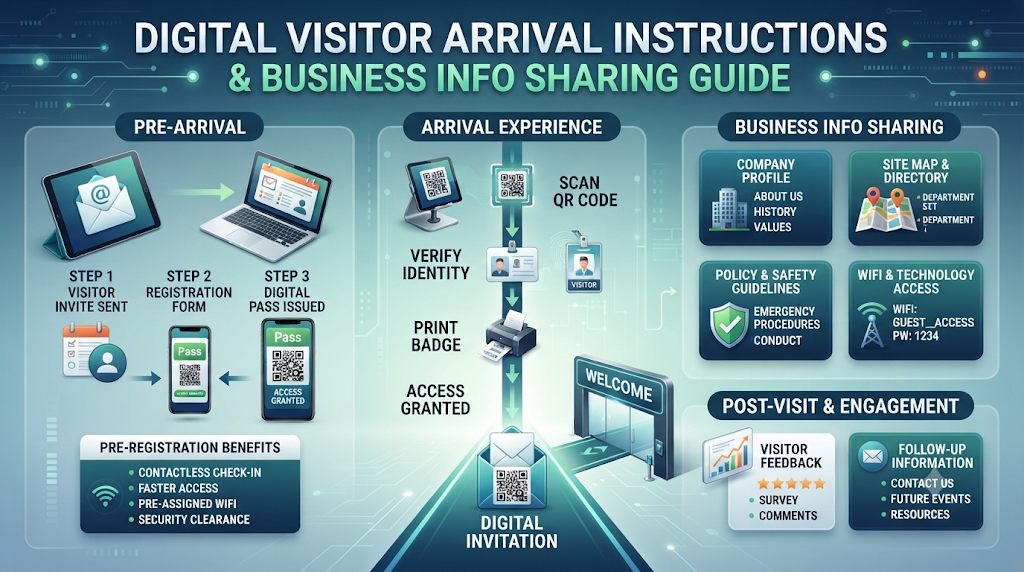
Organizations increasingly solve these everyday bottlenecks with structured, web-based information pages. Instead of repeating the same instructions over phone calls and emails, teams publish clear, reusable links and scannable QR codes. Platforms like Proezi bring digital visitor arrival instructions, payment details, and company registration profiles together into simple pages that open directly in any mobile browser.
This article explains how digital arrival guides, payment information pages, and business identity profiles work, why they improve customer experience, and how any organization can set them up effectively.
Understanding Digital Business Information Sharing
Most company websites include a basic contact page with a street address, a generic email form, and a phone number. While that setup works for initial outreach, it rarely gives visitors or paying customers the practical details they need to complete an action smoothly.
Digital business information sharing bridges that operational gap. Rather than forcing people to hunt through PDF attachments or ask receptionists for directions, businesses create dedicated, mobile-friendly pages for specific tasks:
- Arriving at a physical location without getting lost in the final hundred yards.
- Copying payment details accurately without relying on manual typing.
- Reviewing company registration numbers quickly during supplier or client onboarding.
Because these pages live behind permanent links and QR codes, organizations can update a gate code, change a parking lot notice, or adjust billing instructions without reprinting signs or resending old documents.
Why Clear Arrival and Payment Communication Matters
Every unclear instruction costs time and creates unnecessary friction for both guests and internal teams.
- Reduces front-desk interruptions: Receptionists and office managers spend less time answering phone calls from lost visitors or delivery drivers.
- Improves punctuality: Clear parking and entrance directions for visitors ensure meetings, appointments, and site visits start on schedule.
- Lowers billing errors: Structured payment pages prevent typos in account numbers, routing codes, and invoice references.
- Builds professional credibility: Presenting verified registration details and clear arrival steps shows respect for a visitor's time and attention.
Core Components of Modern Business Information Pages
A complete digital sharing setup addresses three common operational needs through focused, single-purpose web pages.
1. Digital Visitor Arrival Instructions and Last-Mile Navigation
Standard GPS navigation apps work well on highways and main streets, yet they frequently fail during last mile navigation for businesses. Large office campuses, hospitals, industrial estates, and multi-tenant towers often share a single street address across multiple entrances.
Dedicated visitor wayfinding software guides guests from the street directly to the right door or desk using:
- Annotated photographs: Real photos of building entrances, security gates, parking barriers, and lobby elevators marked with clear visual arrows.
- Precise map coordinates: Separate GPS pins for visitor parking bays, taxi drop-off lanes, pedestrian gates, and loading docks.
- Role-specific routes: Tailored arrival steps for car drivers, walk-in guests, rideshare passengers, and courier deliveries.
- Step-free access details: Clear markers showing wheelchair ramps, wide doorways, accessible restrooms, and elevator access.
- Temporary access notices: Real-time alerts for road construction, temporary gate codes, or elevator maintenance.
- Multilingual and offline support: Translated steps for international visitors and cached offline access when mobile signal drops inside underground parking garages.
2. Business Payment Information Pages
When companies need to share bank details with customers, pasting raw text into chat messages or emails invites errors. One wrong digit in an international wire code or account number can delay settlement for days.
A dedicated payment information page organizes receiving instructions cleanly:
- Multiple payment methods: Structured sections for domestic bank transfers, international SWIFT/IBAN details, PayPal accounts, or a UPI QR code payment page.
- One-tap copy fields: Individual copy buttons next to account numbers, bank codes, and payment references so payers never mistype characters.
- Printable payment signs: Clean, ready-to-print QR signage for reception counters, checkout desks, and physical invoices.
It is important to distinguish between sharing payment instructions and processing transactions. Information-sharing pages display your receiving details clearly, but they do not collect, hold, or transfer money. Customers complete the actual payment inside their own trusted banking or payment apps.
3. Business Identity Information Pages
Corporate buyers, logistics partners, and compliance officers routinely request official registration records before approving a new vendor. Creating a centralized page to share business registration details online replaces scattered PDF certificates with a single reference link.
These identity profiles typically include:
- Legal registered business name and public trading name.
- Company incorporation or registration numbers.
- Tax identification numbers such as GST, VAT, or EIN.
- Registered business address and official verification contacts.
Reliable platforms run automatic format and checksum validation on entered tax or registration numbers to catch accidental typing errors. However, format validation only confirms that the number follows the expected structure for that country—it does not independently verify legal ownership with government registries.
Step-by-Step Guidance: Creating Effective Arrival and Info Pages
Setting up clear digital instructions requires careful observation rather than complex technical skills. Follow these steps to build pages visitors actually find helpful.
Step 1: Walk the Route Like a First-Time Visitor
Approach your building from the main road on foot and by car. Note every decision point where a newcomer could hesitate, such as an unmarked turn, a split driveway, or an intercom panel.
Step 2: Capture Clear Daytime Photos
Take bright, uncluttered photos of your parking entrance, main doorway, security desk, and elevator bank. Add simple arrows or short labels pointing directly to the correct door or button.
Step 3: Upgrade Your "How to Find Us" Page
Replace vague text paragraphs on your website with a structured how to find us page for business guests. Combine your annotated photos, exact parking coordinates, and step-free access notes into one logical sequence.
Step 4: Structure Payment and Registration Pages Separately
Keep financial and legal details separate from arrival instructions. Set up a dedicated payment page with copyable account fields and clear invoice reference instructions, alongside a separate identity page listing your tax and registration numbers.
Step 5: Deploy Reusable QR Codes Across Touchpoints
Connect each page to a permanent QR code. Place QR code directions for visitors inside calendar invites, booking confirmations, and email signatures, and display your payment QR code at front desks or on billing statements.
Practical Business Applications Across Industries
Different organizations adapt link-based arrival and business pages to fit their daily workflows:
- Event Venues and Conference Halls: Organizers print an event venue directions QR code on tickets and event badges, guiding attendees to specific parking lots, registration desks, and accessible seating areas.
- Medical Clinics and Wellness Centers: Clinics send calm, photo-guided arrival links ahead of appointments so patients know where to park, which elevator to take, and where to check in.
- Coworking Spaces and Corporate Offices: Hosts include arrival links in meeting invitations so external guests navigate security turnstiles and multi-floor lobbies without calling their host.
- Warehouses and Manufacturing Sites: Facility managers share separate entrance coordinates for freight drivers and office visitors, keeping heavy trucks away from pedestrian areas.
- Consultants and Service Agencies: Independent professionals send a single link containing their tax IDs and bank details during client onboarding to speed up vendor setup.
Benefits and Limitations of Link-Based Business Pages
Understanding both the advantages and realistic boundaries of digital information pages helps organizations use them properly.
Key Benefits
- Zero app friction: Guests open instructions immediately in their phone's default web browser without downloading or installing software.
- Live updates without reprinting: Updating a temporary gate code or changing bank details updates the destination page instantly while keeping the original QR code valid.
- Consistent communication: Every team member shares the exact same verified link, eliminating contradictory directions or outdated billing details.
Important Limitations
- Visual guidance rather than live turn-by-turn GPS: Arrival pages show step-by-step photos and exact coordinates rather than real-time voice routing while driving.
- No direct payment processing: Payment information pages display account details and QR codes for convenience, while actual money movement happens strictly within the customer's bank or payment app.
- Format checks are not government audits: Checksum validation ensures registration numbers are formatted properly, but business partners must still consult official government portals for formal legal verification.
Common Challenges in Visitor Navigation and Detail Sharing
Organizations often encounter four recurring problems when relying on traditional communication methods:
Inaccurate Map Pins: Default street addresses frequently drop drivers behind a building or across a divided highway from the actual visitor entrance.
Lost Signal in Underground Parking: Visitors often lose mobile data in basement garages right when they need to check which stairwell or elevator leads to reception.
Outdated Email Attachments: Static PDF maps and old invoice templates continue circulating long after an office relocates or updates its banking provider.
Unidentified Bank Transfers: Customers send payments using valid account numbers but omit the invoice number, forcing accounting teams to match deposits manually.
Best Practices for Organizing Visitor and Payment Information
Follow these practical guidelines to keep your business pages clear, accurate, and easy to use:
- Keep captions brief: Write one or two short sentences under each arrival photo. People standing outside a building scan for quick visual cues rather than long explanations.
- Separate visitor types: Provide distinct tabs or sections for drivers, public transit riders, pedestrians, and delivery drivers so everyone follows the right path.
- Highlight payment references: Use bold, clear instructions telling customers exactly what invoice number or client name to enter in the transfer remarks field.
- Test on multiple phones: Scan every printed and digital QR code on both iOS and Android devices to confirm fast load times and readable text.
- Audit quarterly: Review your arrival photos, temporary notices, and tax details every three months to ensure everything reflects current operations.
Common Mistakes to Avoid
- Relying solely on a street address: Never assume a postal address is sufficient for a multi-building complex, hospital, or gated facility.
- Burying accessibility details: Place ramp, elevator, and step-free access information near the top of your arrival instructions rather than hiding it in fine print.
- Sharing personal payment accounts: Always list official company bank accounts and registered tax numbers instead of personal banking details.
- Overloading pages with promotional copy: Keep arrival and payment pages strictly functional so visitors can complete their task in seconds.
Realistic Examples of Digital Information Sharing in Action
Example 1: Solving Multi-Gate Campus Confusion
A regional training center operates inside a large industrial park with four numbered gates, only one of which admits guest vehicles. Previously, instructors spent the first fifteen minutes of every workshop fielding calls from lost attendees. By adding a QR code directions for visitors link to every registration email—complete with photos of Gate 3 and the visitor parking zone—late arrivals dropped dramatically within the first month.
Example 2: Simplifying Wholesale Invoice Payments
A B2B distribution company regularly received bank transfers without customer names attached, delaying order dispatch while staff traced payments. The company created a dedicated payment information page featuring one-tap copy fields for its bank account, IFSC/SWIFT codes, and a clear prompt to enter the order number as the payment reference. Reconciliation errors fell immediately because customers copied accurate details directly into their banking apps.
Frequently Asked Questions
1. What are digital visitor arrival instructions?
Digital visitor arrival instructions are step-by-step visual guides—combining annotated photos, map coordinates, parking details, and building entry notes—shared through a mobile-friendly link or QR code.
2. How do QR code directions for visitors work without an app?
When a visitor scans the QR code with a smartphone camera, it opens a lightweight web page directly in their mobile browser, displaying photos and directions without requiring any app download.
3. Why do businesses need last-mile navigation beyond Google Maps?
Standard map apps guide drivers to a main street address, whereas last-mile navigation shows exact visitor parking entrances, security gates, pedestrian doors, elevators, and specific suite numbers.
4. Can digital arrival pages work inside underground parking garages?
Yes, lightweight web-based arrival instructions can be loaded before entering a garage or cached offline so visitors can still view elevator and floor directions without cellular reception.
5. What makes an effective "How to Find Us" page for a business?
A helpful arrival page includes exact GPS coordinates for parking and entrances, annotated photos of landmarks, step-free access details, transit options, and a direct reception phone number.
6. How does a UPI QR code payment page help businesses collect invoices faster?
A UPI QR code payment page displays a scannable payment code alongside copyable bank details and reference instructions, reducing typing errors and helping customers pay quickly from their phone.
7. Is it safe to share bank details with customers on a public payment page?
Sharing receiving information such as an account number, routing code, or UPI ID is standard practice for accepting payments, provided you never publish passwords, PINs, or private login credentials.
8. Does a business payment information page process money directly?
No, payment information pages only present your payment instructions and QR codes cleanly; customers complete the actual financial transfer inside their own banking or payment application.
9. What does format validation do when sharing business registration details online?
Format and checksum validation verifies that a tax or registration number follows the official character length and mathematical structure for that jurisdiction, helping prevent accidental typos.
10. Does publishing registration numbers online count as official government verification?
No, format validation confirms that a registration number is structured correctly, but clients or suppliers must still check official government registries if they require formal legal verification.
Conclusion
Smooth business operations depend on clear, accessible communication at every touchpoint. When guests know exactly where to park, which entrance to use, and how to reach the right floor, meetings begin on time and front-desk teams stay productive. When customers receive structured payment pages and transparent registration records, billing becomes faster and more accurate.
By organizing digital visitor arrival instructions, payment details, and business identity profiles behind reusable links and QR codes, organizations replace repetitive administrative friction with a reliable, modern experience for every visitor and client.






Top comments (0)