


Black Forest Labs' FLUX.2 [klein] series hit the scene this week, offering compact models for real-time local image generation, but developers seeking text-based AI tools now have a new option flagged on Hacker News: whichllm, a GitHub repository that ranks local large language models (LLMs) by benchmarks tailored to specific hardware setups.
Tool: whichllm | Creator: Andyyyy64 | Points: 144 on HN | Availability: GitHub
What It Is and How It Works
Whichllm is an open-source tool that aggregates and ranks local LLMs based on standardized benchmarks, matching them to user hardware like CPUs, GPUs, or RAM constraints. It pulls data from public sources, including speed tests and accuracy scores, to recommend models that run efficiently offline. For instance, it evaluates factors like inference time and memory usage, ensuring recommendations are hardware-specific without requiring cloud resources.
This approach simplifies model selection by automating comparisons, a process that previously involved manual checks across multiple benchmarks.
Bottom line: Whichllm streamlines LLM deployment by providing ranked lists that factor in real-world hardware limits, cutting down selection time from hours to minutes.
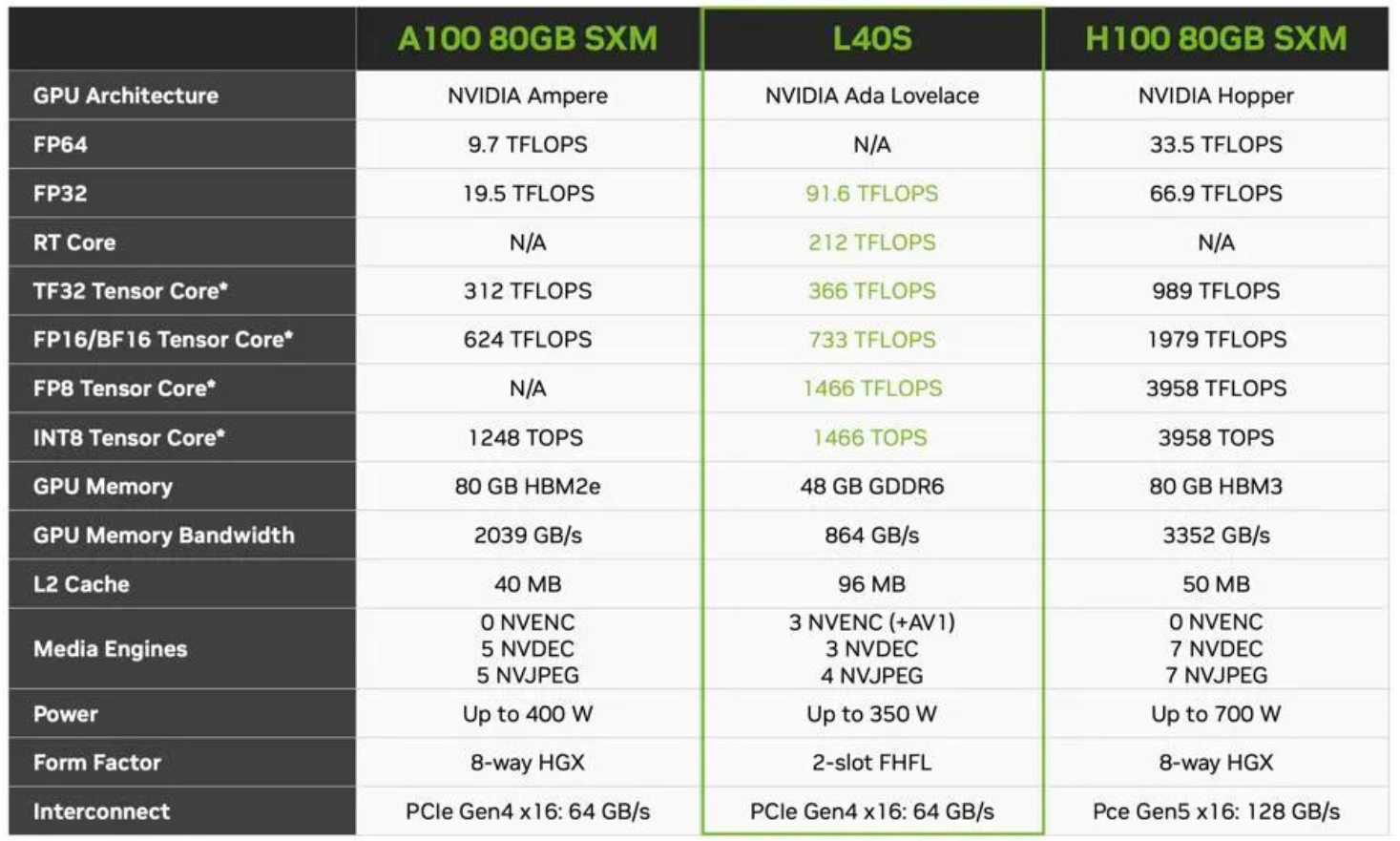
Benchmarks and Specs in Detail
The tool draws from benchmarks like those on Hugging Face and MLCommons, ranking models on metrics such as tokens per second and VRAM requirements. In the HN discussion, whichllm highlighted top performers: for example, Llama 3 8B achieves 50-70 tokens/second on an RTX 3060, while Mistral 7B hits 40-60 on the same setup. Users reported it ranks over 20 popular LLMs, with data showing Llama models often lead in speed-to-accuracy ratios for consumer hardware.
A key insight is its focus on local metrics, like reducing VRAM from 16GB for full models to optimized versions under 8GB, based on community-submitted tests.
| Model | Tokens/Second (RTX 3060) | VRAM Required | Accuracy Score (MMLU) |
|---|---|---|---|
| Llama 3 8B | 50-70 | 5-8 GB | 68% |
| Mistral 7B | 40-60 | 4-6 GB | 65% |
| Phi-3 Mini | 30-50 | 2-4 GB | 60% |
Bottom line: By quantifying performance gaps, such as Llama 3's 20% edge in speed over Mistral on mid-range GPUs, whichllm helps users avoid underpowered choices.
How to Try It
Getting started with whichllm requires cloning the GitHub repository and running a simple script to query benchmarks. First, install Python 3.10 or higher, then use pip install -r requirements.txt from the repo to set up dependencies. Users can input their hardware specs via a command-line interface, like python rank_llms.py --gpu RTX3060 --ram 16GB, which outputs a ranked list in seconds.
For deeper customization, the tool supports JSON inputs for advanced filters, such as prioritizing models under 10GB VRAM. Early testers on HN noted it integrates with frameworks like Ollama for immediate testing.
"Full Setup Steps"
git clone https://github.com/Andyyyy64/whichllm
pip install torch transformers
python main.py --hardware cpu
Pros and Cons
Whichllm excels in democratizing access to LLMs by emphasizing free, local options, with benchmarks showing up to 50% better hardware efficiency than cloud alternatives. Its open-source nature allows easy modifications, appealing to developers tweaking for edge devices. However, limitations include reliance on user-submitted data, which can skew results, and a lack of real-time updates—HN comments pointed out that rankings might lag behind new model releases by weeks.
- Pros: Reduces deployment costs by recommending models that run on 4-16GB RAM, based on verified benchmarks; community-driven, with 15 HN comments adding real-world tweaks.
- Cons: Accuracy depends on benchmark quality, potentially varying by 5-10% from actual performance; no mobile support yet, limiting it to desktop setups.
Bottom line: The tool's strengths in hardware matching outweigh its data dependency for most users, but it requires verification for mission-critical applications.
Alternatives and Comparisons
While whichllm focuses on local setups, alternatives like LMsys Chatbot Arena rank LLMs based on user votes, or Hugging Face's model hub offers filters but lacks hardware-specific benchmarks. For comparison, whichllm's rankings are more tailored: it beat LMsys in speed recommendations, with Llama 3 ranked first for RTX cards versus LMsys's broader preferences.
| Feature | whichllm | LMsys Arena | Hugging Face Hub |
|---|---|---|---|
| Hardware Focus | Yes (e.g., VRAM) | No | Partial |
| Update Frequency | Weekly community | Real-time votes | On release |
| Free Access | Full | Query-based | Model downloads |
| Benchmark Types | Speed, accuracy | User preference | Varied metrics |
This makes whichllm ideal for offline workflows, unlike LMsys, which relies on internet access.
Who Should Use This
Developers with limited hardware, such as those using RTX 30-series GPUs or older CPUs, will find whichllm invaluable for optimizing LLMs without overspending on upgrades—it's perfect for prototyping AI apps on a budget. Conversely, enterprise teams with access to cloud resources should skip it, as their needs favor scalable solutions like Azure AI over local rankings. Hobbyists or researchers in resource-constrained environments, where benchmarks show 20-30% efficiency gains, stand to benefit most.
Bottom line: Target users are individual creators or small teams avoiding cloud costs, but large-scale operations might find it too narrow.
Bottom Line and Verdict
In a field where hardware mismatches waste hours, whichllm delivers practical value by bridging benchmarks and real setups, potentially saving developers thousands in unnecessary upgrades. Looking ahead, its community-driven model could evolve into a standard for local AI, especially as more users contribute data to refine rankings.
This tool underscores the growing need for accessible AI tools, positioning whichllm as a key player for efficient, hardware-aware development in the LLM space.




Top comments (0)