

Color has always been one of the hardest design decisions to get right — not because people lack taste, but because most tools make you work in isolation. You pick colors in a vacuum, stare at hex codes, and only see how they actually work together once you're already three hours into building something.
I wanted to fix that. So I built an AI color palette generator that doesn't just give you colors — it understands context, names every color intelligently, and shows you exactly how your palette looks on a real website before you commit to anything.
Here's what makes it different.
The AI Naming Problem Nobody Talks About
Most AI color tools generate palettes and call it done. You get 5 hex codes labeled "Color 1" through "Color 5" and you're supposed to figure out what to do with them.
The first thing I wanted to solve was naming. When you type a prompt like "Cyberpunk Night Market" or "Organic Skincare Brand" — the AI doesn't just generate matching colors, it generates names that fit the concept. You get something like "Neon Rainfall" or "Cold Circuit Blue" instead of "Dark Blue #3."
It sounds like a small thing. It's not. Named colors have personality. They're easier to communicate to clients, easier to remember in a design system, and they make the whole palette feel intentional rather than random.
5 Ways to Generate — Not Just One
Most color tools have one generation method. I built five because different workflows need different approaches:
AI from text prompts — describe any mood, scene, or brand concept in natural language. The AI generates a matching palette with custom color names. Set color count from 2 to 12.
Image extraction — upload any photo, screenshot, or design file. Choose from 10 extraction moods — Warm, Cool, Pastel, Muted, Jewel Tones, Neon, Earthy, Deep, Monochrome, or Colorful — and extract up to 12 colors. You can also drag markers directly on the image for precise manual picking.
Color harmony theory — 7 theory-based harmony types (Complementary, Analogous, Triadic, Split Complementary, Monochromatic, Square, Rectangle) each supporting 2 to 12 colors. Anchor with a base color or randomize completely.
Theme presets — 11 built-in aesthetic themes for when you need something fast. Retro, Dark, Pastel, Neon, Gradient, Vintage, Monochromatic and more.
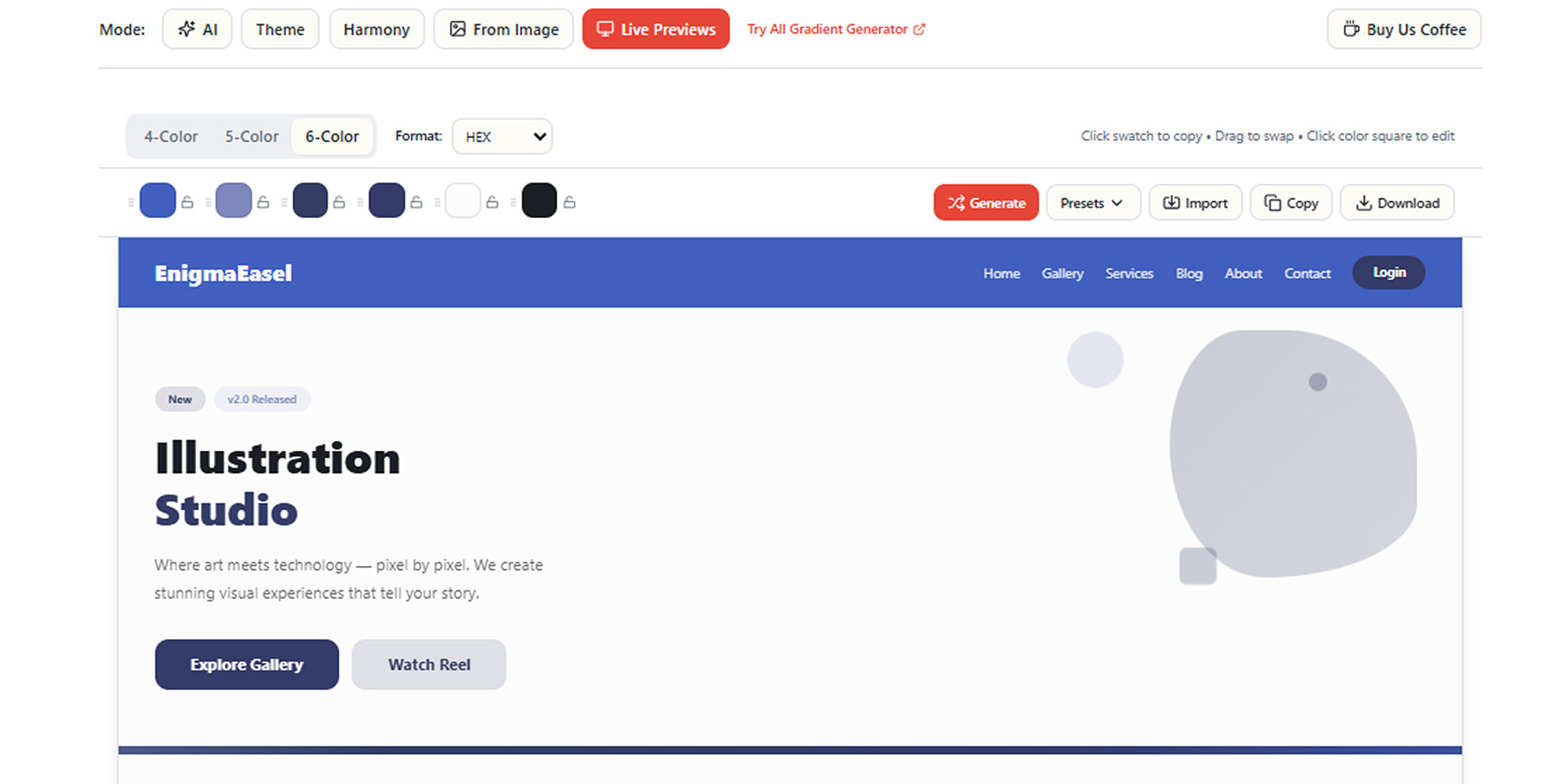
Live website preview — this is the mode I'm most proud of. Your palette gets applied to a complete full-page website mockup in real time — navbar, hero section, features, testimonials, CTA, footer. Supports 4-color, 5-color, and 6-color layout modes. You see exactly how your palette functions in context before committing to it.
Built for Accessibility Too
Color palettes that look beautiful in a swatch grid can completely fall apart for real users. Two features I built specifically for this:
Color blindness simulation — preview your palette through multiple vision types including deuteranopia, protanopia, and tritanopia. See exactly what 300 million color-blind users worldwide would experience.
WCAG contrast checker — every text and background combination gets checked against accessibility standards instantly. No more shipping low-contrast designs by accident.
The Technical Stuff
Beyond generation, every palette has a full editing suite — HSL and LCH sliders for precise fine-tuning, global Lighter/Darker/Vibrant adjustments, and direct hex code input.
Lock the colors you love, regenerate the rest. Full undo/redo history so you never lose a combination that worked.
When you're ready to export — copy individual hex codes, download as PNG, JPG, SVG, or PDF in preset or custom sizes, or grab code directly in CSS, SCSS, Tailwind, Swift, Kotlin, or JSON.
Save palettes to local storage for quick access later. No account needed for any of it.
Why I Built This
I kept switching between 4 or 5 different tools every time I needed a palette — one for AI generation, one for image extraction, one for harmony theory. It was fragmented and slow.
The goal was one tool that covers every approach, without requiring a sign-up or hitting a paywall halfway through.
It's fully free. No account. No watermarks.
🔗 Try it: [https://enigmaeasel.com/tools/color-palette-generator/]




Top comments (0)