
Barcode Printer By A Smart Investment for Modern Businesses
A barcode printer is no longer just a tool for large warehouses or supermarkets. Today, businesses of all sizes rely on barcode printing to manage stock, speed up billing, and reduce manual errors. Whether you run a retail store, a logistics company, a pharmacy, or a manufacturing unit, the right barcode solution can improve accuracy and efficiency in daily operations.
In this article, we will break down what a barcode printer is, how it works, the different types available, and how to choose the right one for your needs.
What Is a Barcode Printer?
A barcode printer is a specialized printer designed to produce barcode labels and tags. These labels contain machine-readable codes that store product details such as price, batch number, or tracking information.
Unlike regular printers, barcode printers are built for precision and durability. They ensure clear lines and consistent quality so scanners can easily read the codes without errors.
Businesses use them for:
Product labeling
Shipping labels
Inventory management
Asset tracking
Retail price tags
How Does a Barcode Printer Work?
Barcode printers create labels using either direct thermal or thermal transfer printing technology. Both methods use heat, but they function slightly differently.
Direct Thermal Printing
This method uses heat-sensitive paper. The printer head applies heat directly to the paper, which darkens to form the barcode and text.
Advantages:
No need for ink or ribbon
Lower maintenance
Cost-effective for short-term labels
Best for: Shipping labels, receipts, and temporary tags.
Thermal Transfer Printing
This process uses a ribbon that melts onto the label surface when heated. It produces more durable and long-lasting prints.
Advantages:
Resistant to heat and moisture
Suitable for long-term use
High-quality output
Best for: Product labeling, asset tracking, and industrial environments.
Types of Barcode Printers
Choosing the right barcode printer depends on your business size and usage level.
Desktop Barcode Printer
Compact and affordable, desktop models are ideal for small businesses with moderate printing needs. They fit easily on counters and are simple to operate.
Industrial Barcode Printer
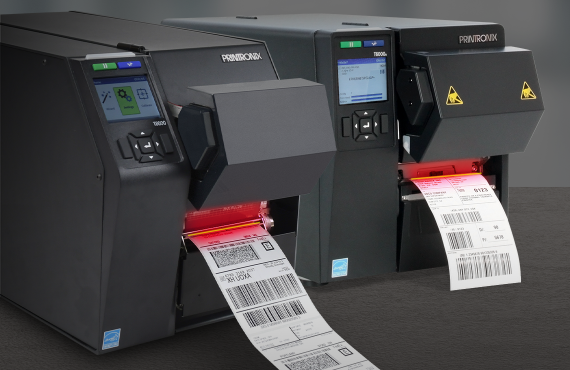
Built for heavy-duty use, industrial printers handle high-volume printing in warehouses and factories. They are durable and designed for continuous operation.
Mobile Barcode Printer
These portable devices are perfect for fieldwork, delivery services, and retail staff who need to print labels on the go.
Key Features to Consider
When selecting a barcode printer, consider the following factors:
Print Resolution
Higher resolution means clearer barcodes. For detailed labels or small text, choose a printer with at least 300 DPI.
Print Speed
If your business handles high order volumes, faster print speeds will improve workflow efficiency.
Connectivity Options
Modern barcode printers support USB, Ethernet, Bluetooth, and Wi-Fi. Choose a model that integrates easily with your POS or inventory system.
Label Size Compatibility
Make sure the printer supports the label sizes required for your products or packaging.
In addition to barcode labeling, many retail and POS environments also rely on thermal paper rolls for printing receipts, making them an essential part of a complete billing and inventory system.
Benefits of Using a Barcode Printer
Investing in a barcode printer offers several advantages:
Improved Accuracy
Manual data entry can lead to mistakes. Barcodes reduce human errors by automating data capture.
Faster Operations
Scanning barcodes is much quicker than typing product details, which speeds up checkout and warehouse processes.
Better Inventory Control
Real-time tracking helps prevent stock shortages and overstocking.
Professional Appearance
Printed labels give products a clean and organized look, improving brand credibility.
Industries That Rely on Barcode Printing
Many industries depend on barcode systems to stay organized and efficient:
Retail stores
Supermarkets
E-commerce businesses
Healthcare facilities
Manufacturing companies
Logistics and courier services
From tracking medicines in hospitals to managing parcels in warehouses, barcode printing plays a vital role in smooth operations.
Maintenance Tips for Long-Term Performance
To keep your barcode printer running smoothly:
Clean the printhead regularly
Use high-quality labels and ribbons
Avoid dust and moisture exposure
Follow manufacturer guidelines for servicing
Proper maintenance ensures consistent print quality and extends the life of your device.
How to Choose the Right Barcode Printer
Before making a purchase, ask yourself:
How many labels do I print daily?
Do I need portable printing?
Are labels temporary or long-lasting?
Does it integrate with my current system?
For small retail stores, a desktop printer is often enough. For warehouses or production lines, an industrial model is more suitable. Always match the printer to your workload and environment.
Final Thoughts on Barcode Printer Solutions
A barcode printer is more than just a printing device. It is a practical tool that improves efficiency, reduces errors, and supports business growth. By choosing the right type and properly maintaining it, you can streamline operations and enhance productivity across departments.
Whether you manage a retail shop, warehouse, or online store, investing in a reliable barcode printer will save time, cut costs, and improve accuracy in the long run.
For more articles, visit by here

Tahir Mahmood
Posted on
Choosing the Right Barcode Printer for Business
For further actions, you may consider blocking this person and/or reporting abuse



Top comments (0)