


Prompting practice has moved from ad hoc trial and error to named methods, benchmarked techniques, and repeatable evaluation. OpenAI's late-2023 guidance on prompt design reflects that shift, and OpenAI's prompt-engineering guide summary captures the same move toward structured control.
In production, the failure mode is usually plain: the prompt leaves behavior implicit, so the model flips polarity, drifts on format, or changes output shape after a model upgrade, a temperature change, or a small context shift. That is why prompt engineering for generative AI now belongs in the same conversation as schemas, tool specs, and eval suites.
Table of Contents
- Why Prompt Engineering Is a Control-Surface Problem Now
- The Six Core Principles That Still Hold Up
- Zero-Shot, Few-Shot, and Chain-of-Thought Compared
- Reusable Prompt Templates You Can Copy Today
- Evaluating Prompts With Evidence Instead of Vibes
- The Iteration Loop From Prompt Fixes to System Changes
- Tooling and References That Keep Your Work Reproducible
- Checklist and Common Pitfalls in Production
Why Prompt Engineering Is a Control-Surface Problem Now
A summarization feature once behaved fine until the team swapped the model. The prompt buried a soft instruction about “keeping the tone balanced,” and the output flipped from neutral summaries to subtle approvals whenever the source text leaned positive. The English looked harmless, but the prompt had no hard structure around the judgment, no explicit output schema, and no reproducible test harness.
That kind of failure is why prompt engineering for generative AI is better treated as control-surface design. You are not polishing prose. You're choosing where the model gets context, what it must emit, what tools it can call, and how you'll detect regressions.
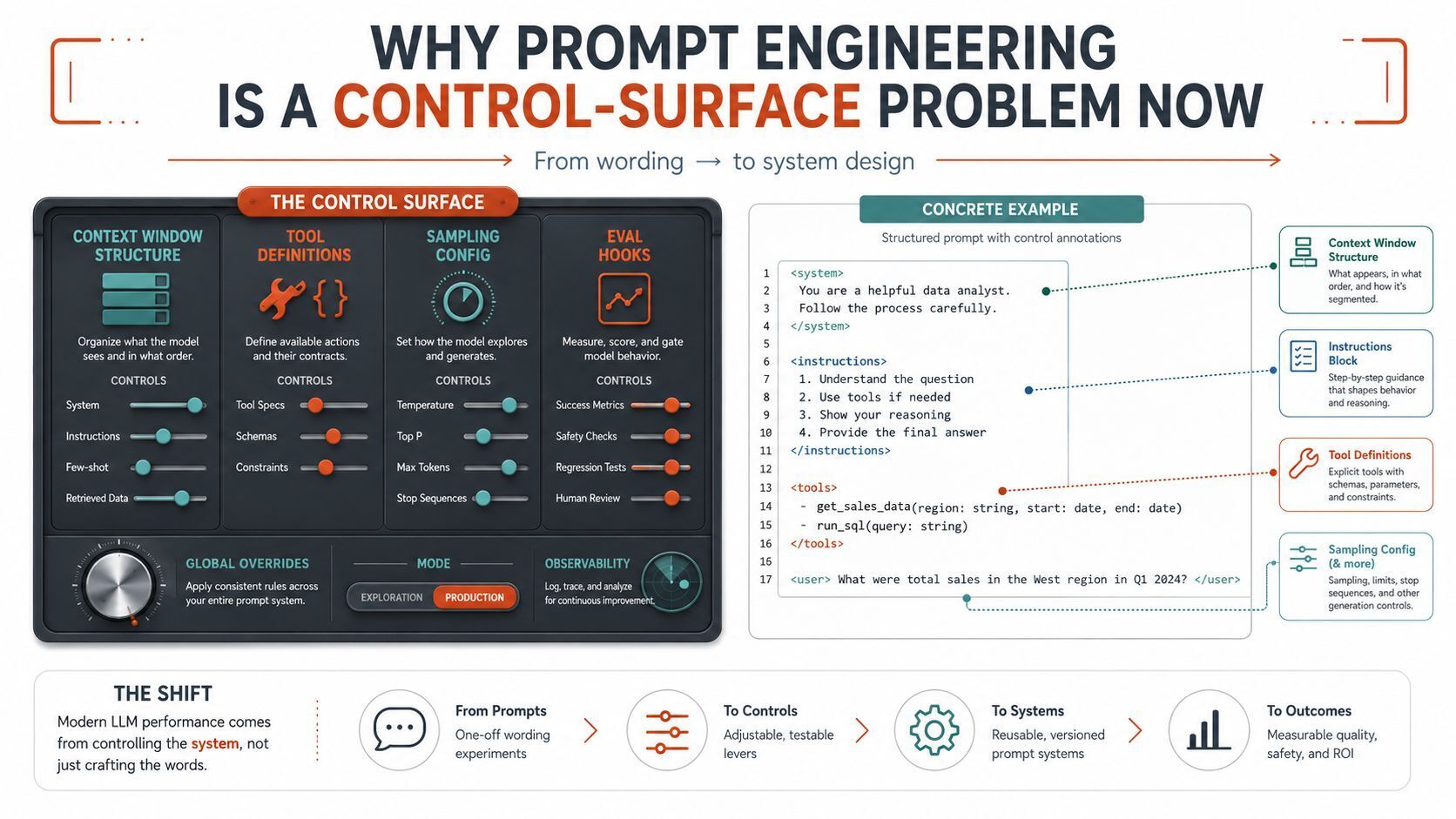
Practical rule: if the output matters in production, the prompt should look more like an interface contract than a paragraph.
A good internal reference for this mindset is Beyond the Chatbox, Why Prompts Aren't Enough and What to Do Instead. The point isn't to collect prompt tricks. It's to reduce hidden behavior.
The production pattern is predictable. Teams overfit on one phrasing, then a model swap exposes the underlying dependency, which is usually an underspecified structure, a missing example, or a loose output format. The fix is structural: separate instruction blocks, explicit schemas, pinned decoding settings, and an eval set that catches drift before users do.
The Six Core Principles That Still Hold Up
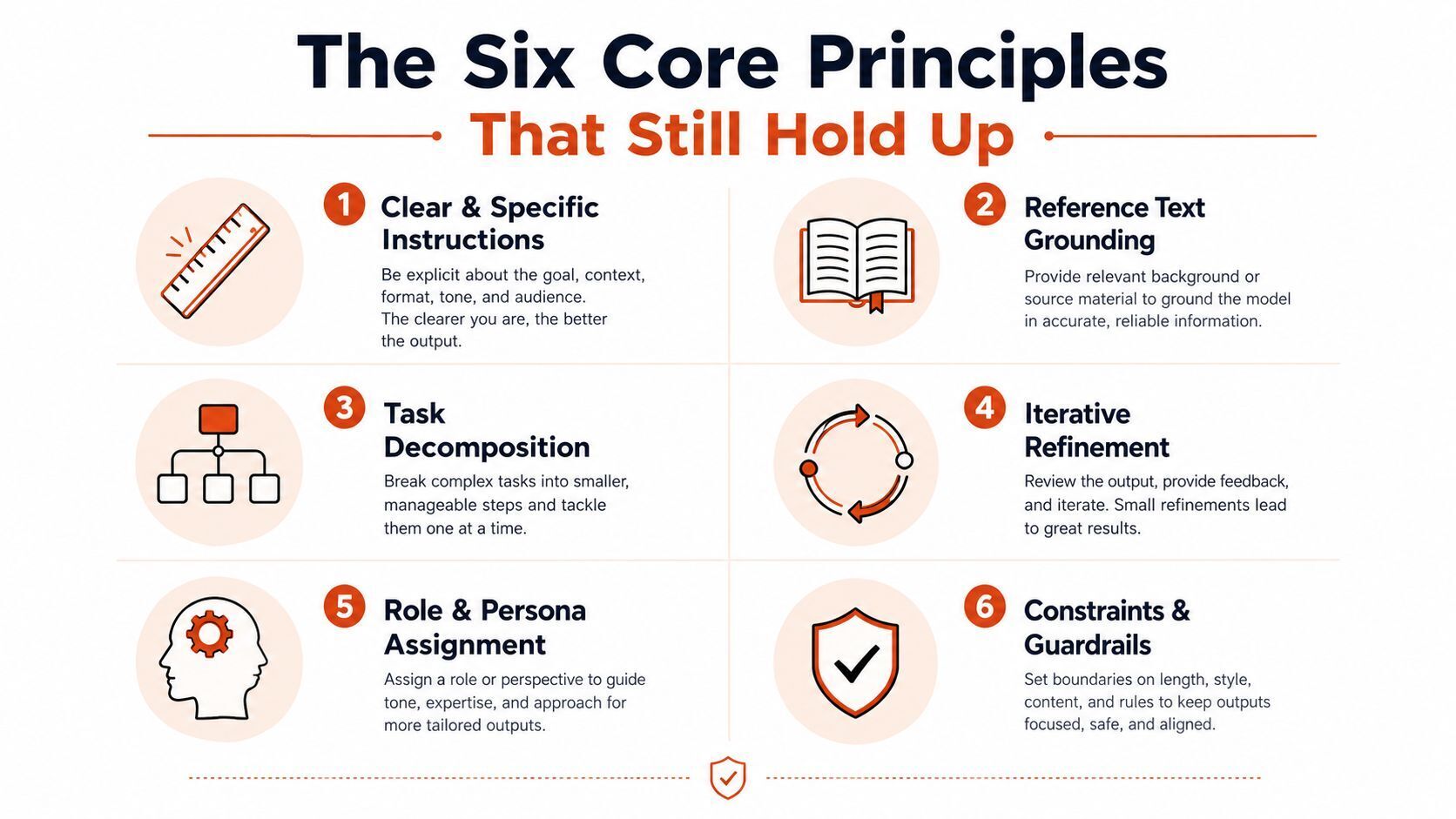
OpenAI's guidance distilled the field into clear instructions, reference text, subtasks, time to think, external tools, and systematic testing. Those six ideas still explain most of the prompt wins that survive production, and they line up with the practical advice in this getting started guide from InjectionMolds.
Treat prompt engineering as control-surface design. Choose where the model gets context, what it must emit, what tools it can call, and how you will detect regressions. The prompt is an interface contract, not a paragraph you polish until it sounds convincing.
Clear instructions and reference text
Start by stating what success looks like, then ground the model in the text it should use.
System: You are an analyst. Answer only from the provided policy text.

User: Summarize the policy in 5 bullets for customer support.
Policy text: {{policy}}
System: You are an analyst.

User: Write a helpful summary.
The first version is easier to test and easier to compare across model changes. The second leaves the model to guess your intent. For a practical primer on this style, improve prompt engineering success is a useful external reference.
Decompose the task
If one prompt asks for extraction, classification, and rewriting, split the work.
System: Extract entities first, then classify the request.

User:
1. Extract all names, dates, and products.
2. Classify the request as billing, support, or sales.
3. Return JSON only.
User: Handle this customer message end to end.
The decomposed version is easier to debug when one step fails. It also makes it obvious which part of the workflow needs a different instruction, schema, or tool call.
Give the model time to think, but only when the task needs it
For multi-step reasoning, a scratchpad or explicit intermediate step can help. For a simple lookup, it usually wastes tokens and adds latency.
System: Solve step by step, then give only the final answer.

User: Compute the shipping plan from these constraints: {{constraints}}
System: Return the matching policy clause.

User: What is the refund window?
The second prompt should stay direct. A reasoning wrapper there adds cost without much benefit.
Use tools instead of asking the model to fake them
When the model must calculate, fetch, or inspect live state, use function calling or another tool boundary.
System: Use the calculator tool for arithmetic.

User: Add these invoice totals: {{amounts}}
System: Estimate the total directly.

User: Add these invoice totals: {{amounts}}
The first pattern is safer. The second can look fine in demos and fail as soon as inputs get messy or the model changes.
Test changes systematically
Never trust one-off spot checks.
System: You must preserve the output schema.

User: Transform this input according to the schema below: {{schema}}
User: Make the output cleaner.
Good prompt work leaves a trail. Keep examples, prompts, decoding settings, and expected outputs together so you can reproduce the result and see exactly what changed when quality slips.
Zero-Shot, Few-Shot, and Chain-of-Thought Compared
The practical question is control, not style. Zero-shot, few-shot, and chain-of-thought change different parts of the prompt surface, and they behave differently under the same model, same task, and same eval set.
The EMNLP 2024 sensitivity study showed that moving from 0-shot to 1-shot gave the biggest stability gain, and that few-shot prompting reduced sensitivity to phrasing and input order, even when accuracy on ARC-Challenge did not always rise (EMNLP 2024 paper). That matters in production. A prompt can be easier to reproduce without scoring higher on every benchmark.
| Technique | Avg. accuracy delta | Token cost | Latency impact | Best for |
|---|---|---|---|---|
| Zero-shot | Baseline, when the task is clear | Lowest | Lowest | Clean instructions, simple lookups |
| Few-shot | Often improves stability more than raw score | Higher, due to examples | Higher | Classification, extraction, fixed output shapes |
| Chain-of-thought | Useful on multi-step reasoning | Highest | Highest | Math, logic, planning, hard transforms |
Zero-shot fits tasks that are already unambiguous and well matched to the model's instruction-following behavior. A standard rewrite, a label from a fixed set, or a direct lookup usually belongs here.
Few-shot is the safer default when the output shape matters more than creativity. A couple of good examples teach format faster than a paragraph of meta-instructions, and adding more examples often gives diminishing returns. Once the model has the pattern, extra shots mostly add token cost.
Chain-of-thought helps when the model has to carry several dependent steps. It is not a free gain. It increases latency and token use, and the stability result above is one reason teams choose few-shot in production even when the raw score barely moves. A reasoning-focused walkthrough like Subtext visualizes LLM reasoning steps makes the trade-off easy to inspect.
Use zero-shot for directness, few-shot for shape control, and chain-of-thought only when intermediate reasoning is part of the task.
Reusable Prompt Templates You Can Copy Today
The best templates are boring in the right way. They pin the model's job, the expected format, and the constraint set, so you can change the input without rewriting the whole prompt.
A practical template library is also where consistency starts to beat cleverness. If you want a broader set of vetted patterns, PromptZone's prompt library foundation is a useful place to compare variants, but the point of any library is the same, reuse the structure and log every change against your eval set.
Extraction
System: Extract structured data only. Return valid JSON.

User:
From the text below, extract company name, contact email, and renewal date.
Text: {{text}}

Output schema:
{
  "company_name": "",
  "contact_email": "",
  "renewal_date": ""
}
Use this for invoices, contracts, support tickets, and logs.
Summarization
System: Summarize for a busy product manager. Keep it concise and neutral.

User:
Summarize the following in 4 bullets, no more than 18 words each.
Text: {{text}}
This works when the audience is known and length matters more than style.
Classification
System: Classify into one label only. Do not explain.

User:
Choose one label from billing, bug, feature-request, or account-access.
Message: {{message}}
If the labels are ambiguous, add calibration examples, but keep the output constraint strict.
Code generation
System: Write production-grade code. Include only the requested function and tests.

User:
Implement this function signature:
{{signature}}

Constraints:
- Use no external network calls.
- Add unit tests for edge cases.
- Return Python only.
Structure pays off. If you don't force tests, you usually get plausible code and no verification.
Agent tool use
System: Use tools when needed. Stop when the task is complete.

User:
Tool manifest:
- search_docs(query)
- fetch_record(id)
- calculate_total(items)

Task:
Resolve the user's request using only the tools above.
Input: {{task}}
Stop conditions:
- The answer is confirmed from tool output.
- No more than 3 tool calls.
- Return a final answer with no chain-of-thought.
That template is useful when tool boundaries matter more than wording. For agent design, Captapi's engineering guide for building agents gives a solid adjacent view of the workflow.
Keep the prompt short enough that the model can't hide from the contract.
Tuned against which model and temperature? That note belongs in your repo alongside the prompt. Without it, the template becomes folklore the moment someone copies it into a different system.
Evaluating Prompts With Evidence Instead of Vibes
A prompt needs a held-out set, not a handful of nice examples. I prefer a test set with at least a couple hundred cases, fixed decoding settings, and a baseline run saved in version control. Without that, a score is just a feeling dressed up as a metric.
The 2025 benchmark work on code generation is a useful reminder that prompt design can change behavior in ways you will miss if you only inspect a few outputs. Validate it against the task you care about, not against a general impression of quality. The same rule applies to every prompt class, including classification, extraction, and code tasks (benchmark study).
Use three measurement layers.
- Exact match and rubric scoring for tasks with known answers.
- Pairwise diffs against the stored baseline to catch regressions.
- LLM-as-judge panels for open-ended outputs, with separate judge models and a fixed rubric.
A prompt that changes behavior when you shuffle examples or wording is not production-ready yet. Small gains that hold on a held-out set matter more than bigger gains measured on the examples you tuned against.
Practical rule: if the eval only works on the prompts you already saw, it's not an eval.
That is why prompt iteration needs a diffable baseline. Save the model, temperature, prompt body, and output. Then compare the new run side by side. If the new version helps one slice and hurts another, you have learned something real instead of collecting a prettier sample.
The Iteration Loop From Prompt Fixes to System Changes
The loop is simple, but the order matters. Diff the prompt first. Then diff the model, because a model swap can break behavior even when the text stays fixed. After that, sweep temperature and top-p, because decoding settings often explain “mysterious” regressions better than wording does.
Use structure before speculation.
System: Return strict JSON matching the schema.

User:
{{task}}
Schema:
{{schema}}
If output still drifts, the next move is not more adjectives. Tighten the output contract, add retrieval, or switch models.
A practical escalation rule looks like this:
- Three prompt revisions with no real gain means phrasing is probably not the problem.
- Cost dominates means move to a smaller model with tighter constraints.
- Domain jargon keeps getting missed means consider retrieval or fine-tuning.
- Tool dependence is stable but output isn't means fix the tool wiring or schema first.
That matches the systematic review and guide and what I've seen in shipped features. Prompting works as one control surface, not the whole system. Teams keep trying to rescue a bad interface with better phrasing, then eventually realize the interface itself is the problem.
If you need a quick order of operations, use prompt, retrieval, tool wiring, fine-tune. Stop at the first layer that the evidence says is failing.
For agent work, the same pattern shows up in the engineering guide for building agents. Keep the loop observable, save each run, and compare against a fixed baseline before you decide the prompt is the issue.
Tooling and References That Keep Your Work Reproducible
The tooling stack should map to the job in front of you. Pick a model, estimate cost, size hardware if you self-host, and keep the prompt trail attached. If a tool cannot support that audit path, it is just a nicer way to browse.
PromptZone fits that workflow as one option. Its prompt directory shows full sandbox-run outputs alongside reproduction metadata, so you can borrow a pattern without importing guesswork. For prompt evaluation across models, the Promptosia performance-tracking guide is a useful reference point.
| Tool | Primary Job | Input | Output |
|---|---|---|---|
| which-llm | Pick a model by task and constraint | Task, latency, cost ceiling | Shortlist of model options |
| llm-api-pricing | Budget API usage | Model name, input/output mix | Cost reference for planning |
| llm-gpu-calculator | Size local inference hardware | Model size, precision target | VRAM and GPU guidance |
| prompt directory | Reuse vetted prompt patterns | Prompt category, use case | Prompt page with evidence drawer |
| ai-resources | Browse the broader directory | Resource type | Curated list of tools and references |
For price-aware planning, use llm-api-pricing. For model selection, which-llm is the faster starting point.
The habit that holds up is simple. Link each stage to one artifact. Selection, cost, hardware, and prompt reuse should all leave a trail you can revisit when the model changes next month.
Checklist and Common Pitfalls in Production
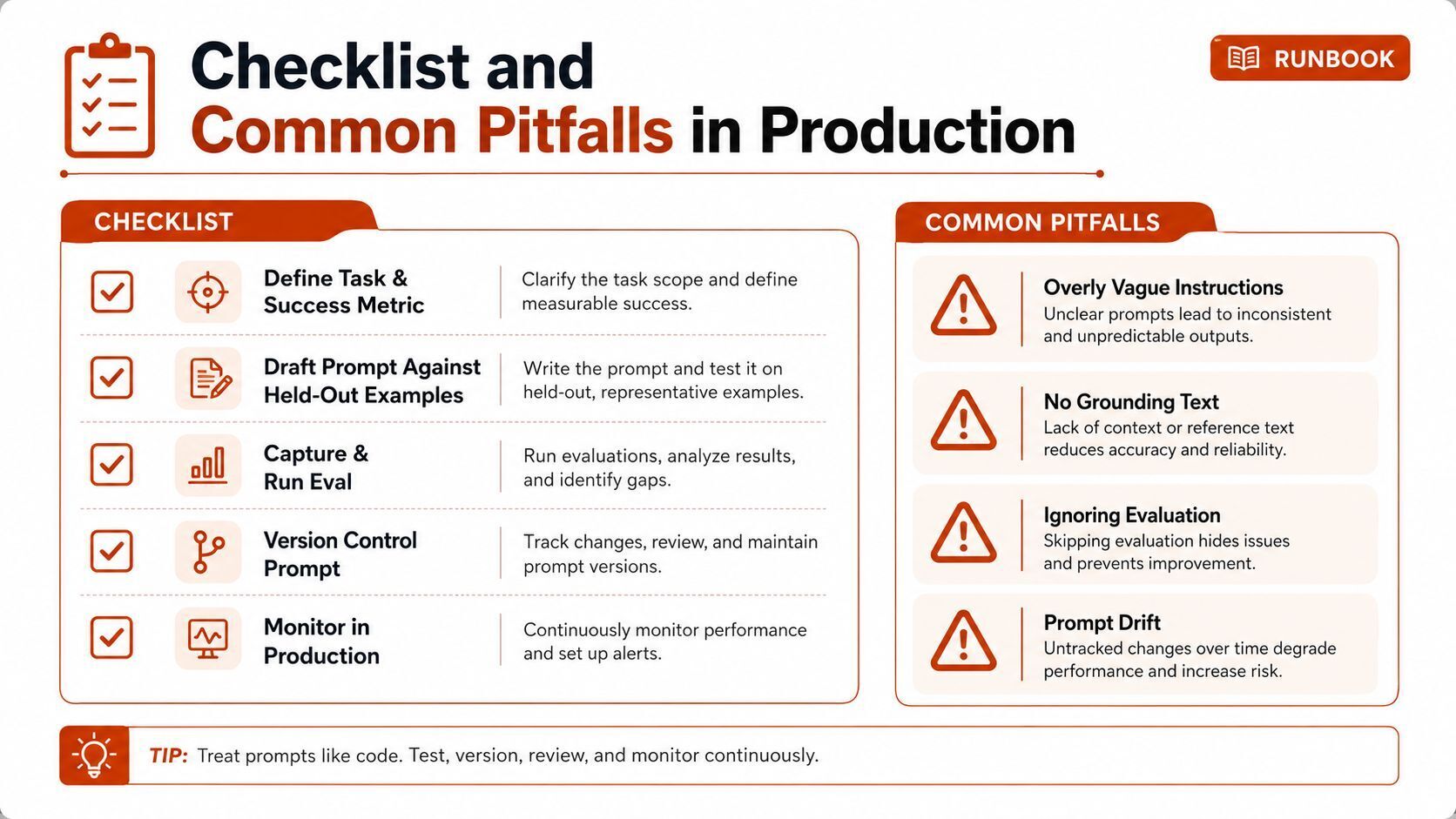
A production prompt workflow should read like a runbook.
- Define the task and success metric.
- Draft against held-out examples.
- Capture the eval baseline.
- Version the prompt in Git.
- Sweep parameters when needed.
- Log cost and latency.
- Choose the escalation path early.
The common failures are just as consistent. Teams trust vibe checks instead of evals. They ignore output-schema drift. They stuff more context into the window until the model gets noisier, not better. They hide prompt edits outside code review. They skip cost guardrails until the API bill makes the feature hard to keep on.
A short FAQ answer helps here. Re-evaluate prompts whenever the model, schema, or upstream context changes. If a fix only works on three examples, it's a hint, not a ship criterion. If prompt revisions stall, move up the stack to retrieval, tool wiring, or fine-tuning.
For the actual workflow of borrowing, testing, and versioning prompts, the directory at PromptZone gives you a place to start with evidence attached instead of anecdote. If you're shipping LLM features, use the templates, compare models, check the pricing pages, and keep every change tied to an eval diff before you roll it into production.
PromptZone keeps the parts of prompt engineering that matter for shipped systems, model comparisons, pricing references, hardware sizing, and prompts you can inspect instead of trust on faith. If you're building generative AI features and want a cleaner evidence trail for your prompts, visit PromptZone and compare the tools, templates, and model references against your own workflow.
Published via Outrank tool






Top comments (0)