

Hey everyone! 👋
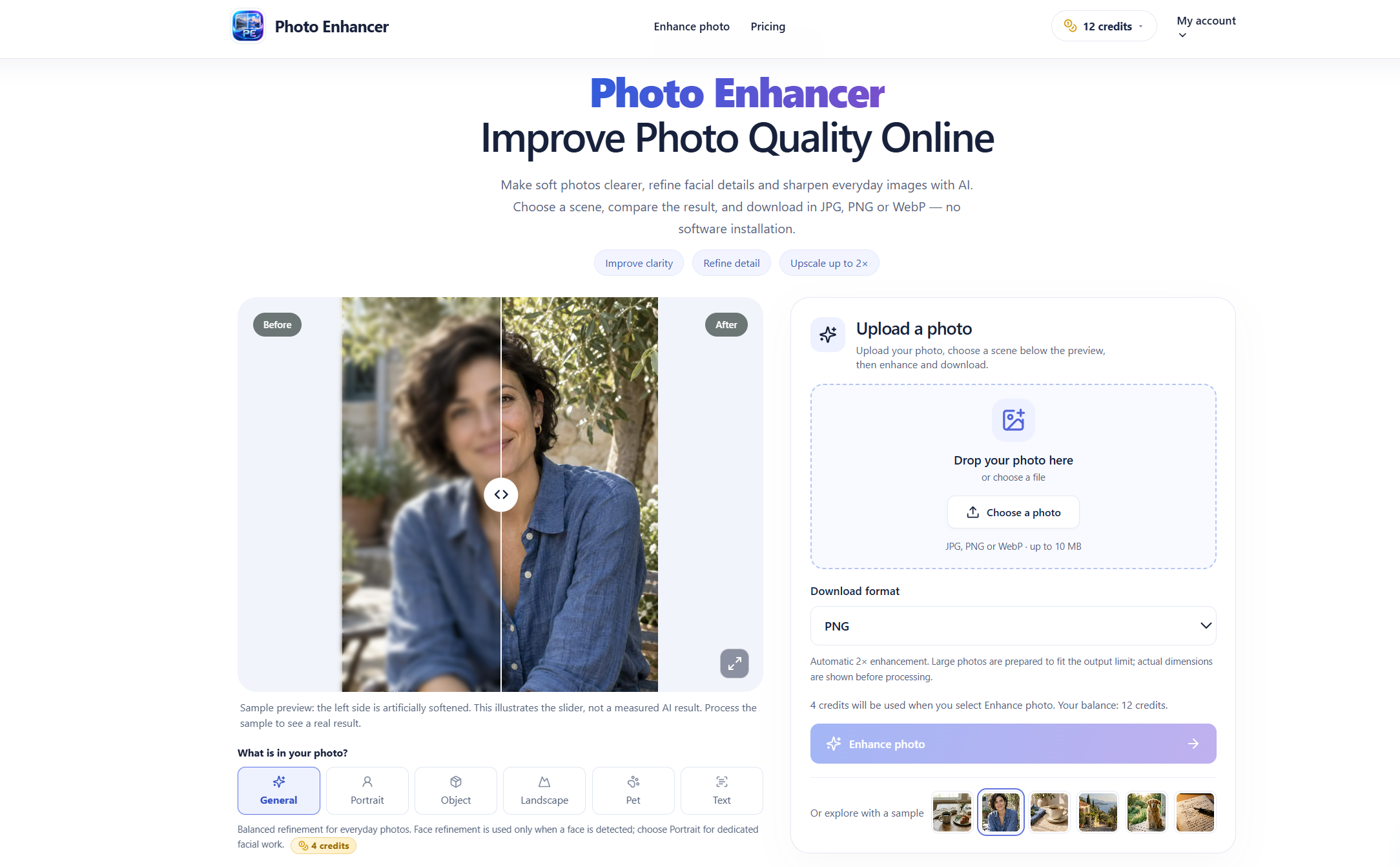
I've been working on EnhancerPhoto, an AI-powered photo enhancement tool designed to help anyone improve image quality without complicated editing software.
We've all experienced it — a great photo turns out slightly blurry, an old family picture loses its clarity, or an image looks too small and pixelated when enlarged.
I wanted to create a simple solution that makes photo enhancement accessible to everyone.
✨ What Can EnhancerPhoto Do?
Here are some of the features I've been building:
- AI Photo Enhancer — Improve photo clarity, refine details, and enhance everyday pictures.
- Image Upscaler — Enlarge low-resolution images while improving their visual quality.
- Sharpen Image — Make soft images clearer without unnecessarily changing their original dimensions.
- Photo Restoration — Help clean up scratches and faded details in old photographs.
- Background Remover — Remove distracting backgrounds from images.
- AI Photo Editor — Access additional image-editing tools in one place.
🚀 Why I Built It
I noticed that many AI image tools require users to create an account before they can even try the core functionality.
With EnhancerPhoto, eligible visitors can try photo enhancement without signing up, using the available daily free credits.
The workflow is simple:
- Upload a JPG, PNG, or WebP image.
- Choose a scene such as Portrait, Landscape, Pet, Object, or Text.
- Let AI process and enhance the photo.
- Compare the original image with the enhanced result.
- Download your image in JPG, PNG, or WebP format.
You can inspect the before-and-after comparison before deciding whether to keep the result. There are no forced watermarks on downloads.
💡 Who Is It For?
EnhancerPhoto can be useful for:
- Content creators improving images for social media.
- Online sellers preparing clearer product photos.
- Photographers refining slightly soft images.
- Families cleaning up old photographs.
- Anyone who wants better-looking photos without learning Photoshop.
AI enhancement works best when the original image still contains recognizable details. Extremely blurry or heavily damaged photos may not be fully recoverable.
🔗 Try EnhancerPhoto
Website: https://enhancerphoto.com/
You can start with the available free credits and explore the tools directly in your browser.
❤️ I'd Love Your Feedback!
This is an ongoing project, and I'm continuously improving the user experience and enhancement quality.
I'd love to hear from the PromptZone community:
- What AI photo enhancement features would you find most useful?
- Do you prefer natural-looking enhancements or stronger AI reconstruction?
- What is your biggest frustration with existing AI photo editing tools?
Your feedback would mean a lot and help me decide what to improve next.
Thanks for checking it out! 🚀



Top comments (0)