

You want a Christmas photo with the whole family, but nobody can find a day when everyone is available.
Someone is traveling. Someone has work. The kids have their own plans. Before you know it, Christmas is getting closer and another family photo session still hasn't happened.
But there's probably already a picture you like. Maybe it was taken at a birthday party, during a weekend visit, or on an ordinary afternoon when everyone happened to be together.
You don't need a new family photo. You can start with the one you already love.
With Christmas AI, you can upload an existing family picture and turn it into a Christmas-themed portrait without arranging another photo session.
Start With a Family Photo You Already Have
The best starting point isn't necessarily a professional portrait.
A simple family picture taken at home can work well if everyone's face is visible and the lighting is reasonably clear.
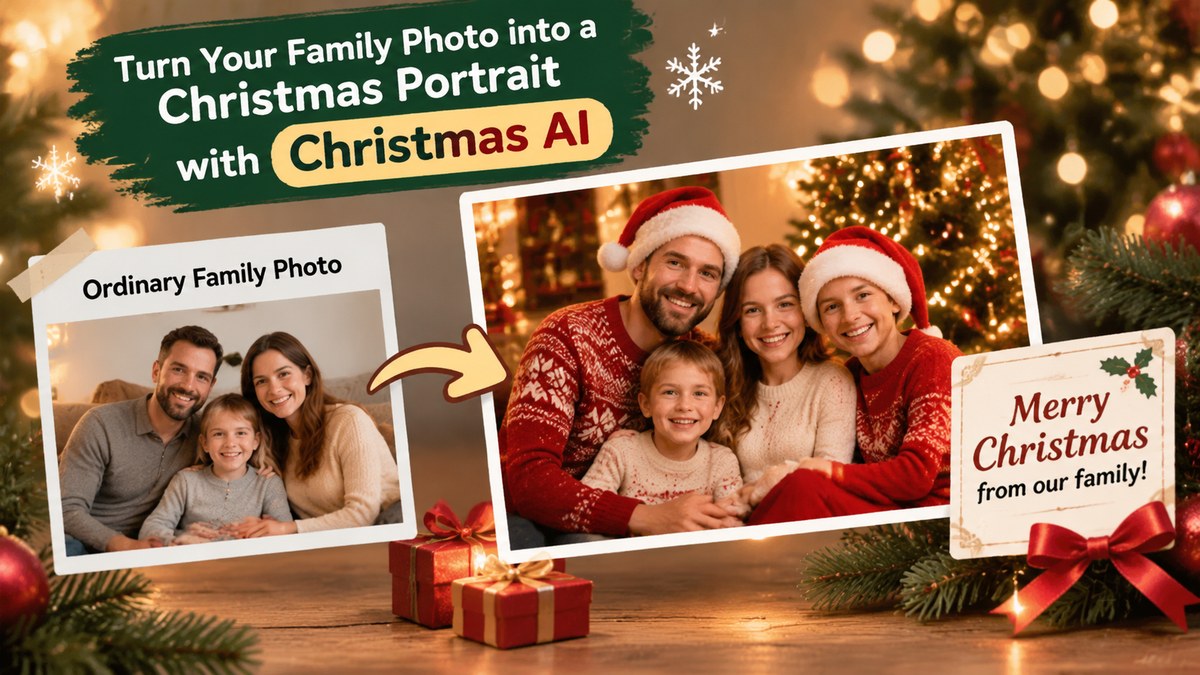
For example, imagine an ordinary living room photo. Everyone is sitting together, but there's no Christmas tree, festive decoration, or holiday clothing.
Instead of trying to recreate the entire scene, you can use Christmas AI to explore a different holiday setting.
I'd start with a style that suits the family rather than choosing the most elaborate option.
A cozy fireplace, for example, can give the picture a warm holiday atmosphere. Matching pajamas might suit a more playful family portrait, while a snowy cabin creates a different seasonal feel.
The important thing is to choose a setting that feels appropriate for the people in the original photo.
Give the Picture a Christmas Feel
Christmas AI offers ready-made styles as well as the option to describe a scene yourself.
For a family portrait, I'd start with something straightforward:
- Setting: A comfortable living room with a decorated Christmas tree.
- Clothing: Casual winter outfits rather than overly elaborate costumes.
- Lighting: Soft, warm Christmas lights.
- Mood: Relaxed and familiar, like a family gathering at home.
You can also use a text instruction such as:
Create a warm Christmas family portrait in a cozy living room with a decorated Christmas tree and soft golden lights. Use comfortable winter clothing and a relaxed, natural atmosphere. Keep the family members recognizable and preserve the original group composition as much as possible.
The idea isn't to change everything about the original picture. It's to give it a seasonal look while keeping the family itself at the center.
After generation, I'd check the faces, clothing, hands, and overall composition. AI-generated results can change individual details, so it's worth reviewing the image before sharing it.
Turn the Portrait Into a Christmas Card
A festive family picture is useful on its own, but you might also want something to send to relatives and friends.
That's where Christmas AI's Christmas Card Maker becomes useful.
You can create a card using an uploaded photo or start with a text description. You can also specify the exact greeting you want by putting it in quotation marks.
For example:
"Merry Christmas from our family to yours!"
Or make it a little more personal:
"Wishing you a peaceful Christmas and many happy moments in the year ahead."
This is a nice option when you don't want to send another generic holiday greeting.
You can use the family portrait as the starting point, choose a card design, and add a message that actually sounds like something your family would say.
A Few Things Worth Checking Before Sharing
Before uploading a family picture, make sure you have permission to use everyone's photo, especially when children are included.
I'd also keep three things in mind:
- Choose an original picture with clearly visible faces.
- Avoid heavily filtered or very blurry images.
- Review the generated result rather than assuming every facial feature and detail will remain unchanged.
An AI-generated Christmas portrait is a creative holiday image, not a replacement for an actual family photograph. If you share it, be clear about how it was made.
Sometimes the Photo You Have Is Enough
Not every Christmas memory needs another photo session.
Sometimes the picture you already have is the one you want to keep. It just needs a little seasonal atmosphere.
If there's a family photo sitting in your phone gallery, you can try giving it a Christmas setting with Christmas AI, then turn the result into a greeting card if you'd like something ready to send.
The people are already there. You just need a Christmas setting.






Top comments (0)