

Nano Banana 2.1 creates images from written instructions and edits images using references. If you are looking for a better product photo, a poster with readable text, or a character that survives a change of setting, the useful question is how to turn your idea into a result you can actually publish.
This guide covers what changed, how Nano Banana 2.1 compares with Nano Banana 2 and Nano Banana Pro, and six prompts you can adapt. It also shows real outputs, explains which details to inspect, and gives you a small trial budget before you spend more.
To follow along, open Nano Banana 2.1. The walkthrough uses its browser editor, which has its own account and credits, separate from a Google Gemini subscription.
What is Nano Banana 2.1, and what changed?
Google released Nano Banana 2.1 to general availability on October 6, 2026. Its API identifier is gemini-nano-banana-2.1. It updates Nano Banana 2, with improvements Google describes in visual quality, instruction following, text rendering and consistency across edits. The release also addresses wide and panoramic image generation. Google's release notes confirm the launch.
For everyday work, those improvements matter in specific places:
| Your task | What to look for in the result |
|---|---|
| A product image | The requested silhouette, material, viewpoint and lighting |
| A poster or thumbnail | Correct words, clear hierarchy and space around the headline |
| A character in another scene | Recognizable facial features, clothing and proportions |
| A wide website banner | A coherent scene across the full frame, without obvious repeated patches |
| A composition using several references | The right subject, setting and style taken from each image |
These are useful tests for Nano Banana 2.1, not a promise that every first attempt will pass. A polished image can still contain a wrong label or an altered product shape.
Nano Banana 2.1 vs Nano Banana 2 vs Nano Banana Pro
The names describe related models, while Google Gemini also refers to a wider ecosystem of models and applications. They are not interchangeable subscription names.
| Name | Model or meaning | How to use the distinction |
|---|---|---|
| Nano Banana | Originally Gemini 2.5 Flash Image; also used as a family nickname | Check the date and version behind an older tutorial. |
| Nano Banana 2 | Gemini 3.1 Flash Image | Use a saved result as your previous-generation baseline. |
| Nano Banana 2.1 | Gemini Nano Banana 2.1 | A practical starting point for a new generation or editing brief. |
| Nano Banana Pro | Gemini 3 Pro Image | Include it when testing a demanding composition or detailed creative brief. |
| Google Gemini | Google's broader model and application ecosystem | Check the selected image model, available controls and account limits. |
Google positions Nano Banana 2.1 as the efficient counterpart to Nano Banana Pro. Its model documentation lists 1K, 2K and 4K output, up to 14 reference images, and support for very wide or tall layouts. Search grounding and configurable thinking are also model capabilities; an editor may expose only some of these controls.
If Nano Banana 2 already produces a usable campaign image, keep it as a reference. Compare the same brief with Nano Banana 2.1 before changing your workflow. Test Nano Banana Pro with the same inputs when the first result misses something important. The winner is the image that meets your brief with the least correction.
How to use Nano Banana 2.1 for your first image
Start with one deliverable: a square store image, a portrait poster, or a landscape article illustration. Deciding the placement first prevents avoidable cropping later.
- Choose your starting material. Use Text to Image for a new scene. Use Image to Image when an existing person's appearance, object or composition matters.
- Select the model and frame. Choose Nano Banana 2.1 and an aspect ratio suited to the final placement. Begin at 1K while exploring the composition.
- Write a specific brief. Describe the subject, setting, framing and light. Add exact wording in quotation marks when the image needs text.
- For an edit, name the fixed details. Separate what must stay from what should change. Upload the clearest relevant reference rather than several contradictory pictures.
- Check the displayed cost and generate. Sign in, review the request settings and submit. Inspect the result before paying for another attempt.
- Save a useful version before refining. Keep the prompt, references, model and settings together. For another reference edit in this browser workflow, upload the chosen image again.
A productive first Nano Banana 2.1 session answers one question: can it make the kind of image you need? Leave a large batch until you have a repeatable brief.
Write a brief the model can follow
A useful Nano Banana prompt explains a scene and its constraints. A string of adjectives such as “amazing, premium, cinematic, ultra-detailed” leaves the important decisions unresolved.
Use this structure:
Deliverable + subject + setting + composition + lighting + exact text + details to preserve.
For example, replace “Make a beautiful bag advertisement” with:
Create a square campaign photograph of the tan canvas tote in the reference image. Put the bag on a pale wooden bench beside a sunlit window. Keep its stitched seams, short handles, rectangular shape and unprinted fabric unchanged. Show the whole bag, with empty space above it for a headline. Soft morning light, realistic fabric texture. Add no text or extra bags.
The second prompt gives Nano Banana 2.1 something you can evaluate. You can inspect the seams, count the handles and decide whether the headline space is usable.
For edits, write two short lists before drafting: keep and change. If you want a new background, do not simultaneously request a new camera angle, material, style and product shape. That makes it harder to identify why the result drifted.
Six Nano Banana 2.1 prompts, with examples and review criteria
The first three prompts below correspond to saved generation records from the website project. They produced the pictured mug, reference edit and event poster. They are examples from a small recorded run, not an independent model benchmark. Prompts four through six are new starter templates, with no claimed test results.
1. Product photography: establish a clean starting image
Settings: Text to Image; Nano Banana 2.1; 1K; 1:1; PNG.
A premium studio product photograph of one handmade sage-green ceramic coffee mug. The mug has a gently tapered cylindrical body, a thick rounded rim, one large curved handle on the right, subtle dark speckles in the matte glaze, and a narrow unglazed terracotta foot. Show the entire mug from a three-quarter front view on a seamless warm ivory background. Soft large-window light from the upper left, a believable soft contact shadow, crisp ceramic texture. Centered composition with generous negative space. No other objects, no plants, no liquid, no text, no logos, no watermark.
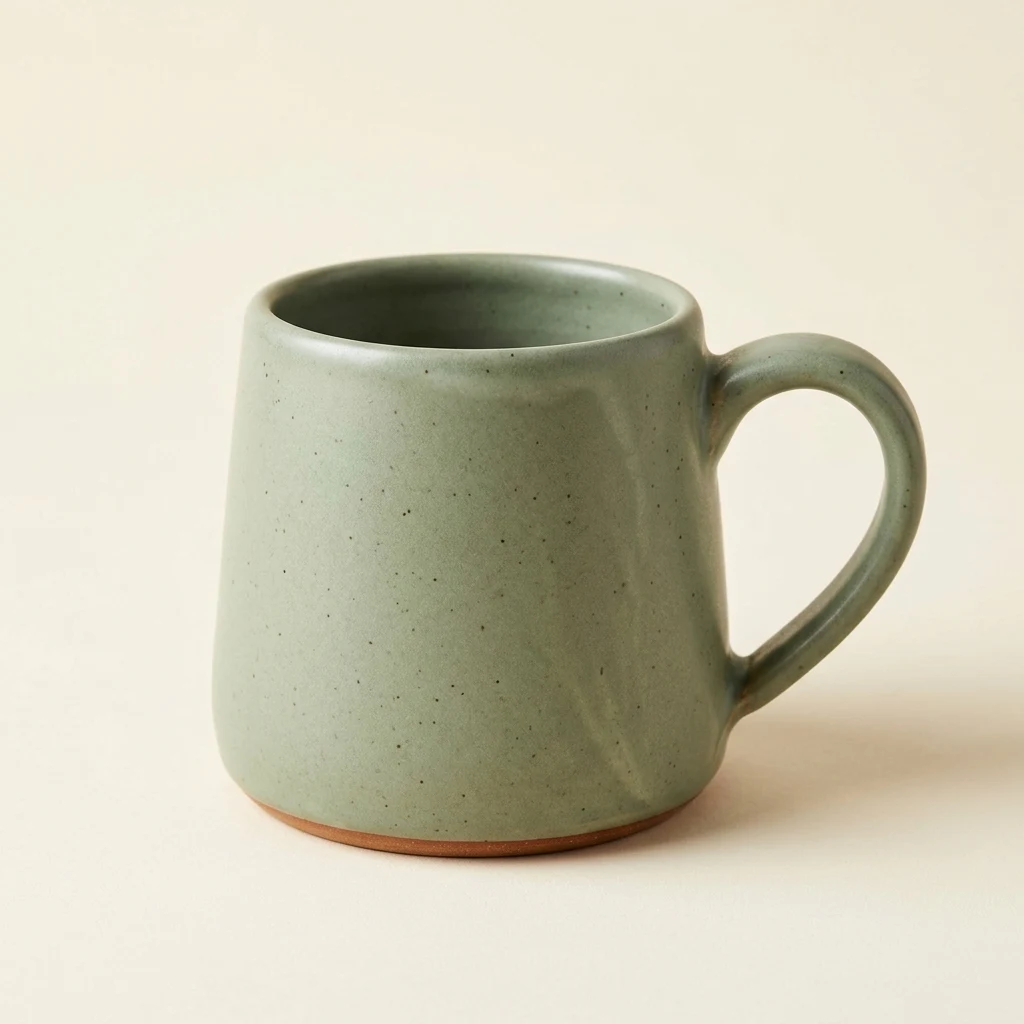
Recorded output: 1024 × 1024 PNG. This is an AI-generated product concept, not a photograph of a retail item. The embedded preview is compressed for reading.
What to inspect: the handle count, rim, glaze, foot and shadow direction. For a real store listing, supply your actual product photograph and compare the output with the item you sell. A convincing invented mug does not establish accurate reproduction of your merchandise.
2. Reference editing: change the setting without redesigning the subject
Settings: Image to Image; upload the first mug image; Nano Banana 2.1; 4K; 1:1; JPG.
Create a premium product campaign photograph using the reference mug. Preserve the exact same sage-green mug: its silhouette, thick rim, single handle on the right, dark speckled matte glaze, narrow terracotta foot, and three-quarter camera angle. Change only the setting and lighting. Place the mug on a pale limestone plinth against a warm apricot studio backdrop. Add soft sunlight from the upper left and the delicate shadow of a leafy branch across the backdrop, without putting leaves in front of the product. Keep the entire mug visible with generous negative space. Realistic contact shadows and ceramic texture. No extra cups, no text, no logos, no watermark.
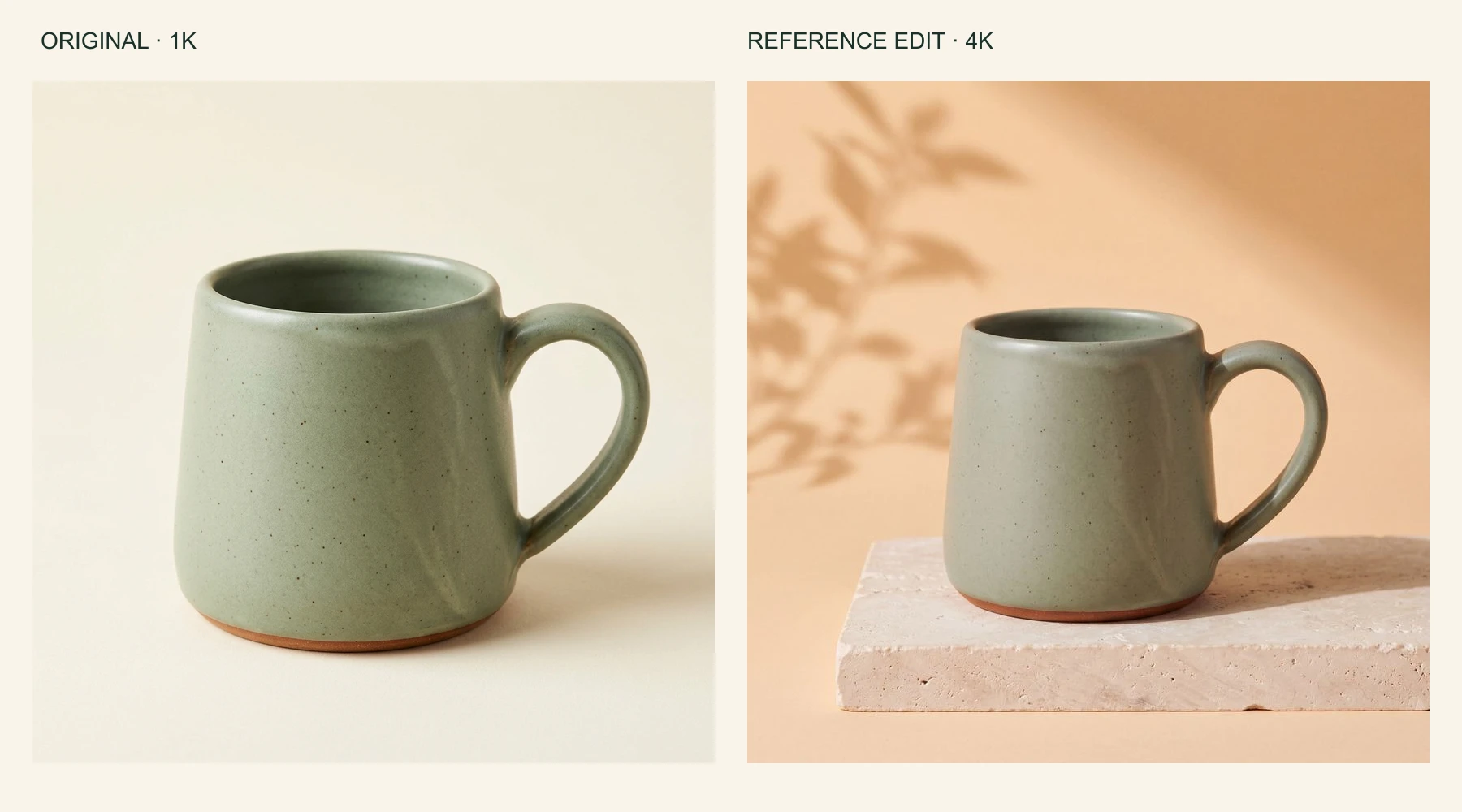
Left: the 1K generated starting image. Right: a reference edit returned as a 4096 × 4096 JPEG. Both previews have been resized for comparison.
The broad identity carries through: a green speckled mug, a right-side handle and a terracotta base. Look more closely at the rim, proportions and surface markings, however. “Preserve exactly” is an instruction, not a pixel-lock guarantee. This Nano Banana 2.1 example is useful precisely because you can compare the details yourself.
To adapt the exercise, open Nano Banana, upload your own reference and replace only the setting section of the prompt. Keep a copy of the original beside the output during review.
3. Poster design: give every line a job
Settings: Text to Image; Nano Banana 2.1; 2K; 3:4; PNG.
Design a polished flat event poster, portrait 3:4 composition, on warm cream uncoated paper. At the top, a large highly legible dark-green headline reads exactly "PLANT SWAP". Below it, a smaller clear line reads exactly "SATURDAY 10 AM". In the center, draw exactly three distinct potted plants: a fern in a terracotta pot, a small cactus in a pale pink pot, and a trailing pothos in a sage-green pot. Use an elegant screen-printed illustration style, a restrained forest-green, terracotta and pale-pink palette, subtle paper grain, clean alignment and generous margins. At the bottom, the only text is exactly "BRING A PLANT. TAKE A PLANT.". All letters must be correctly spelled and easy to read. No other text, no logos, no watermark, no mockup frame.
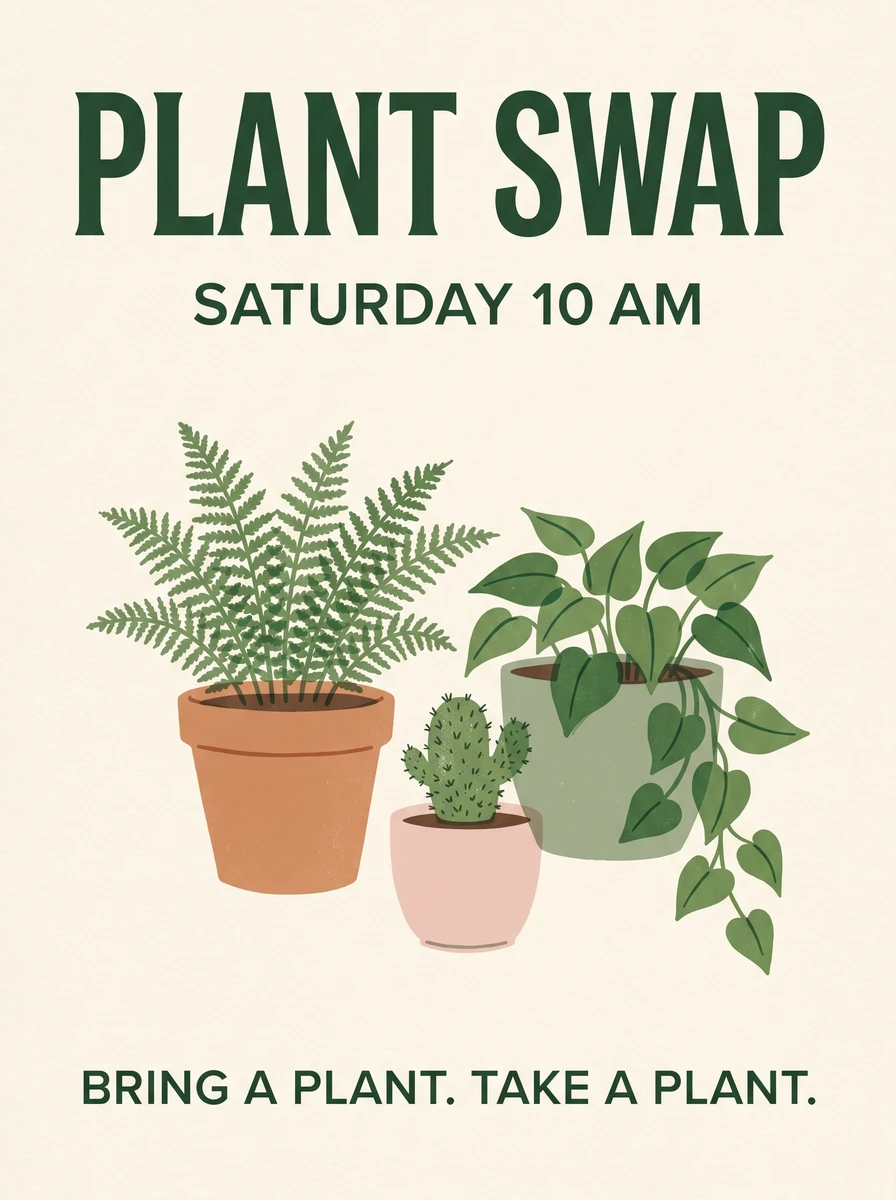
Recorded output: 1792 × 2400 PNG from a 2K request. The three requested text blocks are readable in this sample; the result is not evidence that every text prompt succeeds.
This Nano Banana 2.1 prompt specifies a headline, supporting line and closing line instead of asking for “some event text.” Check punctuation, date, time and the number of illustrated objects. For a real event, add the venue and any essential attendance information before publishing.
4. Character consistency: change one scene at a time
Starter template: upload one clear character reference; begin at 1K in 4:5.
Use the uploaded character as the identity reference. Keep the round glasses, short curly brown hair, teal jacket, facial proportions and illustration style. Place the character at a small train-station café, holding a closed notebook at waist height. Show a medium shot at eye level. Warm window light, quiet background, no other people and no text. Change the setting and pose only.
For a Nano Banana 2.1 character series, retain the same identity description and reference. Compare the face, glasses and jacket after each scene. If an edit drifts, return to the original reference instead of treating the changed face as your new baseline.
5. An article banner with room for a headline
Starter template: Text to Image; begin at 1K in 16:9.
Editorial photograph for an article about repairing household objects. On the right half of a pale workbench, place a small wooden toolbox, a screwdriver and a chipped ceramic bowl. Leave the left half as an uncluttered light background for a headline added later. Side lighting from a workshop window, natural materials, restrained blue and amber accents. No people, logos or embedded text.
A Nano Banana 2.1 banner does not need its title generated inside the image. Adding the final headline as real page text keeps it selectable, accessible and easy to revise. Check the composition at mobile width before choosing your crop.
6. Combine references with explicit roles
Starter template: upload a product image and a separate environment reference; begin at 1K in 1:1.
Image 1 is the product reference. Preserve the backpack's rectangular outline, olive fabric, two front buckles and black shoulder straps. Image 2 is a reference for the room's colors and daylight only. Place the backpack upright on a simple stool in that room. Match the light direction and perspective. Do not copy objects from Image 2 onto the backpack. Show the entire product, with no person or text.
Assigning roles helps Nano Banana 2.1 distinguish identity from inspiration. Use the fewest references needed to explain the task; filling every upload slot can introduce conflicting instructions. If the result is wrong, simplify the references before making the prompt longer.
Choose resolution and budget around the final use
The Nano Banana 2.1 browser editor currently lists these costs. They are website credits, checked on October 9, 2026, and are separate from Google Gemini plan allowances and Google API billing.
| Output setting | Website credits per request | Sensible first use |
|---|---|---|
| 1K | 2 | Test the prompt, framing and overall direction |
| 2K | 3 | Review a poster or a more detailed layout |
| 4K | 4 | Prepare a larger output when the intended placement needs it |
New accounts start with five credits. That covers two 1K requests with one credit left, or one 1K request plus one 2K request. It is a starter allowance, not unlimited daily generation. Always check the current cost shown before submitting.
A three-attempt Nano Banana 2.1 experiment at 1K costs six credits. Planning for revisions is more realistic than budgeting only for the final image. Nano Banana 2 and Nano Banana Pro have their own request costs in the model selector.
Higher resolution gives you more pixels; it does not automatically fix spelling, product fidelity or composition. Also inspect the downloaded dimensions: the recorded portrait poster was 1792 × 2400, while the square 4K edit was 4096 × 4096. A resolution label is not a promise that every aspect ratio returns identical dimensions.
When the result looks wrong, change the right thing
Before switching from Nano Banana 2.1 to another model, identify the failure you want to fix.
| Problem | Next change to try | What to check afterward |
|---|---|---|
| Misspelled or invented text | Quote the exact words; shorten the copy; specify each text block | Every character, numeral and punctuation mark |
| The product has changed | Return to a clear reference and list the identifying details | Silhouette, fasteners, label and material |
| A person looks different | Reuse the original identity reference and reduce simultaneous edits | Face, hair, clothing and proportions |
| Objects are in the wrong places | Anchor them to visible scene elements, such as the window or table edge | Actual placement, not just overall attractiveness |
| The image feels crowded | Specify the object count and a clear empty area | Readability at thumbnail size |
| Repeated edits keep drifting | Restart from the last acceptable output or original reference | Whether the unwanted change has carried over |
| More pixels did not improve the image | Revise the brief before raising resolution again | Composition and correctness at normal viewing size |
These checks are useful across Nano Banana workflows, including results made in Google Gemini. If a legal line, product specification or brand mark must be exact, use your approved artwork or typeset it separately during final assembly.
Is Nano Banana 2.1 better for your work? Run a small comparison
Use three briefs you actually need: one product image, one short-text poster and one reference edit. Run the same prompt, references, aspect ratio and output size through Nano Banana 2.1 and the comparison model available to you.
Score each result from zero to two on five criteria:
- Subject fidelity: are the defining details correct?
- Instruction following: are the requested objects, placement and lighting present?
- Typography: is every required word correct and readable?
- Composition: does the image work at its final size and crop?
- Editing effort: how much work remains before publication?
Use two for “ready,” one for “needs a small fix,” and zero for “unusable” or “needs substantial work.” For editing effort, two means little or no correction. If typography is irrelevant to a brief, mark it not applicable and compare only matching criteria.
Record the total cost as well. Repeat the comparison before drawing a broad conclusion. One excellent Nano Banana Pro image or one poor Nano Banana 2 image is a sample, not a reliable ranking.
A recent video comparison to watch alongside your own test
Watch “Nano Banana 2.1 Is FINALLY Here (I Tested Everything)” by Youri van Hofwegen.
This October 7, 2026 creator video is additional viewing, not the evidence behind the examples above. When watching model comparisons, check whether the creator keeps prompts and settings consistent, shows full-size results and includes failed attempts. Keep your own publishing requirements as the deciding criteria.
Questions before you publish
Is Nano Banana 2.1 free?
The website offers five starter credits for new accounts, with sign-in required to generate. Further use depends on your balance and the selected request cost. Google Gemini access and developer API pricing are separate arrangements.
Can I reuse Nano Banana 2 prompts?
Yes. Start by keeping the prompt unchanged so you have a useful comparison. After reviewing the Nano Banana 2.1 result, adjust only the instructions that caused a specific problem. Do the same when evaluating Nano Banana Pro.
Do I need a Google Gemini subscription or an API key?
For the browser editor used here, you need a website account and enough credits; a separate paid Google Gemini subscription or personal API key is not required. Developers integrating the model directly follow their provider's authentication and billing requirements.
Can Nano Banana 2.1 make videos?
The workflow covered here generates and edits still images. Animating a finished picture is a separate video-generation or editing step. A tutorial containing moving footage does not establish that this image editor exports video.
Can I use the images commercially?
Check the service's current terms, your rights to reference images, and any relevant provider conditions. Review recognizable people, trademarks, product claims and likeness permissions before commercial publication. Generating an image does not clear every right associated with its contents.
Will a prompt reproduce the exact same picture?
Do not plan around an identical result. Save the image you like and use it as a reference when continuity matters. The prompts and settings above document useful starting points, not deterministic replicas.
Start with one image you need this week
Choose the closest exercise, replace the subject with your own, and write down three details that must survive. Try it in Nano Banana 2.1, inspect the result at full size, and revise the most important mismatch first. Save the prompt with the finished image so your next project starts from something you have already learned.



Top comments (0)