

A generated backdrop might leave room for your subject, yet provide nowhere believable for its shadow to fall. Before writing an elaborate prompt, define the exact surface where the subject will rest.

Describe the contact area
Plain matte tabletop, viewed slightly from above. Open space near the center. One soft window light from the right. No objects crossing the contact area.
Ensure the surface and lighting direction are coherent before adding your foreground. Decorative details will not fix a table whose perspective conflicts with the subject.
Keep replacement and lighting review separate
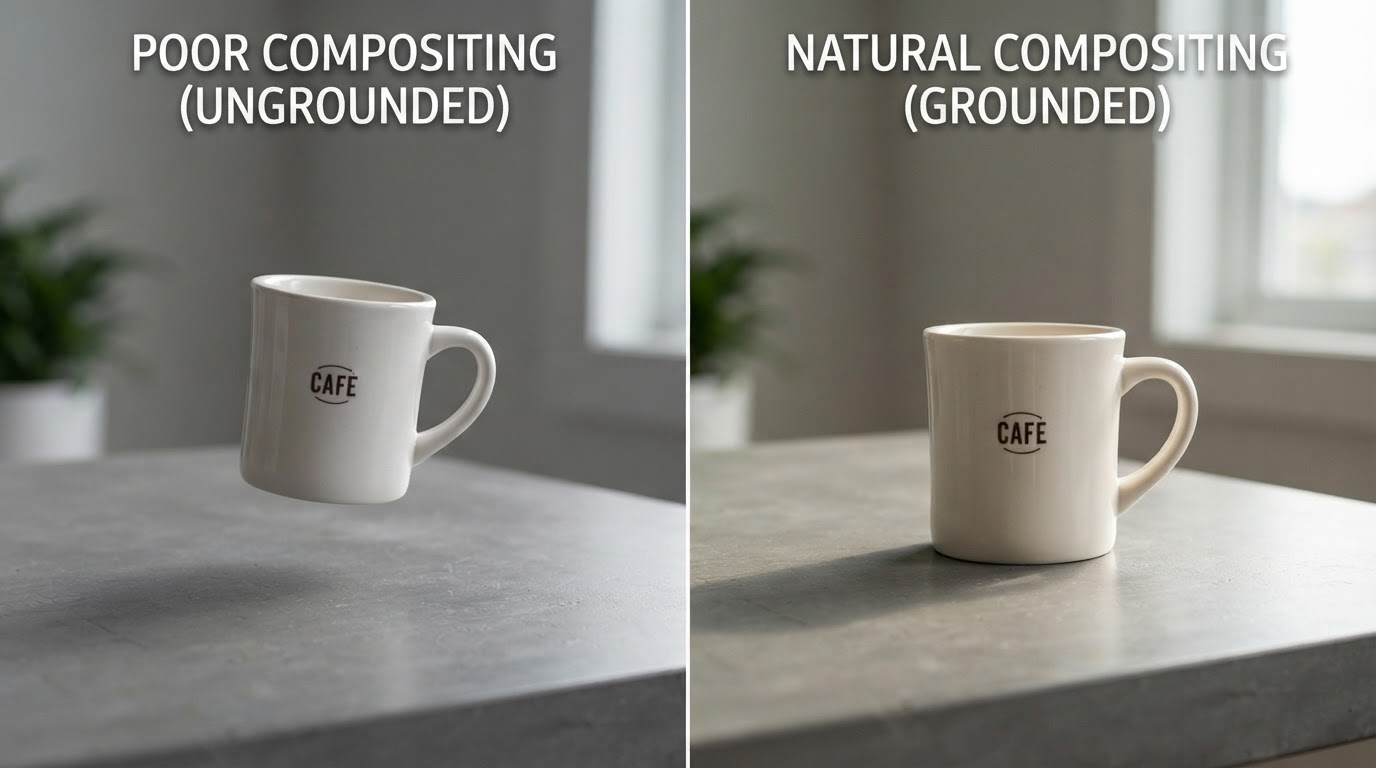
The how to change background in photo guide covers the technical mechanics of background replacement. Once the subject is placed, inspect where it meets the surface—even a clean cutout can appear to float if the grounding is off.
Similarly, the W3C compositing reference explains how image layers blend mathematically. However, pixel-level blending alone cannot establish physically consistent lighting, perspective, or contact shadows.
Reject a scene for a specific reason
When a backdrop fails, note whether the issue is camera angle, surface height, or light direction. Adjust only the relevant prompt phrase and regenerate to compare. Keep the foreground unchanged so you can clearly isolate the difference.
Before publishing, inspect the full composition at its final output size. A convincing surface should naturally anchor the object without relying on heavy, artificial shadows to mask a perspective mismatch.
Finally, archive rejected backdrops alongside their prompts and failure notes. A background that fails for your current subject might work well for a different camera angle later—and a categorized mismatch is far more useful to learn from than a folder simply labeled "bad."





Top comments (0)